
HelpDesky vs Crisp: knowledge base, AI and team pricing
A dated comparison of Crisp workspace plans and HelpDesky, with knowledge base requirements, AI billing examples and practical small team scenarios.
 Will Slatton ·
· 6 min read
Will Slatton ·
· 6 min read

Quick answer: Choose HelpDesky if you mainly need a public help centre, answers from your articles and a place for customers to continue support conversations, with unlimited teammate seats. Shortlist Crisp if you need a broader mix of messaging channels, routing and automation. Crisp’s public knowledge base starts on Essentials at $95 per workspace monthly. HelpDesky Pro is $9 monthly with 50 articles and 150 conversations; AI provider usage is separate. These products overlap, but the lower price does not establish equivalent capabilities.
HelpDesky publishes this comparison. We checked public product pages and documentation on 30 September 2026. Prices below are published US dollar monthly rates, excluding taxes, discounts and optional services. The examples are calculations for evaluation, not measured customer savings or an AI accuracy benchmark.
What does each Crisp plan actually include?
The important starting point is that Crisp uses workspace pricing with included seats. It is not simply a fee multiplied by every employee. Its current plan comparison lists the following monthly packages.
| Plan | Base price | Included seats | Included Hugo credit value | Public knowledge base |
|---|---|---|---|---|
| Free | $0 | 2 | None | No |
| Mini | $45 | 4 | $5 monthly | No |
| Essentials | $95 | 10 | $25 monthly | Yes |
| Plus | $295 | 20, with additional seats available | $75 monthly | Yes |
Crisp lists additional Plus agents at $10 each monthly. Its customer ticket portal and white labelling are also positioned on Plus. Confirm the specific plan for every essential feature, rather than treating a trial with all features unlocked as the package you intend to buy.
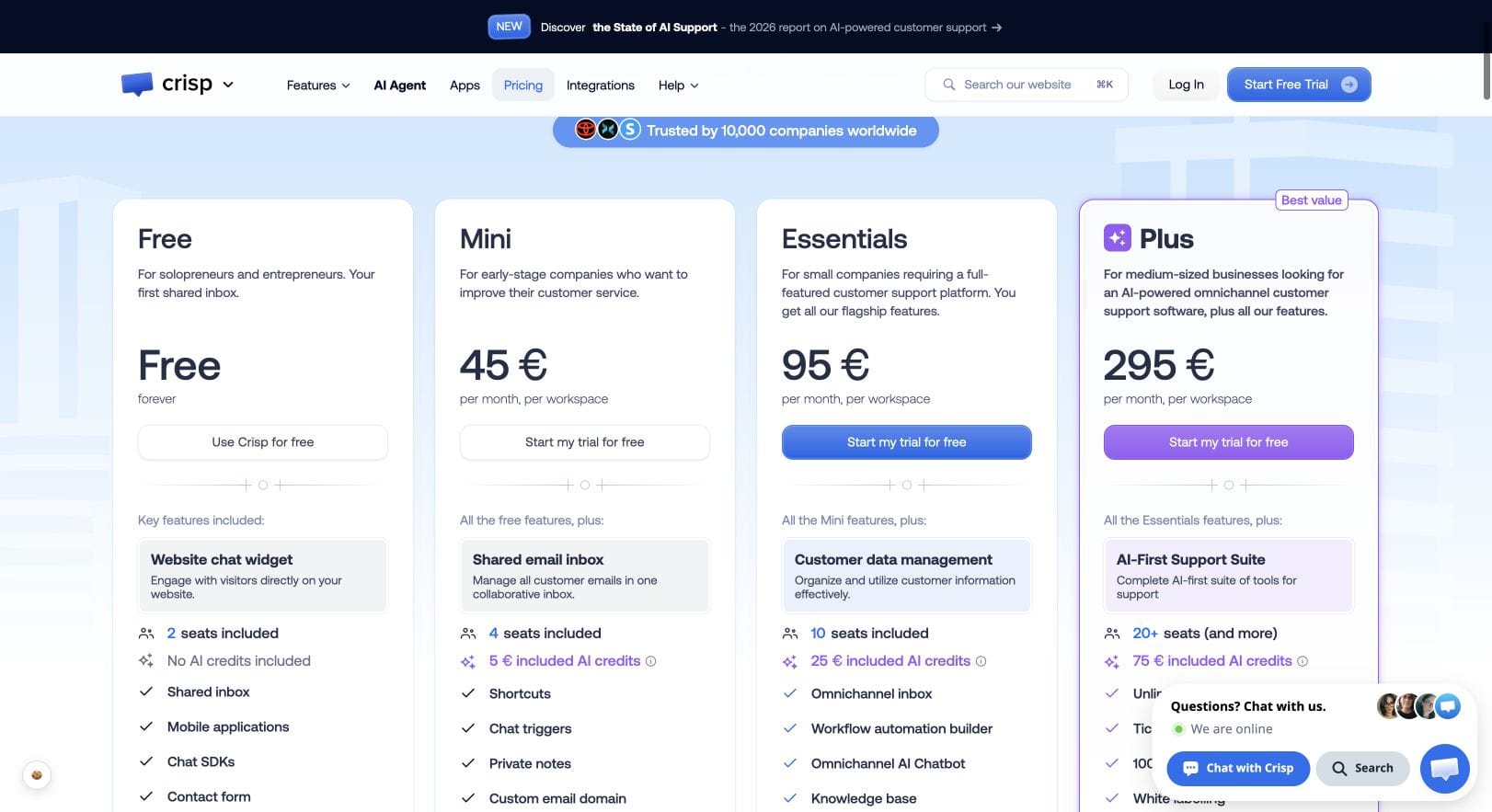
The Mini plan guide describes shared email, private notes and Hugo access. The Essentials guide adds the knowledge base, channels such as WhatsApp and Instagram, workflows, analytics and routing. A two person business may need Essentials for its capabilities even though it does not need ten seats.
How is HelpDesky priced?
HelpDesky’s plans include unlimited seats. Free has one helpdesk, two published articles and ten monthly conversations. Pro costs $9 monthly for one helpdesk, 50 articles and 150 monthly conversations, with branding removal. Ultimate costs $29 monthly for three helpdesks and unlimited articles and conversations. Provider charges for AI remain separate.
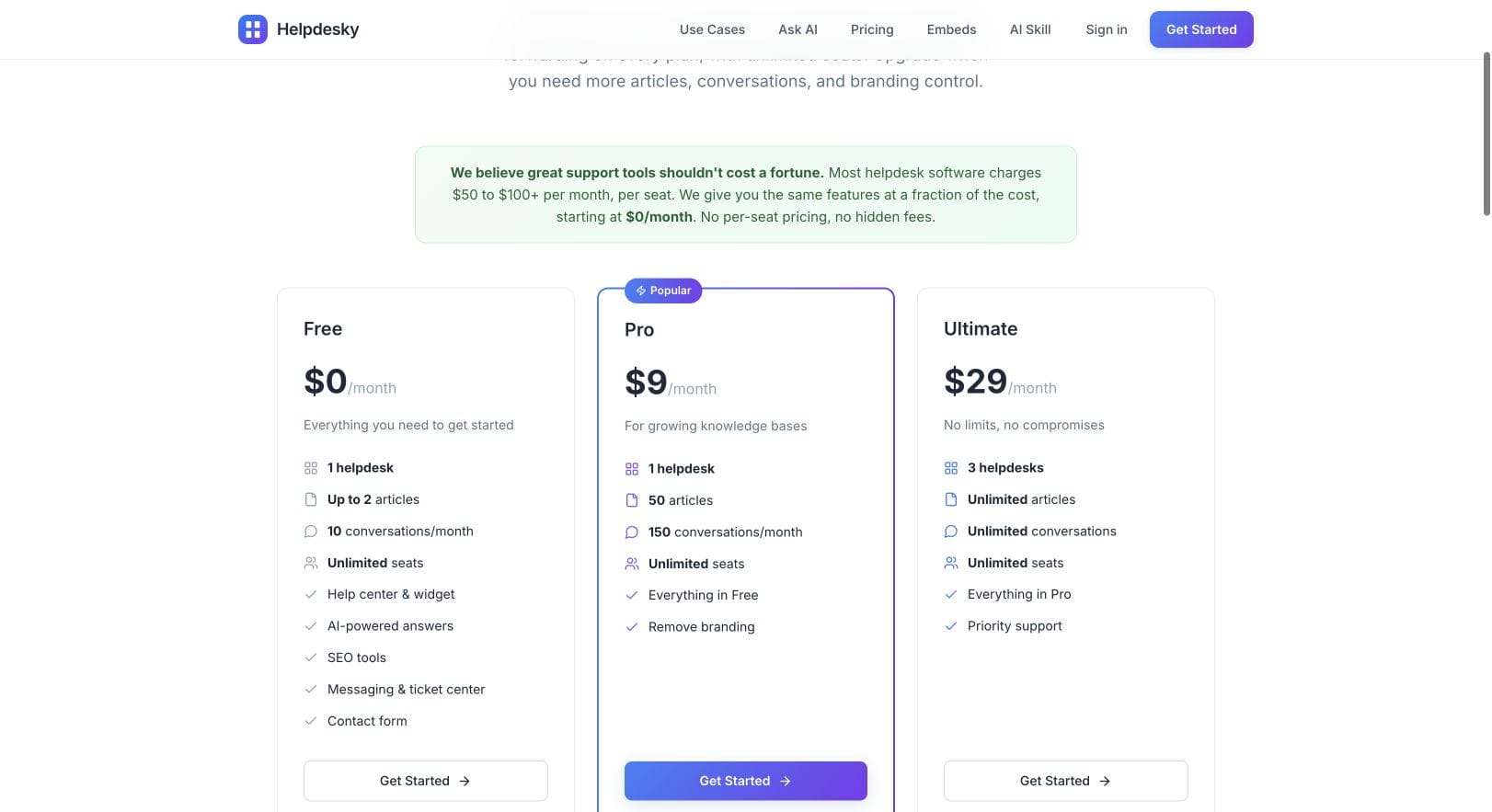
This makes article count and conversation volume important purchasing inputs. Adding a colleague does not by itself change the subscription, but growing beyond Pro’s capacity changes which plan fits. Count the support you actually handle before selecting the lowest headline price.
Does an AI agent mean you also get a public help centre?
No. A knowledge source used by an AI agent and a published library for customers are separate jobs. Crisp’s knowledge base documentation confirms Essentials or Plus is required for its public help centre. The guide describes categories, multiple languages, customisation and sharing articles from the inbox. Mini’s Hugo access should not be mistaken for that publishing feature.
HelpDesky’s explanation of Ask AI sources describes answers drawn from published articles, with source links. Its support embeds provide the surrounding entry points, including the widget and contact options. If your main job is explaining a product clearly, evaluate the public articles and the unanswered question path together.
For either product, try this small exercise: publish a clear answer to a common billing question, then ask it in different words. Can the customer inspect the source? What happens if the answer is missing or the question concerns their private account? A polished reply is only one part of a successful support interaction.
What happens to the AI bill as usage grows?
Crisp’s Hugo billing guide explains that credits depend on token usage, including context and model choice. Conversation estimates are not guaranteed allowances. Without additional usage enabled, exhausted credits stop automated replies and send new conversations to human operators. Tests can consume credits too.
The guide estimates roughly $0.05 to $0.10 per Hugo handled conversation. For illustration, 600 conversations at those average costs produce $30 to $60 of usage. Subtract Essentials’ $25 credit value and the extra usage would be $5 to $35, giving a $100 to $130 monthly total with its $95 subscription. This assumes additional usage is enabled, the credit applies to those conversations and no other AI activity consumes it. Actual usage can fall outside that range.
HelpDesky’s AI provider requirements explain the other model: connect your own provider key and pay that provider for usage. Budget the appropriate HelpDesky plan plus the observed provider charge. Neither unlimited conversations nor a free software subscription means unlimited free AI.
Measure the same sample questions, including follow ups and unsuccessful answers, when comparing bills. Record answer quality and human handover alongside cost. A cheap reply that creates another support exchange is not automatically an efficient outcome.
Crisp’s own video below explains choices that affect Hugo costs. It is useful vendor context for an evaluation, not independent evidence that either product performs better.
Which plan fits these small team scenarios?
| Situation | HelpDesky starting point | Crisp starting point |
|---|---|---|
| Three people, 30 public help articles, 100 monthly conversations | Pro, $9, fits those published capacity limits. | Essentials, $95, provides the public knowledge base. |
| Five people, 80 public articles, 600 monthly conversations | Ultimate, $29, removes the Pro capacity mismatch. | Essentials, $95, covers five seats and the knowledge base; evaluate Hugo usage separately. |
| Four people who need shared email and live chat, without a new public help centre | Choose by volume, then test the workflow rather than assuming parity. | Mini, $45, is a relevant starting package to evaluate. |
These scenarios select packages for stated requirements, not winners. In the second example, do not compare Ultimate to Mini just because Mini is Crisp’s first paid plan: the public knowledge base changes the relevant package. Equally, do not pay for a new publishing system if your existing documentation already does the job and you only need a different inbox.
When is Crisp worth the larger subscription?
Crisp is worth testing when its documented channel mix, workflows and routing address work your team currently performs by hand. If customers already expect support through social messaging, a lower subscription elsewhere may not compensate for losing that channel. Put your actual requirements into a trial before deciding that either product is enough.
Define one representative path: a customer asks a question, the system offers a source, a person takes over, and the customer returns later. Then test the difficult variation: a teammate is absent or the issue moves to a different specialist. Judge continuity and ownership, not just the first reply.
When is HelpDesky a sensible Crisp alternative?
HelpDesky is a sensible starting point when public product answers and ongoing support conversations are your main needs, and you want colleagues to participate without separate seat fees. The HelpDesky demo helps you assess the customer experience. The ticket centre integration guide helps you understand the identity and integration work behind returning customer conversations.
Before moving, list the workflows you cannot lose, export requirements, important article URLs and who will own the new help centre. Test a representative sample before changing your main support address. We have not verified a complete automated Crisp migration or a fixed implementation time, so neither is assumed here.
For a broader buying framework, read what support software a small SaaS actually needs. If your shortlist also includes Zendesk, our small SaaS Zendesk comparison separates basic ticketing from its wider suite. Use the same requirements list across every trial.
Frequently asked questions
Is Crisp priced per person?
Its plans have a workspace fee and included seat allowances. Check the allowance before adding people; Plus also lists an additional agent charge. It is not an unlimited seat model across all tiers.
Does Mini include Crisp’s knowledge base?
No. The public knowledge base requires Essentials or Plus. An AI agent having access to information does not mean the plan includes a public article library.
Are Hugo’s estimated conversation numbers a hard quota?
No. Hugo uses credits, and the cost depends on its work. Use the billing guide and your own trial usage instead of assuming every conversation consumes an identical amount.
Does HelpDesky Free include provider usage?
No. Ask AI requires a provider key, with usage billed separately by that provider. Set and monitor an appropriate provider spending limit.
Will a trial prove the cheapest plan fits?
Only if you check which features remain available on that plan afterwards. Keep a written list of the features you used and compare it with the package you intend to purchase.
Should we switch just to reduce the subscription?
Compare the full cost of serving customers, including missing channels, integration work and team time. A lower base price is useful when the resulting support workflow still meets your requirements.