
HelpDesky vs Zendesk for a small SaaS team
A practical small team comparison covering three and five agent costs, AI billing, implementation work and the support workflows that determine fit.
 Will Slatton ·
· 7 min read
Will Slatton ·
· 7 min read

Quick answer: Start with HelpDesky if your small SaaS needs a public help centre, an AI search widget and a shared place for customer conversations without a fee for each teammate. Shortlist Zendesk if your requirements include a broader channel mix, more sophisticated routing or detailed operational controls. At the published annual rate, Zendesk Suite Team costs $165 per month equivalent for three agents or $275 for five, before usage and extras. HelpDesky Pro costs $9 monthly for either team size, subject to its article and conversation limits; AI provider usage is separate.
This comparison is published by HelpDesky and checked on 29 September 2026. The calculations use US dollar list prices, exclude tax and discounts, and do not claim feature parity or measured savings for your business. We distinguish current plans from older references and show what to test before moving a working support operation.
Are you comparing ticketing or a complete support package?
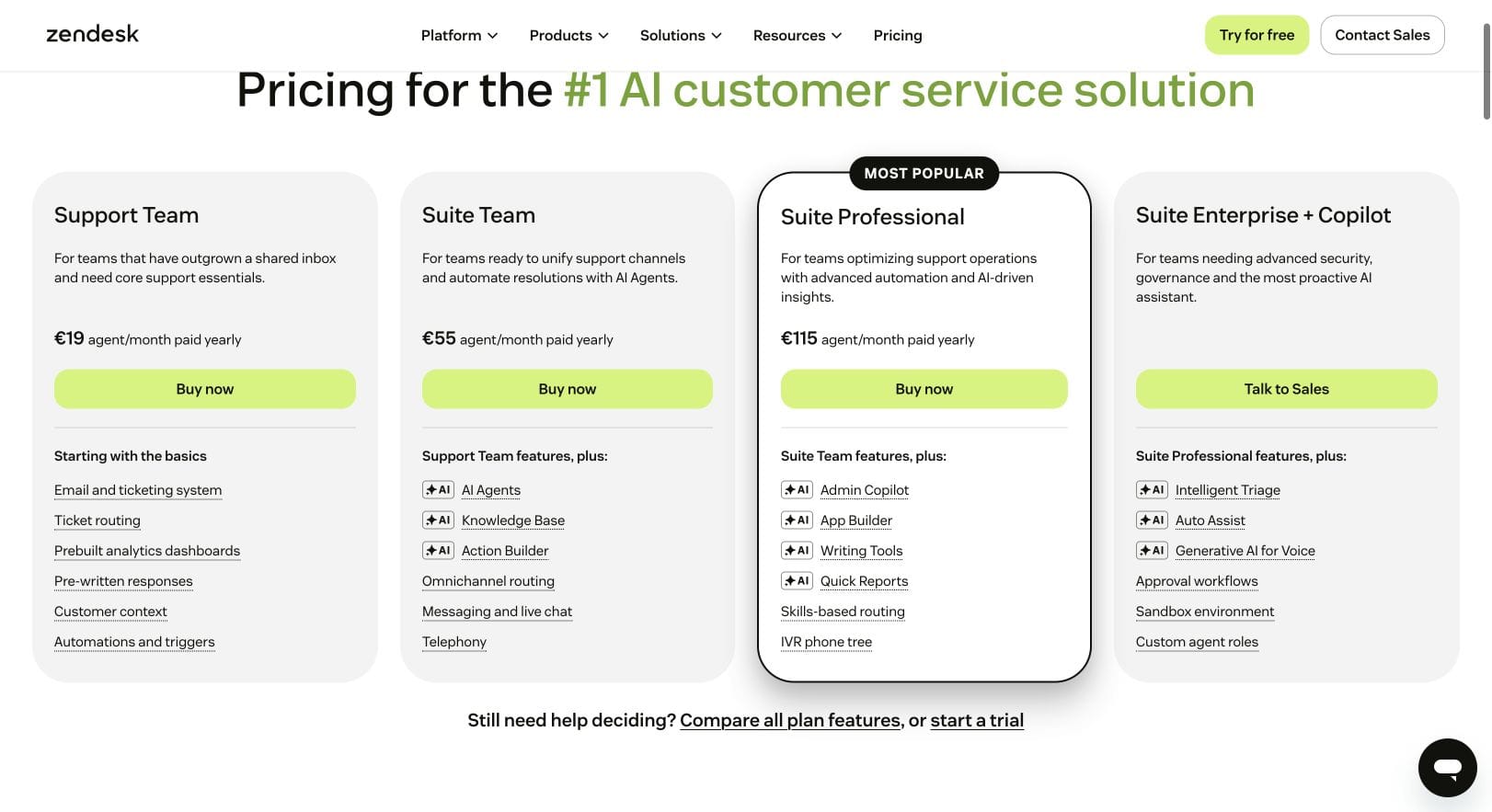
Zendesk’s lowest advertised plan is Support Team. Its current pricing page positions that plan around email and ticket handling. Suite Team adds a knowledge base, messaging and live chat, telephony and AI agents. A comparison that uses the basic price while assuming all Suite capabilities will underestimate the purchase.
HelpDesky brings together public answers, a widget, contact forms and a ticket centre. Its customer support embeds show the different entry points. These are useful core jobs, but they do not establish that every Zendesk channel or administrative control has an equivalent.
Write down the job before choosing the plan. “Receive and answer customer emails” is narrower than “route phone calls and messages across specialist teams”. A three person company can have demanding requirements; a larger company can have a straightforward workflow. Headcount alone is a weak way to judge fit.
What do three and five agents cost?
The table uses Zendesk’s published US dollar annual rates, also listed on its pricing page, alongside HelpDesky’s monthly plans. Zendesk figures are monthly equivalents with annual billing. HelpDesky figures are monthly subscriptions. Confirm your billing currency, order terms and renewal price before buying.
| Plan | Price basis | Three agents | Five agents |
|---|---|---|---|
| Zendesk Support Team | $19 per agent monthly equivalent, paid yearly | $57 equivalent; $684 yearly | $95 equivalent; $1,140 yearly |
| Zendesk Suite Team | $55 per agent monthly equivalent, paid yearly | $165 equivalent; $1,980 yearly | $275 equivalent; $3,300 yearly |
| Zendesk Suite Professional | $115 per agent monthly equivalent, paid yearly | $345 equivalent; $4,140 yearly | $575 equivalent; $6,900 yearly |
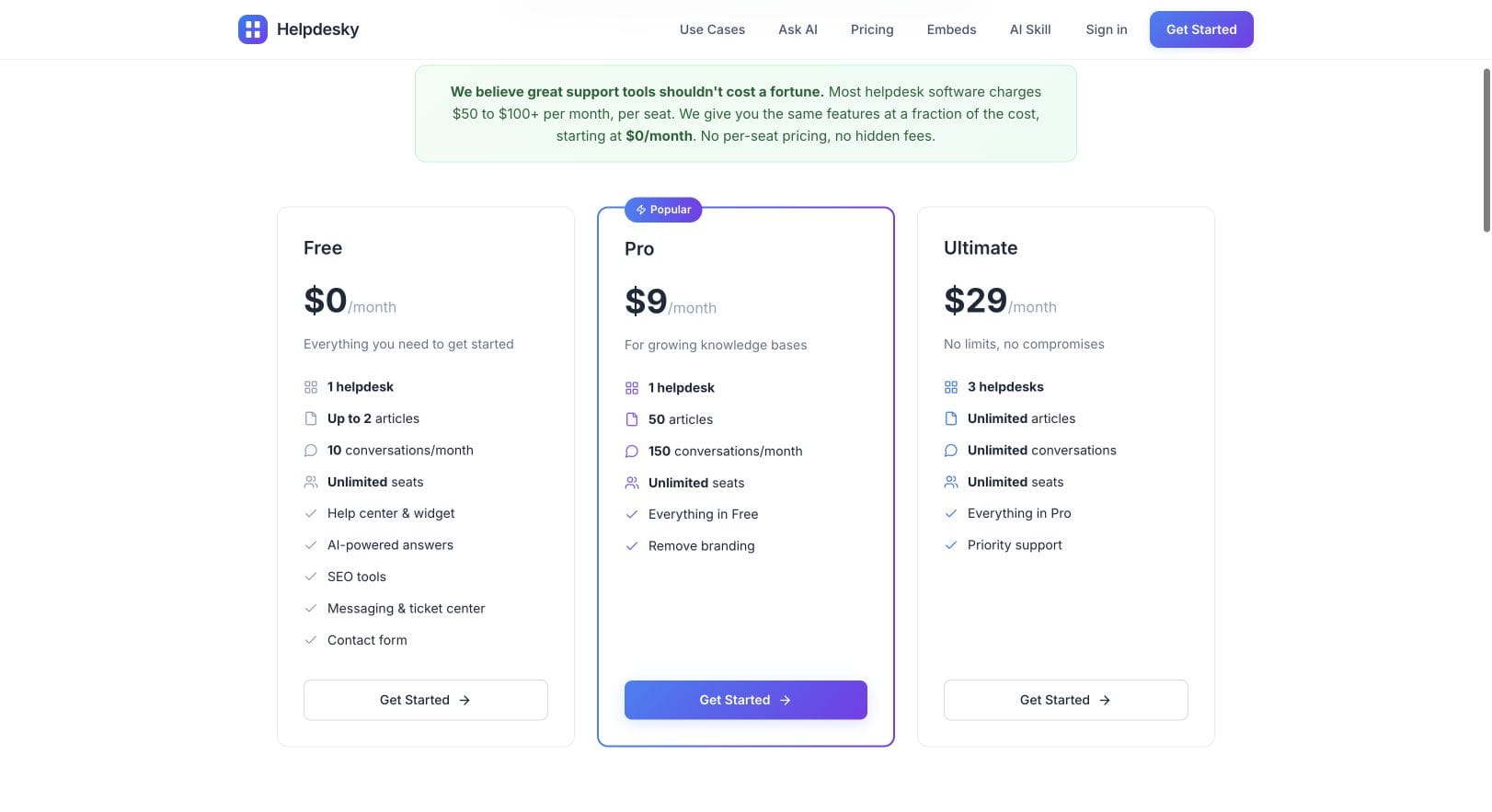
| HelpDesky Pro | $9 per month, unlimited seats | $9 monthly | $9 monthly |
| HelpDesky Ultimate | $29 per month, unlimited seats | $29 monthly | $29 monthly |
HelpDesky Pro includes one helpdesk, 50 articles and 150 conversations per month. Ultimate includes three helpdesks and unlimited articles and conversations. The $0 Free plan includes two published articles and 10 monthly conversations, making it a small starting point for evaluation. Unlimited seats do not remove the other plan limits.
For an illustrative five agent SaaS with 40 help articles and 100 monthly conversations, Pro’s published capacity is enough on those two measures. At 400 monthly conversations, Pro’s allowance no longer fits; use Ultimate when estimating that workload. Neither example proves the workflow itself is suitable. Test it before committing.
Moving from three full Zendesk Suite Team agents to five adds $110 to the monthly equivalent, or $1,320 to the annual base subscription at these rates. Adding those two teammates does not multiply HelpDesky’s plan price. This is a seat cost calculation, not a claim that changing products saves that amount after migration, AI and other requirements.
What belongs outside the base subscription?
Use a simple worksheet: total budget = subscription + AI usage + optional services + administration time. Keep each component visible. A software comparison becomes misleading when one product’s AI bill is included and the other’s is silently omitted.
HelpDesky’s AI provider requirements explain that you connect a provider key and pay the provider separately. Your bill depends on the provider, model and usage. Do not turn “unlimited conversations” into a promise of unlimited free AI.
Zendesk documents both its automated resolution tiers, introduced in May 2026, and an earlier resolution platform that some accounts still use. The current tier documentation distinguishes interactions that consume a resolution allowance from those that do not. Do not apply an old per agent allowance to a new quote without checking which platform and terms apply.
Ask Zendesk to itemise included resolution capacity, additional usage, optional agent assistance and any phone or other consumption charges you need. Its product add on documentation is a useful checklist. We have not verified an account specific AI quote, so the base table deliberately avoids inventing a universal AI surcharge.
For example, write a five agent Suite Team estimate as $275 monthly equivalent plus the quoted extras. Write the HelpDesky estimate as the appropriate flat plan plus measured provider usage. Then put implementation work on a separate line. This makes assumptions visible without pretending an automated resolution and a model token are interchangeable.
What setup work should a small team expect?
Both choices need somebody to own the support process. Decide which address receives requests, who handles each issue, what customers can find themselves and how a conversation continues when its first owner is unavailable. A product can store the work; it cannot choose your service policy for you.
For HelpDesky, review the existing email forwarding guide when assessing your support address, and the ticket centre guide when assessing customer identity and returning conversations. These links help you estimate integration work. This buying comparison is not an installation walkthrough.
For Zendesk, identify the queues, channels and rules you will actually use, then test one representative workflow. More configuration options can be valuable when they replace manual coordination. They can also create maintenance work if nobody owns the rules. We have not measured implementation times, so neither “migrate in an afternoon” nor “Zendesk is always difficult” is a justified promise here.
| Test | What your team should observe |
|---|---|
| A repeatable product question | The customer finds a clear, current explanation and can follow its source. |
| An account specific billing issue | A person receives enough context to investigate privately. |
| A bug passed to a developer | Ownership and the next action remain clear after handover. |
| A customer returning tomorrow | The conversation history remains available to the right person. |
| An absent teammate | Another agent can continue the work without relying on private notes elsewhere. |
When is Zendesk the better fit?
Shortlist Zendesk when its broader channel and routing options solve requirements you already have. The current Suite Professional card includes skills based routing and an IVR phone tree; higher plans offer further governance options. Verify tier eligibility for your exact requirements rather than buying on the strength of a feature name.
A small SaaS supporting urgent customer problems by phone may reasonably choose a more expensive platform. So may a team whose required integration removes substantial manual work. There is no sensible rule that Zendesk only becomes useful after a particular headcount.
The official demonstration below illustrates how customers can reach a support team through different channels. It was published in 2022, so use it as workflow context and check current documentation for today’s interface, plan limits and AI features.
When should you start with HelpDesky?
Start with HelpDesky when your main need is to keep public explanations and ongoing customer conversations together, and you want founders, developers and support staff to participate without separate seat fees. Try the live HelpDesky demo before making assumptions about the customer experience.
The tradeoff is accepting the product’s current scope. HelpDesky labels live messaging as beta. Test any must have workflow, including assignment and customer return access, rather than assuming it matches a mature deployment elsewhere.
If you have not yet defined your support requirements, use our small SaaS support software framework first. If Intercom is also on your shortlist, our five person Intercom cost comparison separates its seat and AI charges. Choose the system that handles your real requests with a budget and maintenance burden your team can sustain.
Frequently asked questions
Is Zendesk Support Team the same as Suite Team?
No. Support Team is the basic ticketing offer; Suite Team adds the broader set described above. Select the package that contains your required channels and knowledge features before comparing prices.
Can I treat the annual monthly equivalent as a monthly contract?
No. The Zendesk figures in this table assume annual billing. Confirm the current monthly offer separately if flexibility matters, and compare the full commitment rather than just the headline number.
Does every employee need a full support seat?
Count the people who need agent permissions, not everyone on payroll. Ask about limited collaboration roles and their restrictions before estimating your purchase. Our scenarios deliberately assume three or five full agents.
Does HelpDesky charge more when we add a developer?
Its plans include unlimited seats, so an additional teammate does not create a separate seat fee. Your article, conversation and helpdesk allowances, plus provider usage, still matter.
Can we assume all Zendesk accounts have the same AI allowance?
No. Zendesk maintains documentation for different resolution billing platforms. Confirm your account’s platform and quoted allowance before applying a historical pricing example.
What should we preserve when switching?
Inventory public article URLs, open conversations, attachments, ownership and integration requirements. Test the available export and import paths with a small sample before retiring the old system. Do not assume either product provides an automatic complete migration.