
How much should a small SaaS spend on support software?
A practical budget worksheet for small SaaS teams, separating the help desk subscription, AI usage, setup work and the time needed to support customers.

Prices checked on 2 October 2026. All monetary examples use US dollars, before applicable taxes. The workload, AI reserves and hourly values below are illustrative planning assumptions, not industry averages, provider quotes or measured customer results. HelpDesky publishes this guide.
What belongs in a support software budget?
Make two totals. The first is the cash you pay for software and services each month. The second is the time your team spends answering questions, maintaining documentation and administering the tools. Keeping them separate makes it easier to tell whether a more expensive subscription actually improves the economics.
- Recurring software: the help desk, required seats, mandatory modules and any connected services you need to buy.
- Variable usage: AI provider consumption, purchased credits or other usage charges under the chosen contract.
- Initial work: migration, integration, testing and training. Record this separately from the ordinary monthly bill.
- Ongoing work: answering cases, reviewing AI responses, updating articles and handling escalations.
A useful worksheet is monthly software budget = required subscriptions + expected usage charges + a stated contingency. Add applicable taxes and currency conversion costs using your actual billing details. Do not count the same service twice if it is already included in the plan.
If you have not decided which support jobs the platform must cover, first read our guide to the support tools a small SaaS needs. Buying a cheap inbox and later adding a separate help centre can produce a different total from choosing one suitable package at the start.
What is a realistic starting subscription?
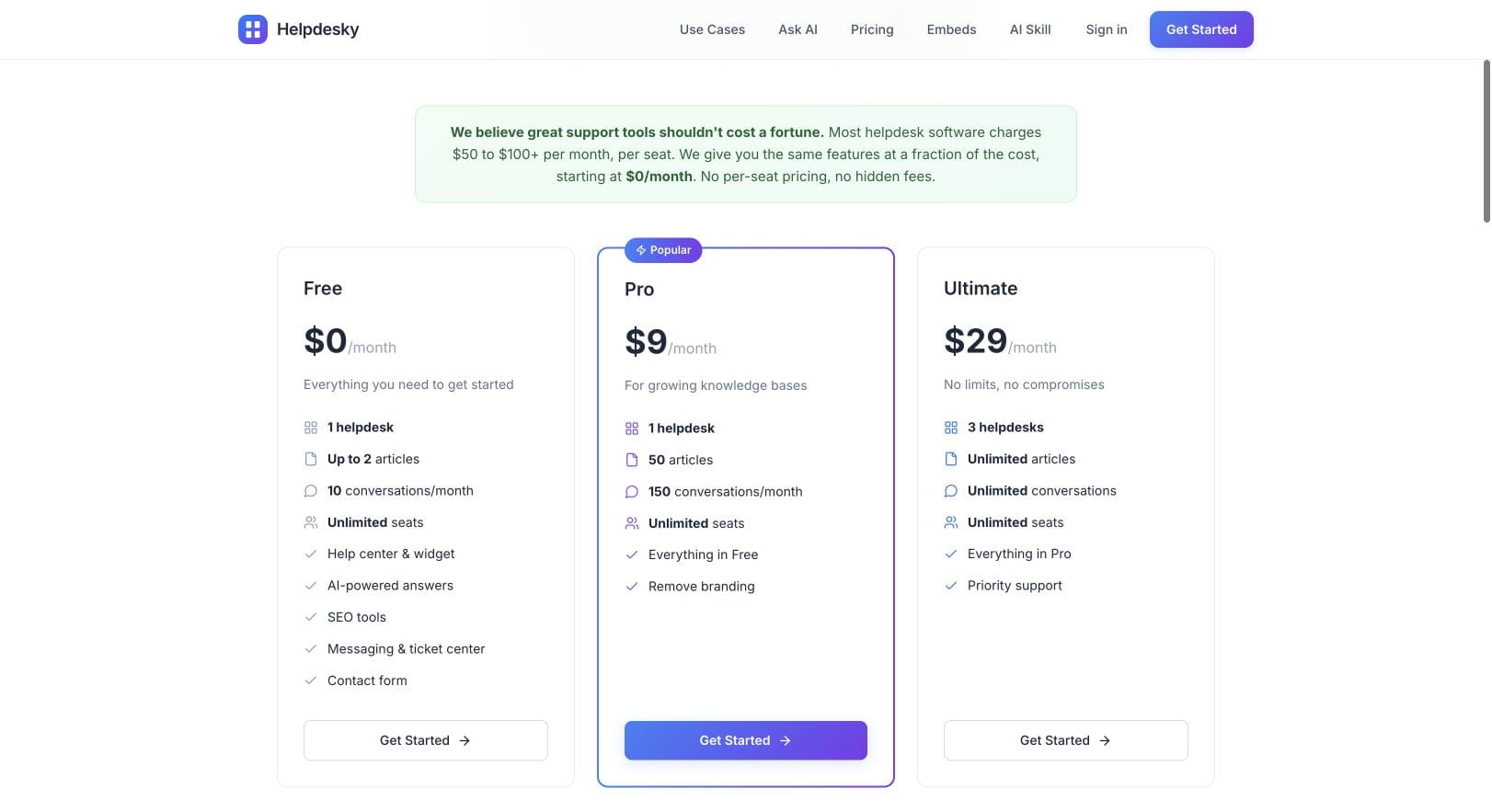
Use current product allowances to establish a floor, rather than choosing an arbitrary percentage of revenue. HelpDesky’s pricing lists Free at $0 with two articles and ten monthly conversations, Pro at $9 with 50 articles and 150 monthly conversations, and Ultimate at $29 with unlimited articles and conversations. All include unlimited seats; Free and Pro cover one helpdesk and Ultimate covers three.
A different product can be worth a larger budget if you need its workflow. For example, Crisp lists Essentials at $95 a month, including ten seats and its knowledge base. That is a package comparison to investigate, not evidence that every small SaaS should spend $95 or that its features are identical to HelpDesky.
If headcount is your main cost concern, our guide to unlimited seat help desks compares the pricing models. This article focuses on the next decision: how much to allocate once you know the work the tool must support.
How would the budget change at different conversation volumes?
The following examples assume one helpdesk and a workflow that fits HelpDesky. Conversation counts refer to the plan’s monthly conversation allowance, not the number of individual messages or AI replies. Check how your selected product counts usage before importing your own figures.
| Example workload | Plan | AI reserve | Monthly allocation |
|---|---|---|---|
| 1 founder, 80 conversations, 30 articles | Pro: $9 | $15 assumed | $24 |
| 3 contributors, 400 conversations, 80 articles | Ultimate: $29 | $40 assumed | $69 |
| 5 contributors, 1,200 conversations, 150 articles | Ultimate: $29 | $100 assumed | $129 |
The AI reserves are placeholders chosen for this worksheet. They do not predict what these conversation volumes will cost. A reserve is money set aside, not an included allowance or a charge from HelpDesky. Replace it with evidence from your provider bill and a representative trial. No extra software services are assumed in these examples; add any that your implementation requires.
The first example fits within Pro’s listed capacity. The other examples exceed it, so the larger plan is the starting point. Adding contributors does not change these HelpDesky subscription figures. A bigger customer workload, additional helpdesks or a different required workflow can still change the decision.
The difference between the last two allocations comes entirely from the assumed AI reserve. That is deliberate: it shows why a stable subscription and a variable usage budget belong on separate lines. If AI is disabled, remove that reserve rather than treating it as a mandatory fee.
How should you estimate AI costs without guessing?
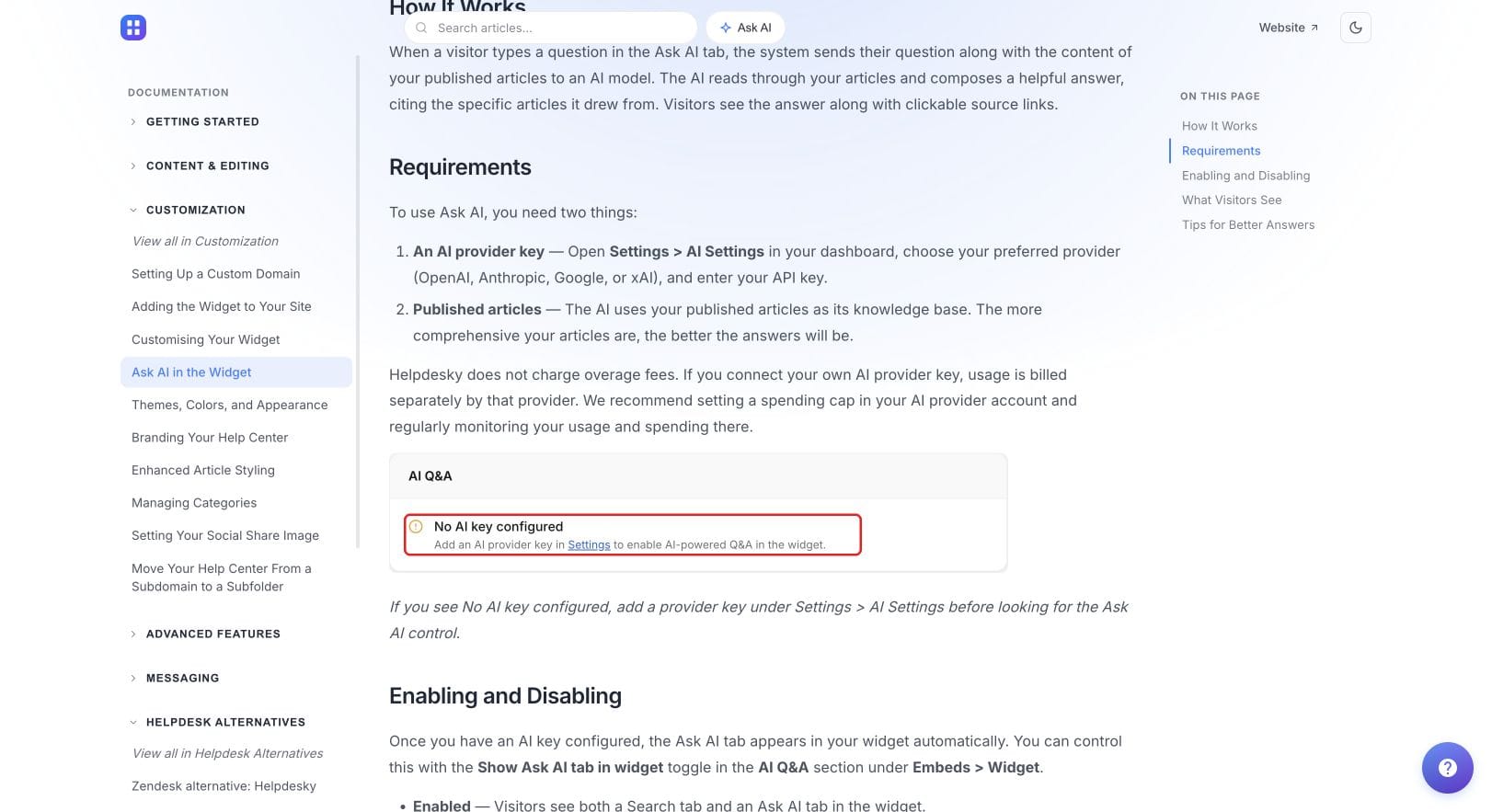
HelpDesky’s Ask AI requirements explain that you connect your own provider key and the provider bills usage separately. Its documentation recommends a spending cap and regular monitoring. A low help desk subscription therefore does not mean AI usage is included at no cost.
For a first estimate, use a dedicated reporting period and record what was charged, how many AI interactions occurred and which cases needed human correction. Exclude unrelated experiments where you can identify them. Divide the relevant spend by the measured activity, then apply that observed rate to a comparable expected workload. Label the result as an estimate.
For example, suppose a representative trial costs $6 for 300 AI interactions. That is $0.02 per interaction in this invented example. At the same mix of questions, context and settings, 2,000 interactions would suggest $40. Longer questions, different models, retries and different documentation can change the result. This arithmetic is a method, not a published AI tariff.
Choose a reserve above your estimate to reflect your uncertainty, and review it after the first billing cycle. Check whether the provider’s budget control is a hard limit or an alert, and what happens to customer support when it is reached. Keep a route to a person available rather than assuming every automated answer will be successful.
Crisp’s official video below explains cost review for its Hugo AI product. It is useful supporting context for separating AI consumption from the subscription. It is a vendor explanation, not an independent test or a promise of the same savings in HelpDesky.
When is a more expensive support tool worth it?
Put a measurable requirement beside each proposed upgrade. Perhaps it removes repeated manual routing, supports a channel you genuinely need or gives a larger team the controls it requires. “More features” is too vague to assess against a recurring bill.
Consider an illustrative move from a $29 subscription to a $95 subscription. The difference is $66 a month before changes in AI, migration, taxes or other services. If you value the relevant staff time at $30 an hour, recovering 2.2 hours a month covers that subscription difference in the worksheet: $66 divided by $30.
That is a decision threshold, not a claim that either tool saves 2.2 hours. Test the workflow and check the actual reduction. Recovered founder time is also not automatically a cash saving; it may mean more time available for product work while payroll stays the same.
Include ongoing administration in the test. Saving an hour on replies while adding two hours of weekly configuration work does not improve the time budget. Check answer quality and reopened cases too, so faster replies do not hide extra work later.
How can you set a budget before you have much support history?
- List the required support jobs. Separate launch requirements from features you might use later.
- Write a starting workload assumption. Include expected conversations, article count, contributors and the busiest likely week.
- Trial the smallest suitable package. Include representative billing, technical and account questions, not only simple FAQs.
- Record the full cost. Track subscriptions, provider usage and setup hours separately.
- Review after the first month. Compare forecast and actual volume, unresolved cases, human time and spending. Adjust the budget using those results.
If email will feed the shared inbox, include the integration work in your estimate. The HelpDesky email forwarding guide is a useful reference for evaluating that requirement. Reading it before committing helps identify setup work without turning the buying decision into an installation project.
Keep the budget explanation short enough that the whole team can understand it: “This plan covers our current capacity; this amount is reserved for measured AI usage; we will upgrade when this specific workflow or allowance becomes a constraint.” That is easier to review than a subscription chosen only because a competitor uses it.
Test the workflow before increasing the budget. Start with HelpDesky Free, then choose a paid plan when your article or conversation volume requires it. Keep AI provider usage as a separate budget line.
Frequently asked questions
Should we spend a fixed percentage of revenue on support software?
Use revenue to judge affordability, but start the software estimate with required features and workload. Two businesses with the same revenue can have very different support volumes and service commitments. This guide does not propose a universal percentage.
Does a $29 subscription mean our entire support operation costs $29?
No. Provider usage, other services, setup work and human time can sit outside the subscription. Keep both a software cash budget and an operating time budget.
Should the founder’s unpaid time count?
Record it, even when it is not a payroll expense. Giving those hours an explicit planning value lets you compare tools without pretending that the value is cash already saved.
Are the AI reserves in the examples recommended spending caps?
No. They are illustrative allocations. Set a real cap using your provider’s billing controls, measured usage, acceptable service limits and available budget.
How often should we review the budget?
A monthly review is a practical starting point for a small team. Revisit it sooner after a launch, a large customer arrival or a change to the AI configuration that materially affects usage.
Should we buy an annual plan to reduce the monthly equivalent?
Compare the full commitment and cancellation terms with the expected saving. A lower monthly equivalent is less useful if you have not yet established that the workflow fits. Check each vendor’s current billing options before deciding.