
LiveChat alternatives that include a help centre
Compare complete chat and help centre packages for three or five people, with current subscription totals and the distinction between LiveChat and Text.
A live chat subscription and a public library of answers solve different problems. Your team needs somewhere to reply, but customers also need articles they can read, search and share without starting a conversation.
This guide compares two LiveChat alternatives with an included help centre and the documented LiveChat plus KnowledgeBase combination. It also explains why the newer Text plans need a separate check.
What does chat plus a help centre cost?
The figures below are US dollars on regular monthly billing, checked on 3 November 2026. Each example covers one help centre and either three or five human agents.
| Product and package | Three agents / month | Five agents / month | Help centre and key limit |
|---|---|---|---|
| Helpdesky Pro | $5 total | $5 total | Included; unlimited seats, articles and conversations in one workspace |
| Chatwoot Cloud Startups | 3 × $19 = $57 | 5 × $19 = $95 | Included; one year of conversation retention |
| Existing LiveChat Team + KnowledgeBase | 3 × $59 + $59 = $236 | 5 × $59 + $59 = $354 | Separate KnowledgeBase subscription; one knowledge base with unlimited articles and seats |
Sources: Helpdesky pricing, Chatwoot Cloud pricing, existing LiveChat plan pricing and KnowledgeBase pricing.
Base subscription differences: Helpdesky’s $5 fee is about 91% lower than Chatwoot Startups for three agents and 95% lower for five. Against the listed LiveChat Team plus KnowledgeBase bundle, the differences are about 98% and 99% respectively. These compare subscription fees only, excluding AI usage, taxes, optional services and migration work.
Helpdesky currently lists $5 as its regular Pro price, with no temporary promotion shown. The LiveChat bundle uses Team because the existing Starter plan lists a single user. Team and KnowledgeBase also list annual equivalents of $49 per person and $49 per knowledge base per month respectively; those require annual billing and are not the monthly prices above.
First, distinguish LiveChat from Text
The main LiveChat pricing page now presents Text plans and links existing customers to a separate LiveChat plan page. The bundle above is an existing LiveChat comparison, not a quote for a new Text contract.
Text Essential is $25 per user monthly, or $75 for three people and $125 for five. It includes 10 AI resolutions per month. Growth is $99 per user monthly and includes 200; an extra package of 50 resolutions is listed at $49.50. Annual equivalents are $19 and $79 per user respectively.
Text’s knowledge source documentation describes websites, files and custom articles used by AI Agent and Copilot. That describes AI reference material; it does not by itself establish the public publishing bundle your team needs. Get that scope confirmed for your proposed Text plan.
Helpdesky: a public help centre with one workspace price
Helpdesky is a practical starting point for a small SaaS team whose support begins with product documentation. Pro combines the help centre, website widget, messaging, contact form, ticket centre and email forwarding at one workspace price. Adding a founder or developer to help with replies does not add a seat charge.
The widget brings articles, Ask AI and messaging onto your website. That matters when the visitor’s first need is a clear explanation and their second need is a person who can help.
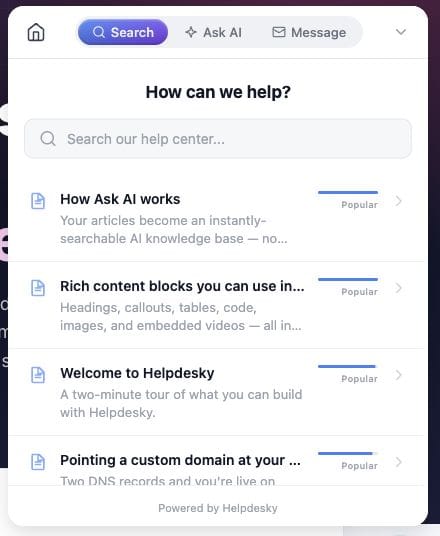
There is a useful operational detail to test before switching. Helpdesky counts an operator as online while their dashboard is open and they are not marked Away. With the default behaviour, the widget offers a ticket form when nobody is online. The live chat and ticket messaging guide explains the customer experience and availability rules.
That can suit a small team sharing support alongside other work. If your current workflow depends on a particular mobile app, sales integration or routing rule, include it in your trial checklist. A lower subscription is only useful if your team can still serve customers properly.
Chatwoot Cloud: an alternative for a broader inbox
Chatwoot’s help centre product combines public articles, custom domains and article search inside its chat widget. It is worth testing when your requirements extend beyond website conversations and documentation.
Cloud Startups is the lowest listed paid package with a help centre. It includes 300 Captain AI credits per month and unlimited conversations subject to fair use. Extra credits cost $20 per 1,000. Its free Hacker plan does not include the help centre and is limited to two agents and 500 monthly conversations.
Check workflow features before choosing the cheapest paid tier. Teams and automation rules start on Business at $39 per agent monthly, making a three person subscription $117 and a five person subscription $195. Startups does not include those features or voice.
This comparison uses managed Cloud pricing. Running the software yourself changes who handles updates, backups and incidents; our Chatwoot hosting cost guide covers that separate decision.
When keeping LiveChat can make sense
A team already relying on LiveChat’s integrations may get more value from adding a public help centre than replacing its chat workflow. The documented KnowledgeBase integration exposes help articles inside the widget and lets agents find and share them from their working app.
KnowledgeBase’s monthly $59 subscription covers one knowledge base. Extra knowledge bases and multilingual capabilities are separate options, so include them only if you need them. The bundle in the table assumes neither.
The official LiveChat University video below explains the marketplace and desktop and mobile apps. Use it to identify integrations worth checking before a switch. It is a vendor walkthrough, not current pricing evidence or proof that every integration is included without extra charges.
Compare AI bills separately from human seats
Helpdesky’s Ask AI uses your published articles and your own provider key. Supported providers include OpenAI, Anthropic, Google and xAI. This gives you a choice of supported providers and models, direct visibility into their usage bill and access to their spending controls.
Those controls vary by provider and account. Check whether a setting is an alert or an enforced limit; do not assume a budget notification stops requests. Helpdesky’s request rate limits protect against bursts of use, but they are not a total monthly spending cap.
For a useful trial, use the same set of real customer questions with each shortlisted product. Record answer quality, source accuracy, human handoff and AI usage separately. A credit allowance, an AI resolution and a provider token bill are different units, so none should be treated as a free equivalent of another.
Choose with a small, practical trial
- Publish a handful of important answers. Open each article without signing in, search for it in the widget and share its public URL with a teammate.
- Test the gap between an answer and a conversation. Use an unclear question, check what happens when nobody is online and confirm how the customer receives the reply.
- Invite everyone who actually helps. Include occasional support from engineering or the founder when comparing seat costs.
- List the integrations you cannot lose. Check each required channel and workflow against the proposed package, including any separate app fee.
- Plan the article move. Map existing URLs and redirects before changing hosts. Our guide to switching help desks while preserving help centre URLs provides a migration checklist.
Start with Helpdesky when the priority is a public help centre and everyday website support at a predictable workspace price. Test Chatwoot when its broader inbox is central to the decision. Keep LiveChat on the shortlist when preserving established integrations is worth the larger bundle cost.
Helpdesky’s Free plan gives you 15 articles and 15 conversations per month with unlimited teammates, so you can test a small set of support journeys before moving to Pro. Connected AI usage remains separate on either plan.
Frequently asked questions
Which LiveChat alternatives include a public help centre?
Helpdesky includes one on Free and Pro, with different article and conversation limits. Chatwoot Cloud includes one from Startups. Choose the package around the number of agents and the workflow you need, then verify the public article and widget experience in a trial.
Does LiveChat have a knowledge base?
Existing LiveChat customers can connect the separate KnowledgeBase product to their widget and agent app. The newer Text plans also include AI knowledge capabilities. Public help centre hosting and AI reference content should be checked separately when buying.
Why compare LiveChat Team rather than Starter?
The current existing customer plan page lists Starter with one user. Team is therefore the appropriate starting point for the three and five person examples in this guide.
Is Chatwoot’s free plan enough for this comparison?
No. Its Cloud Hacker plan excludes the help centre. Startups supplies the public help centre used in the table; Business is needed if teams or automation rules are part of your requirements.
Does Helpdesky’s $5 subscription include unlimited AI usage?
No. Pro includes unlimited seats, articles and conversations for one workspace. AI usage through your connected key is billed separately by the provider. Review that bill and its available spending controls alongside the platform subscription.
Should I move my existing articles when I change chat software?
Only if moving improves the customer journey or simplifies your support work. You can evaluate chat and article hosting separately. If you do move, check redirects, images, internal links, public search and the new widget before retiring the old help centre.