
Switching help desks: protecting your help centre SEO
Before switching help desks, check who controls your old URLs, what the export preserves and which redirects the new platform can actually handle.
Changing the tool behind your help centre can be sensible. Losing the article linked from your onboarding email is a separate problem. Treat the support workflow and the public documentation move as two acceptance decisions.
This guide helps a small SaaS team evaluate migration support before committing to a new platform. It is a buying checklist, rather than a promise that any migration can preserve every ranking.
What evidence should you request before choosing a new help desk?
Give each shortlisted vendor the same small sample. Include your most visited answer, an illustrated troubleshooting guide, a translated page if you have one, and an article linked from inside your app. Ask for a demonstration using those addresses, rather than a generic assurance that migration is supported.
| Buying question | Evidence to request | Decision it informs |
|---|---|---|
| What can we export? | A sample including content, images and article addresses | How much manual repair to budget |
| Who controls old URLs? | A named owner for the old host and redirect rules | Whether old links can survive cancellation |
| Which paths can redirect? | Working examples using your actual URL patterns | Whether a vendor feature fits your move |
| What must our developer maintain? | A list of routing, templates and monitoring responsibilities | Whether the ongoing workload is affordable |
| What makes the move ready? | An agreed checklist with owners and recorded results | When to change public entry points |
Keep the answers beside the commercial quote. A cheaper subscription may still be the right choice, but it does not remove the time needed to repair content or maintain a redirect service.
Who will answer requests for the old addresses?
Start with the hostname, then the path. If your help centre uses a domain you own, establish who manages its DNS and the web service receiving requests. If it uses a vendor owned address, ask the outgoing provider what remains available after cancellation. Do not assume the new provider can control that address.
For example, imagine an old answer at help.example.com/articles/123 and a replacement at www.example.com/help/billing. Someone must still receive the request to the old host and send the visitor to the new page. Merely creating the replacement does not do that.
DNS selects where a hostname is served; the HTTP service handles a redirect for an article path. Ask your developer or hosting provider to explain both responsibilities in the migration plan. This matters particularly when your old help centre subscription is also the service currently answering those requests.
Google's redirect guidance recommends permanent server redirects where possible for a lasting URL change. Both 301 and 308 indicate a permanent move. A temporary redirect serves a different purpose, so the word “redirect” in a feature list is not enough.
Does the redirect feature cover your particular move?
Redirect tools have boundaries. A feature for renaming articles inside one help centre may not accept arbitrary paths from a previous platform. Likewise, a tool that helps you move into a service is not automatically an exit service when you leave it.
Intercom's article redirect documentation describes permanent redirects within the same Help Center domain and workspace. Its documented domain handover differs from keeping two live workspaces redirecting between one another. It also distinguishes these path redirects from changing between customer owned domains, which requires your own infrastructure.
Zendesk's redirect rules API documents supported paths, destination URLs and status codes. It also identifies reserved paths, including /knowledge/, and a limit of 50,000 rules per brand. Check your real URL list against those restrictions. The existence of an API does not establish that the service remains available after you cancel.
HelpDesky documents an option to create a redirect when an article's URL handle changes, plus a page for managing those redirects. The article URL redirect guide explains that scope. We also inspected the demo account's Redirects screen on 29 October 2026.
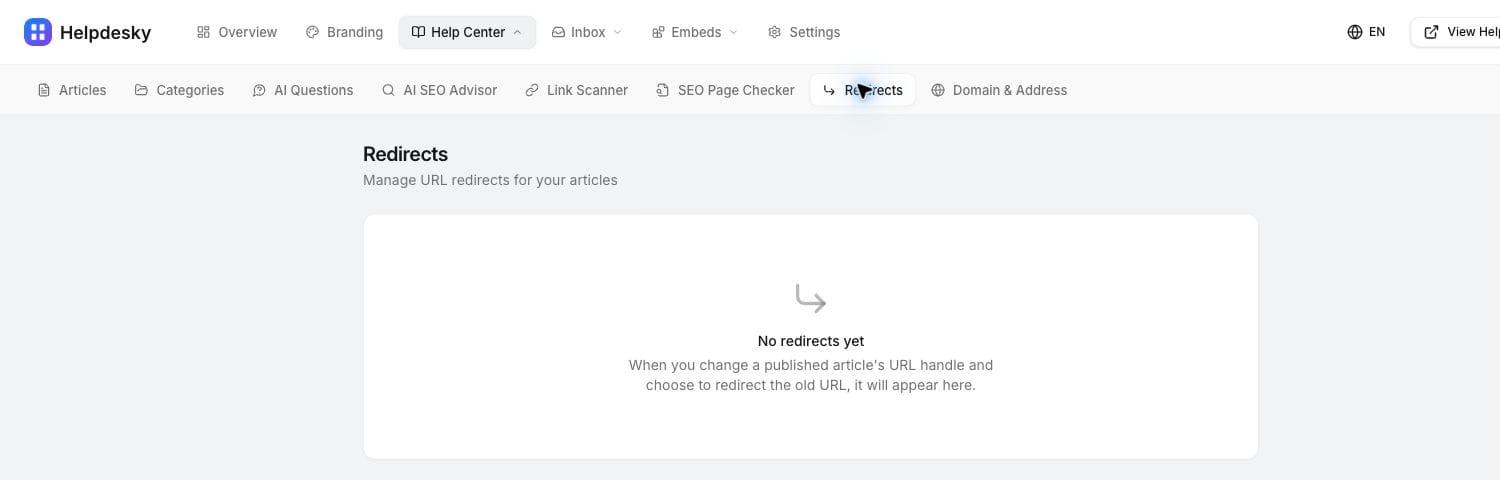
That is useful evidence of article rename handling. It does not establish a bulk importer for another vendor's articles or support for every legacy path. Before choosing HelpDesky for an existing library, get your export format and old URL patterns checked. Keep those requirements separate from the features already documented.
What belongs in the content acceptance sample?
Make the sample representative of customer work. A text only FAQ can migrate neatly while the troubleshooting page with screenshots, code and downloads needs attention. Use the trial to estimate that difference before assigning a launch date.
- Answer fidelity: Can a reader complete the same task using the destination article? Check examples, warnings and plan qualifications.
- Media: Do images and downloads belong to an account or host that will remain available? Record anything that needs moving.
- Navigation: Can someone find the related answer and return to the right category?
- Public scope: Is customer documentation separated from internal notes and restricted material?
- Support continuity: If the answer is insufficient, does the next step reach the team that will own the enquiry?
Record each issue against an owner rather than treating “import complete” as the finish line. Our guide to moving from Notion to a dedicated help centre explores the wider customer support decision. The migration sample determines whether your particular library is ready.
Would hosted or headless delivery change the workload?
Choose the delivery model before promising a migration date. HelpDesky offers its own hosted address, a custom subdomain, a subfolder through your website infrastructure, or headless delivery through its Content API. The hosting options guide explains the different responsibilities.
Headless delivery can fit a team that needs its own templates around the articles. It also makes your website responsible for the surrounding experience. HelpDesky's headless specification assigns navigation, sitemap entries, error responses and redirect handling to the implementation. A developer should check those requirements against the existing site before the team buys on the assumption that everything is managed for it.
For a small team, the practical question is whether that control is worth owning those tasks. If the standard hosted experience meets your needs, custom templates may add work without addressing the support problem that prompted the move.
How should you judge the launch?
Google's site move guidance recommends mapping old URLs, updating internal links and canonical references, submitting the new sitemap and monitoring the transition. It warns that rankings can fluctuate while pages are recrawled. It also recommends retaining redirects for as long as possible, generally at least a year.
Turn the agreed sample into a launch record. Save the old address, expected destination, result, date and person responsible. Include direct visits from outside a staff session and a mobile reading check. If the destination looks right but the old address fails, the migration has not met that acceptance condition.
Keep content improvement separate from the initial move where practical. A migration already gives your team enough to diagnose. Record later editorial changes so you can distinguish a missing answer from a routing issue. Our guide to documentation for search and AI citations covers ongoing discovery checks; moving platforms alone does not guarantee either.
For useful background, Google's Search Central discussion below covers site migration questions, including traffic changes and common mistakes. It was published in 2020; use the current documentation linked above for implementation decisions.
What would a useful HelpDesky trial prove?
Use a trial to establish whether your team can maintain the content and manage the customer's next question in one place. Bring a representative sample and your URL requirements. Resolve any unverified migration requirements before moving the public library.
HelpDesky Free supports one workspace with unlimited seats, up to 15 published articles and 15 conversations per month. Pro is $5 monthly for one workspace with unlimited articles, conversations and seats. Prices checked on 29 October 2026.
Connected AI usage is billed separately by the provider. Your own key gives you a choice among supported providers and models and visibility into that usage bill. Check whether your provider's spending controls stop requests or only send alerts before relying on a hard cap. Include migration work and any retained hosting alongside the subscription in your budget.
Frequently asked questions
Can switching help desks guarantee unchanged rankings?
No. Google describes temporary ranking fluctuations during site moves. A vendor should demonstrate the technical migration requirements rather than promise a particular search result.
Should we keep the same help centre domain?
Keeping an address your team controls may simplify ownership, but article paths can still change. Compare the complete old and new URLs before deciding that no redirects are needed.
Does changing DNS redirect each article?
No. The service receiving the request must handle the path and return the appropriate destination. Confirm that behaviour with the person managing your website infrastructure.
Does HelpDesky have article redirects?
Yes. Its documentation describes creating a redirect when changing an article handle, and the demo includes a Redirects management screen. A bulk migration from another provider needs a separate compatibility check.
Can we cancel the old platform immediately after importing?
Only after checking what still depends on it. Old addresses, embedded media or files may require that service until you have moved them or arranged another supported route. Get the exit conditions confirmed first.
How long does a migration take to settle in search?
There is no reliable deadline for an individual help centre. Monitor the actual old and new URLs, investigate failed requests and keep a record of the move rather than promising a fixed recovery date.