
HelpDesky vs Intercom: what does a five person team pay?
A dated five person cost comparison separating support seats, AI charges and billing commitments, with a practical checklist for choosing the right fit.
 Will Slatton ·
· 6 min read
Will Slatton ·
· 6 min read

Quick answer: For five people answering customers, HelpDesky charges one plan price: $9 per month on Pro or $29 on Ultimate, plus separate AI provider usage. Intercom charges for full seats and Fin outcomes. Its documented Essential rate produces a $195 monthly seat bill for five people, although the live page showed a lower $145 total during our check. Compare the quote you actually receive, the billing commitment and the features your team needs.
HelpDesky publishes this comparison. Prices were checked on 28 September 2026 in US dollars. The scenarios below are calculations, not customer results or a test of either product’s AI accuracy. Taxes, negotiated discounts and optional services are excluded unless stated.
Are you paying for five employees or five support seats?
Start with who needs to reply. A company with five employees might have two people handling customers and three people contributing occasional internal information. That is a different purchase from five agents who all need to send replies.
Intercom’s full and Lite seat rules distinguish customer facing access from limited collaboration. Advanced includes 20 Lite seats and Expert includes 50; Essential does not include them. Lite access is not a substitute for a full seat when someone needs to answer customers.
Our main comparison assumes all five people need full support access. Do not use five merely because it is your company headcount. Make a list of each person’s actual job, then price the required access. Equally, do not reduce the estimate by assuming teammates can share an account.
What are the subscription costs for five people?
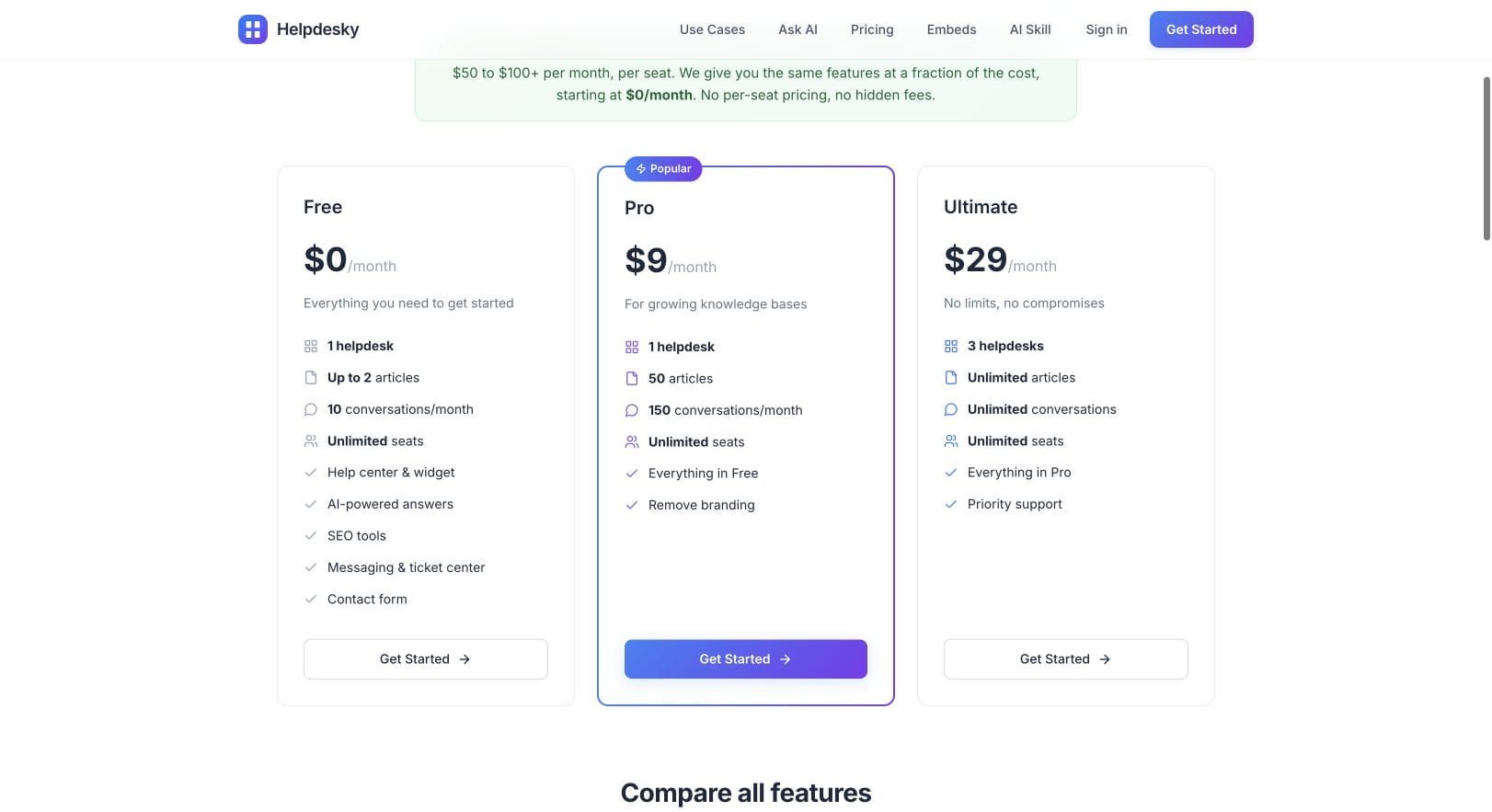
HelpDesky’s current plans include unlimited seats. Pro is $9 monthly with one helpdesk, 50 articles and 150 monthly conversations. Ultimate is $29 monthly with three helpdesks and unlimited articles and conversations. The Free plan has two published articles and 10 monthly conversations, so it is useful for a small trial rather than this example’s ongoing workload.
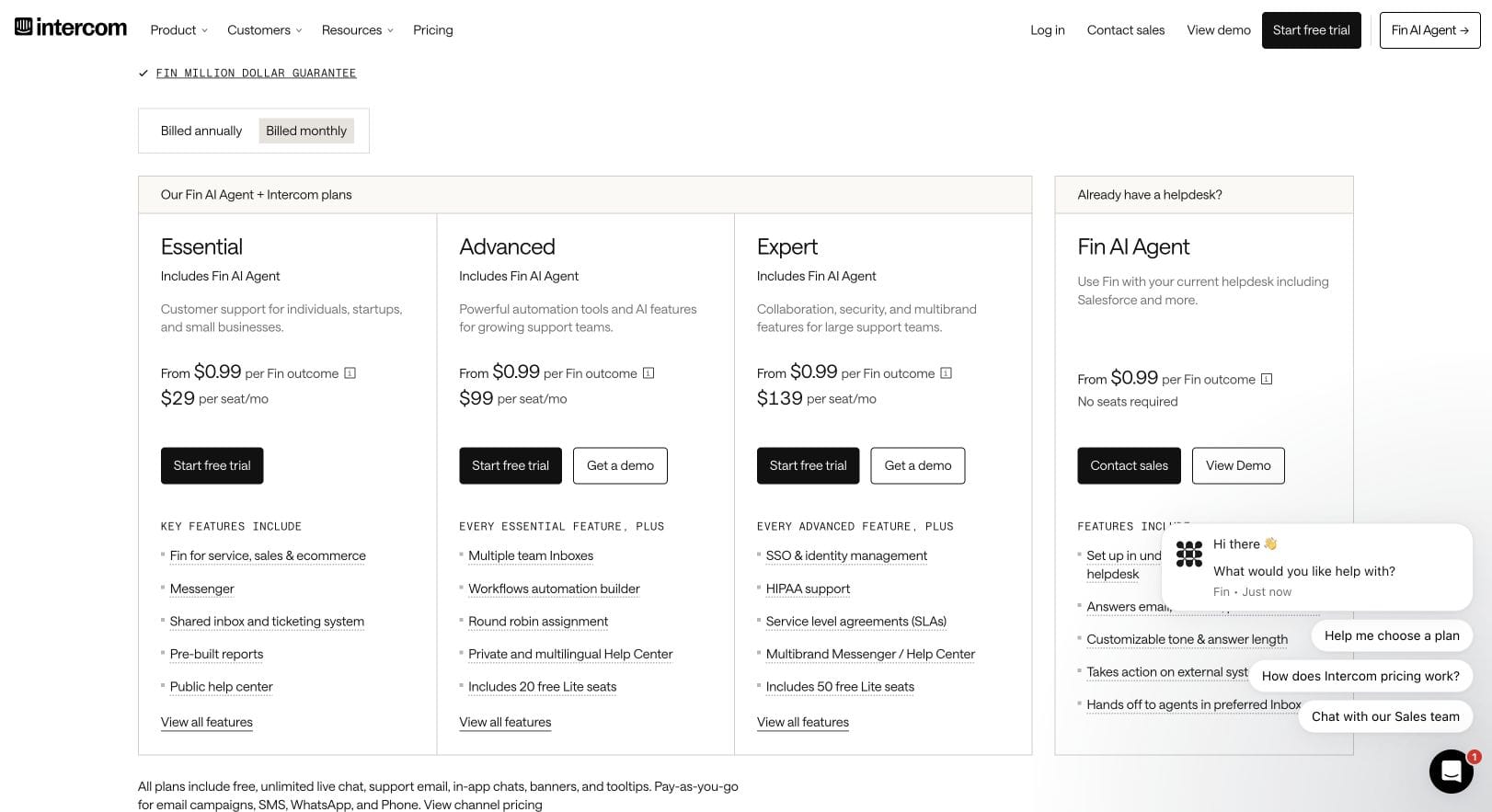
Intercom’s published pricing guide lists the following standard rates. Annual figures are monthly equivalents of an annual commitment, not monthly cancellation prices.
| Plan | Monthly billing per seat | Five seats, monthly billing | Five seats, annual monthly equivalent | Annual seat commitment |
|---|---|---|---|---|
| Essential | $39 | $195 | $145 | $1,740 |
| Advanced | $99 | $495 | $425 | $5,100 |
| Expert | $139 | $695 | $660 | $7,920 |
A live price difference matters: during our browser check, the Intercom pricing page displayed Essential at $29 per seat with monthly billing selected and $19 with annual billing selected. Those displayed rates imply $145 monthly for five seats, or $95 per month equivalent with a $1,140 annual seat commitment. Advanced and Expert matched the standard figures above.
We have not verified the eligibility, duration or renewal terms of that lower Essential display. Do not assume it is available to everyone or that the higher documented rate is the only offer. Confirm the order summary before buying, particularly if your budget depends on the difference. Intercom also has an Early Stage programme for eligible startups; a qualifying offer deserves its own comparison.
How does AI usage change the bill?
Intercom currently prices Fin from $0.99 per outcome. Its pricing explanation includes confirmed or assumed resolutions and completed Procedures, including handoffs, in the outcome definition. Do not estimate this bill simply by counting all incoming messages, or assume only a customer’s explicit “thank you” creates a charge. Review the applicable outcome rules against your intended workflow.
For HelpDesky, the AI provider requirements and billing explanation say you connect your own provider key and pay that provider separately. Unlimited seats and conversations therefore do not mean free, unlimited model usage. Track the provider bill as a separate budget line.
These charging units are different. A Fin outcome is not a HelpDesky conversation or an AI token. We have not measured equivalent answer quality or resolution rates, so the following table is a budgeting illustration, not a claim that the products deliver identical results.
| Option | Subscription | AI line | Total before tax and extras |
|---|---|---|---|
| Intercom Essential, documented monthly rate | $195 | 200 × $0.99 = $198 | $393 |
| Intercom Essential, observed monthly display | $145, if applicable | $198 | $343, if applicable |
| Intercom Advanced, monthly billing | $495 | $198 | $693 |
| HelpDesky Ultimate | $29 | Your measured provider bill, called A | $29 + A |
We use Ultimate in the workload example to avoid presenting Pro’s 150 conversation allowance as unlimited. The 200 outcome assumption applies only to Intercom’s calculation. It does not predict HelpDesky’s usage or performance. If your provider bill were an illustrative $20, HelpDesky’s total would be $49; that is arithmetic, not a forecast of what your provider will charge.
A useful budget sheet has separate rows for the subscription, AI, optional tools and the staff time needed to maintain support content. Use your own trial results to populate those rows. Multiplying an advertised AI rate by a guessed resolution rate can make a precise looking forecast unreliable.
When is paying more for Intercom sensible?
Intercom’s Advanced tier adds capabilities such as workflow automation and multiple team inboxes; Expert adds controls including SSO and service level agreements. Those can be purchasing requirements rather than optional conveniences. See its plan and feature breakdown before choosing a tier.
Imagine five agents who must route customers between several specialist teams, enforce response commitments and report on a complex operation. The cheapest subscription is a poor saving if it leaves those jobs manual or forces another tool purchase. Write each requirement next to a verified feature and test the actual handoff.
The official Intercom inbox overview below provides useful context for assessing agent work. It dates from 2023, so treat it as an interface introduction and use current documentation for feature availability and prices.
When is HelpDesky the more practical starting point?
HelpDesky is worth trying when your five people mainly need to publish answers and handle the conversations those answers cannot resolve. A flat subscription lets a founder or developer participate without turning each extra teammate into another seat fee.
The product includes a help centre, widget, contact form and ticket centre. You can inspect the public HelpDesky demo and available customer support embeds before designing your trial. Live messaging is labelled beta on the pricing page. Assess its current behaviour if it is essential to your service.
The tradeoff is scope. Do not treat a lower price as proof of feature parity with Intercom. Test your escalation, assignment and customer return journey, and make someone responsible for maintaining the articles used by AI. Our small SaaS support software buying framework helps you decide which jobs actually need a tool.
What should your five people test before deciding?
- One documented question. Check whether the answer is accurate and the customer can find its source.
- One private account problem. Check how it reaches a person without exposing private details in public documentation.
- One transfer between teammates. Check whether the second person understands the history and owns the next reply.
- One returning customer. Check whether they can find the continuing conversation.
- One cost review. Record full seats, billable AI activity, provider usage and optional tools separately.
Make the choice after those checks. If HelpDesky covers the work you actually do, its subscription can leave more budget for the people answering customers. If Intercom’s additional capabilities remove a material operational problem, compare their value with the verified total bill.
Frequently asked questions
Does a five person company always need five paid Intercom seats?
No. Count the people who need full customer support access. Limited collaborators may fit Lite seats on eligible plans, but those permissions cannot replace agent access.
Is the annual price the amount paid each month?
The annual column is a monthly equivalent. Budget the full annual commitment and check payment and renewal terms. It is not the same offer as flexible monthly billing.
Is Fin the same purchase as Intercom Copilot?
No. Fin handles customer interactions; Copilot assists agents. Budget any optional Copilot subscription separately rather than assuming it is covered by the outcome calculation.
Does HelpDesky’s free plan include free AI consumption?
No. The software plan and your connected provider’s usage bill are separate. A free subscription does not remove the provider’s charges.
Which Essential price should I put in my budget?
Use your actual quote and renewal terms. Until those are confirmed, keep both the documented rate and the lower observed display as separate scenarios rather than silently assuming a discount.
Can this comparison tell us which AI gives better answers?
No. It compares charging models and buying requirements. Evaluate both against your own maintained documentation and unresolved customer questions before judging answer quality.