
Which Help Scout alternatives offer unlimited seats?
Compare monthly costs for three and five users, then decide whether removing seat charges is worth changing your support workflow.
If your Help Scout bill makes you hesitate before inviting a developer or founder, start by separating access from workload. Removing seat charges can make collaboration easier to budget, but moving a working support system still needs a clear reason.
What would three or five support users pay?
The comparison below assumes every person needs full support access. Prices are USD with monthly billing, checked on 19 October 2026. These are subscription totals before AI usage, taxes and optional services, not quotes for identical capabilities.
| Option | 3 people | 5 people | Main allowance or reason to choose |
|---|---|---|---|
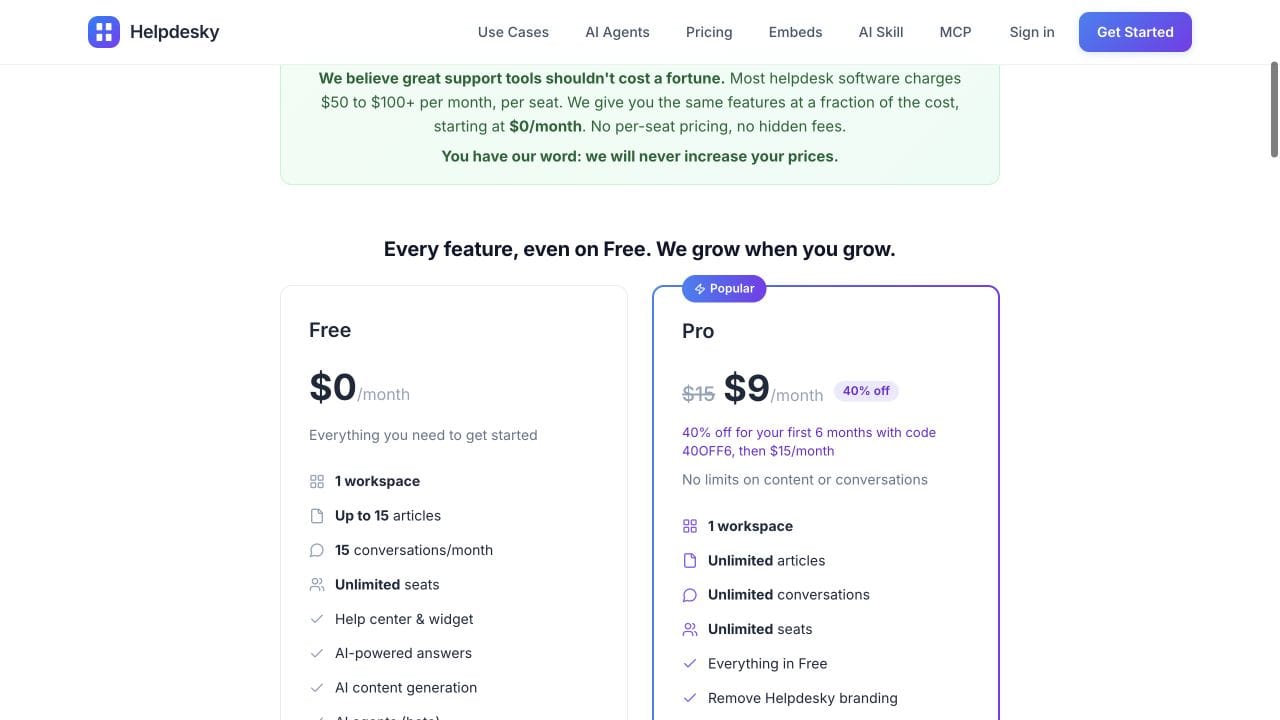
| HelpDesky Pro, regular | $15 | $15 | Unlimited seats, articles and conversations; one workspace |
| HelpDesky Pro, current offer | $9 | $9 | Code 40OFF6 for six months, then $15 |
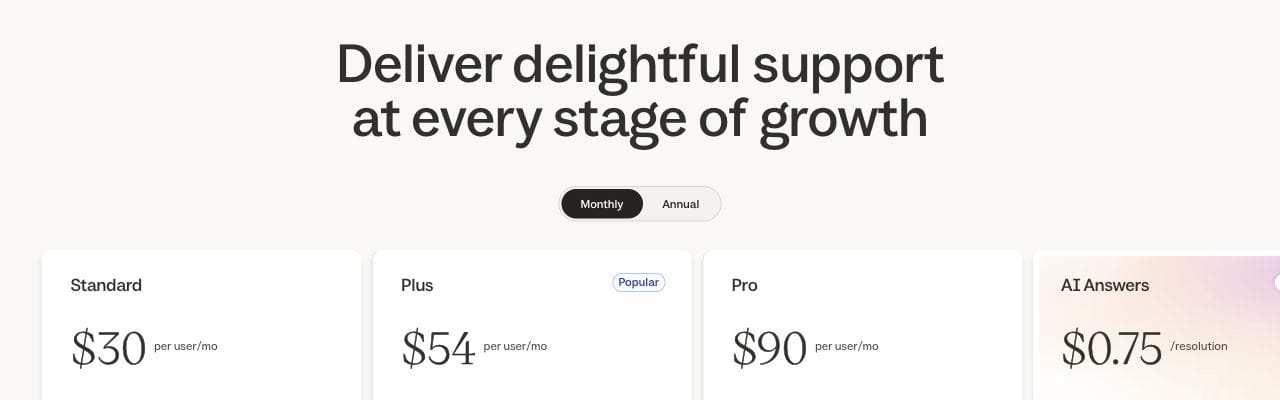
| Help Scout Standard | $90 | $150 | $30 per user; basic workflows and SLA policy |
| Help Scout Plus | $162 | $270 | $54 per user; round robin routing and customer portal |
| tawk.to core software | $0 | $0 | Unlimited human agents; optional extras separate |
Sources: HelpDesky plans, Help Scout monthly pricing and tawk.to agent allowances. Standard is the entry paid Help Scout comparison; Plus is relevant when the named additional features are required.
Against five Standard users at $150, HelpDesky’s regular $15 fee is 90% lower in base subscription cost; the temporary $9 fee is 94% lower. For three Standard users at $90, the corresponding differences are 83% and 90%, rounded to whole percentages. These calculations exclude both products’ AI charges and do not measure total operating savings.
Does Help Scout already offer unlimited users?
Its Pro plan lists unlimited user capacity with a minimum of ten users, but still charges per user. Monthly rates are $90 for Pro; annual billing shows $75 per user per month. Standard and Plus annual equivalents are $25 and $45, respectively. Those annual rates require annual billing and are not the monthly prices in the table.
Help Scout Free supports five users, 100 monthly contacts and ten articles. It deserves consideration if you fit those limits. Plus and Pro also offer restricted light user access: decide who needs to reply to customers before assuming every colleague needs a full seat. Check your existing contract separately, especially if it uses an older billing arrangement.
When is HelpDesky the useful alternative?
HelpDesky suits a SaaS where support is shared across the company and the knowledge base is central to answering questions. Its chat widget, contact form, ticket centre and forwarded email feed one shared inbox. The same help centre supplies search and Ask AI, so documentation and conversations can work together.
There are two straightforward plans. Free includes 15 published articles and 15 monthly conversations, with unlimited seats. Pro removes those article and conversation limits and HelpDesky branding for one workspace. The current six month offer is useful for starting, but use the regular $15 fee when planning the ongoing budget.
Try the public HelpDesky demo with the journey your customers actually need. If an authenticated ticket view matters, read the ticket centre integration requirements before deciding. An embedded view inside your app has integration requirements; it is not automatically interchangeable with every hosted customer portal.
When is tawk.to a better fit?
tawk.to is worth evaluating when the main requirement is letting your own team answer live chats without paying for each agent. Its official FAQ confirms unlimited human agents and concurrent chats. Its free platform also includes ticketing and knowledge base tools, so it should not be dismissed as only a chat bubble.
The optional services page lists Whitelabel at $29 monthly and paid AI Assist from $29 monthly, with a limited free AI tier. A team of three or five using both starting paid options would therefore begin at $58 monthly before additional usage or services. Neither option is compulsory for a team happy with the free core product.
Test the customer journey and permissions you need, not just whether accounts can be added. For a wider explanation of seat bundles and workload allowances, see our guide to help desks without per user pricing.
How should you compare the AI bill?
Help Scout AI Answers is listed at $0.75 per resolution after its three month trial, with a configurable monthly resolution cap. Keep this separate from the seat subscription.
HelpDesky connects to your own AI provider account. That gives you visibility into the usage bill and choice among supported providers and models. Its AI agents, currently in beta, offer suggestions, drafts for approval or automatic replies. Provider usage remains payable even though the platform includes the AI features.
The Ask AI requirements describe the supported provider connection. Choose a supported model for the balance of cost and answer quality, then configure and monitor the provider’s available spending controls. Confirm whether a control stops requests or only sends an alert; an account budget is not universally a hard cap.
Our own key versus resolution cost guide explains how to compare measured usage. Do not equate one AI message, one conversation and one billable resolution, or assume the HelpDesky provider bill is zero.
Crisp’s official video below offers useful context on controlling AI support costs. It is a vendor explanation, not a benchmark of Help Scout or evidence that either shortlisted alternative produces equivalent answers.
What should you test before leaving Help Scout?
Stay with your current system if changing it would remove a capability your team uses every day. Help Scout’s published plan differences include SLA policies, routing, multiple inboxes and Docs sites, and additional communication channels. A lower subscription is not evidence that a replacement matches that depth.
- List the channels, routing rules, integrations and reports you use, with an owner for each requirement.
- Test a documentation question, a technical escalation and a conversation that resumes the following day.
- Check export and migration options for historical conversations, attachments, customer identities and help article URLs. Do not assume automatic migration exists.
- Confirm who receives each new message during the transition and keep an agreed rollback route.
- Compare the complete software bill and the extra human work after the trial.
For a small SaaS with a straightforward shared support workflow, begin by testing HelpDesky. For a team prioritising free human chat access, test tawk.to. Keep Help Scout when the features and established workflow earn their cost.
Frequently asked questions
Can unlimited seats still mean paying per person?
A vendor can use unlimited to describe the maximum team size rather than the price. Read the charging unit beside the allowance. For this comparison, the useful requirement is no additional subscription charge when another human teammate joins.
Is switching worthwhile for occasional contributors?
It can be, but first check whether restricted collaborator access meets their needs in the current system. Compare the people who must answer customers with those who only need context.
Does HelpDesky Pro include unlimited free AI?
No. Unlimited conversations are a platform allowance. The connected provider bills its AI usage separately, and model activity can cost money even when a person ultimately handles the question.
Should we choose a free plan solely because it fits five people?
No. Check monthly workload, article capacity, branding and the required customer journey. A plan can accommodate your colleagues while still being too limited for your support volume.
Do tawk.to’s AI agent limits restrict human seats?
No. Human agent access and the AI service’s allowances are separate. Check the selected AI tier’s message credits and bot allowance independently.
Can we assume our Help Scout history will move automatically?
No. Confirm the available export, import and retention arrangements before committing. Test a small representative sample and keep access to essential records during the transition.