
Which MCP server should you choose for a SaaS help centre?
A practical buying framework for matching MCP search, drafting and publishing tools to your SaaS support workflow.
Product documentation and prices checked on 20 October 2026. Published by HelpDesky. This is a buying framework with HelpDesky as a worked example, not a market ranking or a report of hands on client testing.
What do you need the server to do?
Start with a complete task, such as finding the current cancellation policy or preparing an article for a new feature. “Supports MCP” is too broad to tell you whether a product can finish either job.
| Your job | Capability to check | Evidence to request |
|---|---|---|
| Answer from existing documentation | Search and full article retrieval | The correct source text and public URL |
| Prepare content for review | Create and edit drafts | A saved draft with the intended category |
| Maintain a live help centre | Publish, unpublish and update articles | The saved result, public page and access checks |
| Keep an existing custom workflow | An API integration or suitable MCP adapter | A named owner for maintenance and recovery |
A server limited to reading can be the right choice when your team only needs reliable reference material. Copying an occasional AI draft into your existing editor may also be sufficient. Direct publishing becomes more useful when the repeated transfer, categorisation and checking work is worth automating.
The MCP architecture reference describes a standard for exchanging context and exposing tools. It does not decide which business actions a particular server offers or how an AI application uses them. Assess the actual tool catalogue, not the badge.
What does HelpDesky expose?
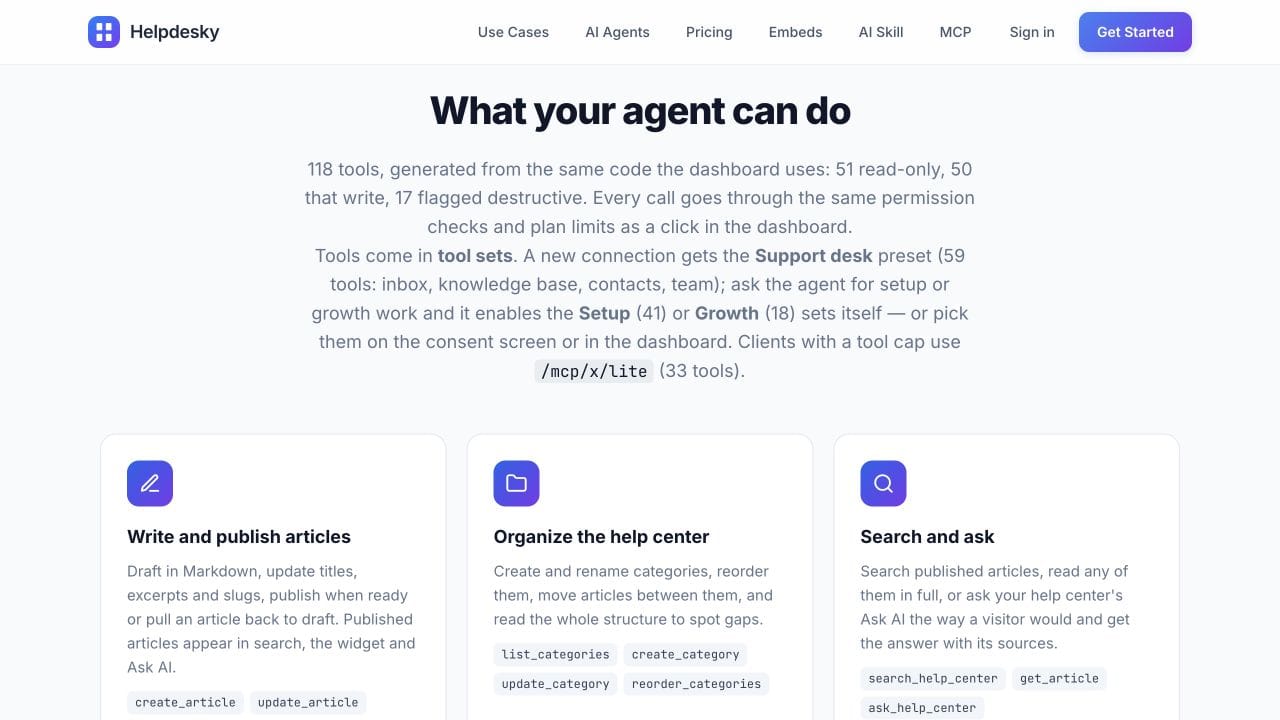
The public HelpDesky tool catalogue includes article search, full content retrieval, creation, updates and separate publish and unpublish actions. New articles default to drafts unless publication is explicitly requested. The update tool supports a freshness check against the version the agent read, helping it avoid overwriting a newer edit.
That makes it a candidate for a small SaaS team that wants an agent to maintain customer documentation alongside its support workspace. It is a different requirement from giving a coding assistant a searchable copy of a developer reference.
For the broader platform decision, read what support software a small SaaS needs. An MCP connection should fit that workflow rather than become the sole reason to replace a working help desk.
How do you check client compatibility?
Check three things together: the server’s connection method, the client’s current support and the controls available to your account. A vendor listing an AI product does not establish that every plan, mode or workspace configuration can perform every action.
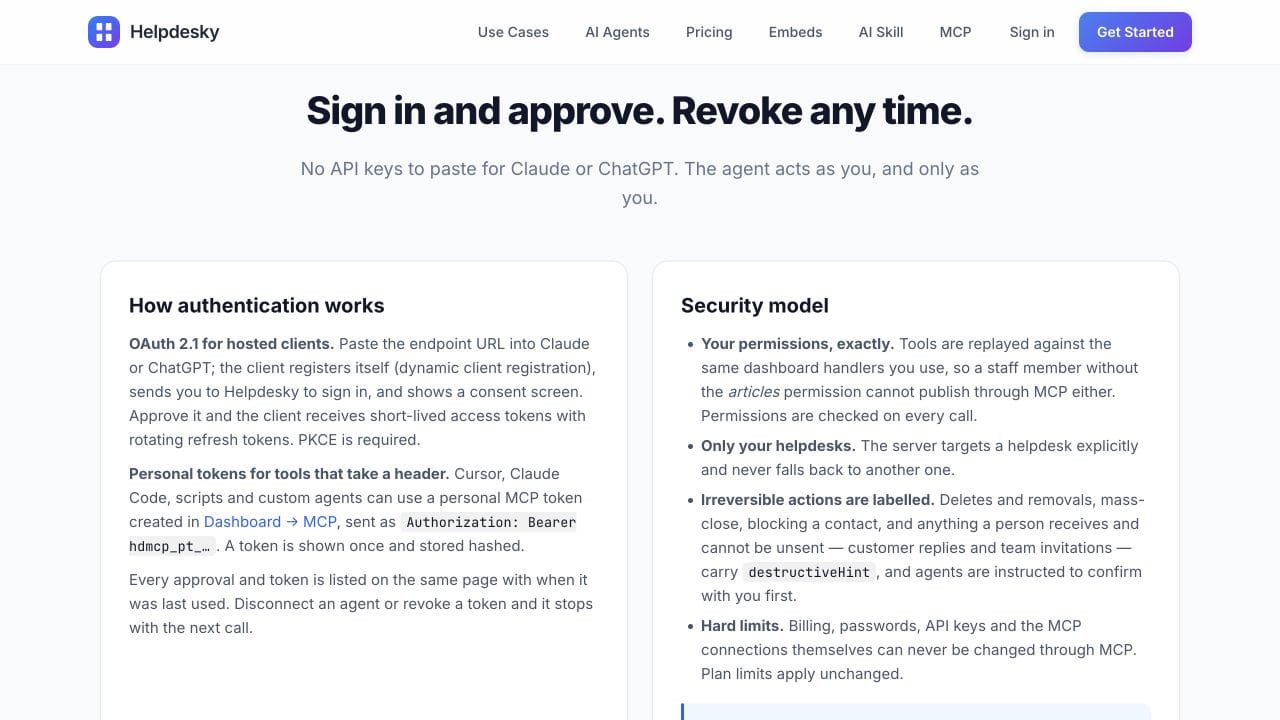
HelpDesky documents a remote Streamable HTTP endpoint with OAuth and personal token authentication. Its client connection reference covers Claude, ChatGPT, Cursor, Claude Code and Replit Agent. Treat that as the starting point for evaluation, then verify the specific client you intend to use.
For example, Claude’s remote connector guidance explains that these connections run from Anthropic’s cloud infrastructure. That distinction matters when a server is only reachable from an office network. A connection working on a developer’s machine is not proof that a hosted client can reach it.
In a trial, ask the client to identify the intended workspace and retrieve one known article before attempting changes. Then check that the required editing tools are actually available. Do not assume a successful search proves publishing support, or that a tool absent from the current set is absent from the whole service.
Which permission checks belong in the buying decision?
Ask whose identity the agent uses, which workspaces it can access and how access is revoked. Also ask whether the server checks permissions itself. A prompt telling an agent to be careful is not a substitute for an enforced permission boundary.
HelpDesky’s authentication and permission overview says calls use the connected operator’s permissions and access can be revoked. Its team roles reference is useful when deciding who should connect an agent. Evaluate the role you will actually use rather than testing only with an owner account.
What should a small evaluation include?
Use a deliberately modest example: an approved changelog entry and an existing article that needs one factual correction. These are suggested acceptance checks, not tests we claim to have run.
- Retrieve: find the existing article and confirm the returned content is current.
- Draft: turn the approved source into a saved draft. Check that uncertain product details were not invented.
- Revise: make a narrow correction while preserving unrelated content. Ask how concurrent edits are detected.
- Release: after review, publish the selected draft and verify the actual public page.
- Recover: confirm the available unpublish or correction route and what happens when access is revoked.
Keep the success criteria concrete. “The category is correct and the article remains a draft” is measurable. “The integration feels intelligent” is not. Record any manual steps still needed; those steps determine how much work the connector actually removes.
Anthropic’s discussion below introduces MCP and its components. It provides background for evaluating connections, not a HelpDesky demonstration or a guarantee of compatibility with current client versions.
Watch Anthropic’s MCP introduction if the player does not load.
What does the complete workflow cost?
Separate the help desk subscription, the AI client and any AI provider consumption. MCP availability on a help desk plan does not mean the external agent runs without cost.
HelpDesky’s current plans include MCP and unlimited human seats. Free is $0 with one workspace, 15 published articles and 15 monthly conversations. Pro is $15 per month for one workspace with unlimited articles and conversations and HelpDesky branding removed. Code 40OFF6 currently reduces Pro to $9 per month for six months, then $15.
A three person and a five person team therefore pay the same HelpDesky subscription for the same plan. Budget separately for the client driving MCP. If you also enable HelpDesky features using your own AI provider key, provider usage is separate too. Supported provider and model choice gives you visibility into that bill; check the provider’s actual budget controls before relying on a hard spending cap.
Our guide to AI provider usage and resolution charges explains that separate cost decision. Do not combine it with the cost of an external writing agent or count an assumed zero usage bill as a saving.
When is another approach a better fit?
Keep a search focused connection if retrieval is all you need. Keep manual editorial publishing if article changes are infrequent and review is straightforward. Consider an API integration when a developer already owns a specific workflow that MCP does not expose; HelpDesky’s REST API reference shows the separate API route.
HelpDesky is not automatically the right platform because it exposes publishing tools. Check any required service management, routing, governance and integration features separately. A connector cannot supply a missing business workflow, and the Free plan’s published article and conversation allowances still apply.
Choose the smallest trial that proves your real task. Once the workflow and client fit, expand it using verified source material and an explicit review process.
Frequently asked questions
Is an MCP server the same as an AI chatbot?
No. MCP connects an AI application to tools and context. A customer chatbot is a user facing support experience. One does not imply that the other is included.
Can a search connection publish an article?
Only if it also exposes a suitable publishing action and the client and account can use it. Search and retrieval alone do not grant editing capability.
Does HelpDesky charge extra for MCP?
Its public documentation includes MCP on every plan, including Free. Plan allowances still apply, and an external AI client or provider may have separate charges.
Can an agent leave a HelpDesky article as a draft?
Yes. The documented creation tool defaults to a draft unless publication is requested. Verify the saved state as part of your review.
Does connecting MCP make public AI searches cite our site?
No. Retrieval through a connection you enabled is different from discovery in public search. Our guide to checking documentation citations explains how to keep those observations separate.
Should we choose the server with the most tools?
Choose the one that completes your required task with suitable permissions and a workable client. A larger catalogue is not evidence of better results for your team.