
When should a startup replace its shared support Gmail inbox?
A shared mailbox can work well until responsibility and customer context become hard to track. Use these buying triggers to decide what your team needs next.
Product information checked on 15 October 2026. HelpDesky publishes this guide. The examples and trial framework are recommendations, not measured customer results.
Is it time to move beyond the mailbox?
A shared address is a sensible place to start. It becomes harder to manage when answering a message requires a second conversation just to establish who is dealing with it.
Look for repeated failures in the work, rather than buying software because the inbox looks busy.
| What keeps happening? | What your next workflow needs |
|---|---|
| Two people reply, or both assume the other will | A visible owner for each request |
| A read email disappears from attention | A clear separation between seen and resolved |
| A colleague cannot continue an investigation | Shared history and private handover notes |
| Customers repeatedly ask for progress | A dependable update process and, where useful, a ticket portal |
| The same explanations fill the inbox | Published help articles connected to replies |
| Weekly reporting means reconstructing the week | Consistent status records and verified reporting or export options |
HelpDesky addresses several of these needs in one workspace: conversation assignment, private notes, contact history, a help centre and support messaging. If your only problem is basic ownership of email, first check whether your existing Google tools can solve it.
What can Gmail and Google Groups already do?
Do not confuse sharing a password with sharing access. Gmail delegation lets another person read, send and delete messages without giving them your password. That can suit a small team with a simple coverage rota.
Google Groups Collaborative Inbox goes further: authorised members can take or assign conversations, mark them complete and search by assignee or resolution status. It requires the appropriate permissions and conversation history. It would be wrong to claim that Google has no assignment features.
The buying question is whether that arrangement covers your whole support journey. If you also need public answers, messages from your app and a customer view of ongoing requests, evaluate those jobs together. Our small SaaS support software guide explains the wider toolkit.
Google Workspace’s official overview below introduces Collaborative Inbox. It was published in 2012, so use it for the concept rather than current screen instructions; the linked Google documentation is the current reference.
Three signs that coordination is becoming the real cost
Ownership lives in somebody’s memory. A founder reads a billing question on a phone. An engineer assumes it has been handled. Neither has agreed who will send the next reply. The missing step is an accountable owner, not another notification.
Handover requires a private explanation. A teammate covering support should be able to understand the customer’s issue, the checks already completed and the next commitment from the conversation record. If they need to interrupt the previous responder each time, continuity is fragile.
Closed and quiet look the same. A customer waiting for a bug fix may stop emailing for several days. That does not mean the issue is resolved. Your working queue should make unfinished commitments visible even when no new message arrives.
HelpDesky’s documented inbox separates Pending, Open, Resolved and Stale conversations. It also supports assignment and private notes. Assignment signals responsibility but does not prevent another teammate from replying, so keep an explicit team convention for taking over.
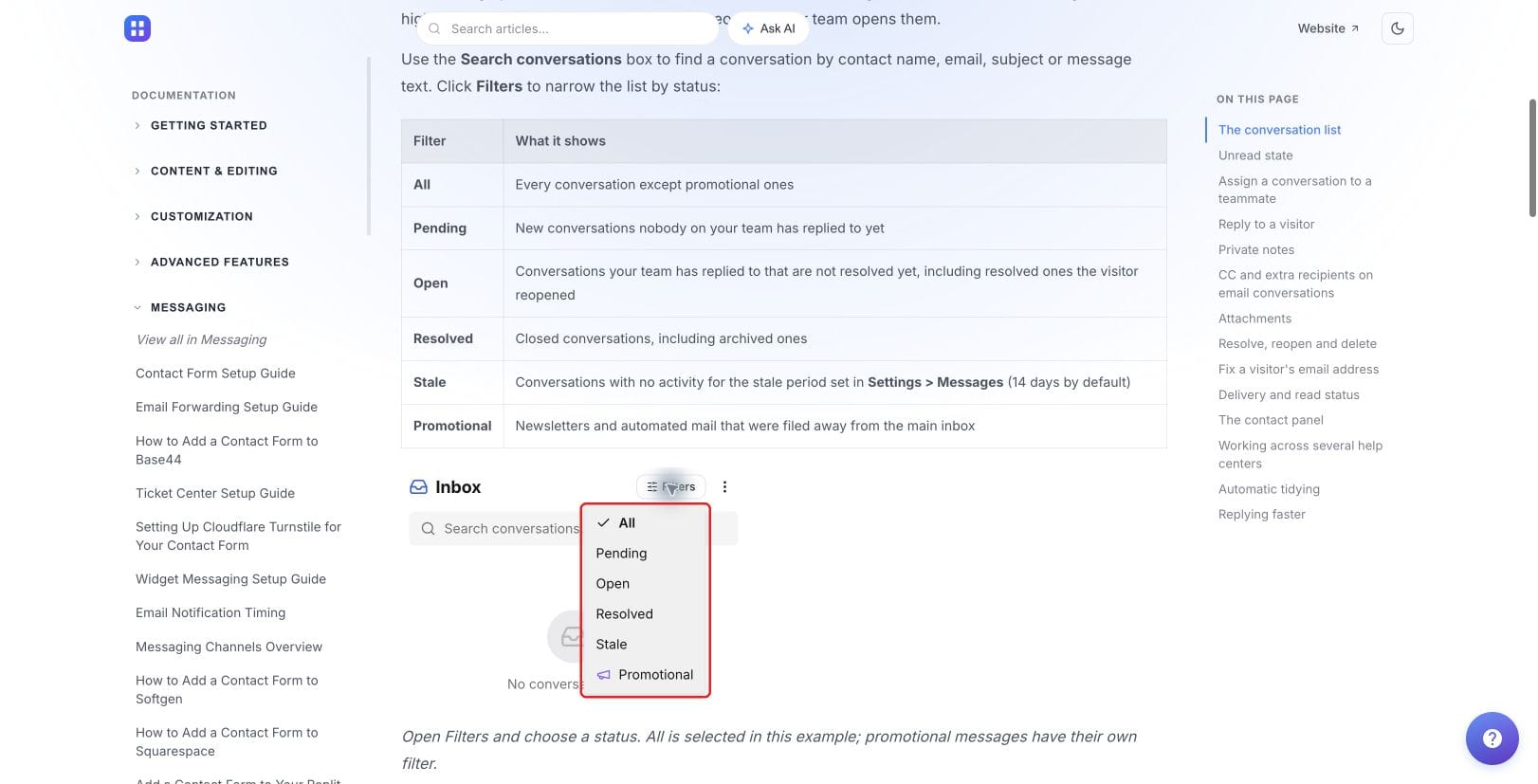
Review the assignment behaviour and private notes when assessing a handover. Both matter more than simply giving everyone access to the same address.
When does the customer experience justify a change?
Consider an illustrative startup with three people sharing support. A customer reports a failed import by email, sends another detail through the website and asks for progress the following day. The team now needs to connect the context and explain the next step consistently.
A help desk is useful if it makes that work easier to follow. Test the actual identity and conversation behaviour rather than assuming all messages from every channel automatically merge into one case.
HelpDesky’s contact panel lists other conversations from the same contact. Its ticket centre gives authenticated users a place inside your app to view and reply to their conversations. That can help customers return to an investigation without searching their email history.
A portal is not necessary for every quick enquiry. Use our guide to contact forms, AI answers and ticket portals to choose the appropriate entry points. Keep a public route available for customers who cannot sign in.
What should you budget for the move?
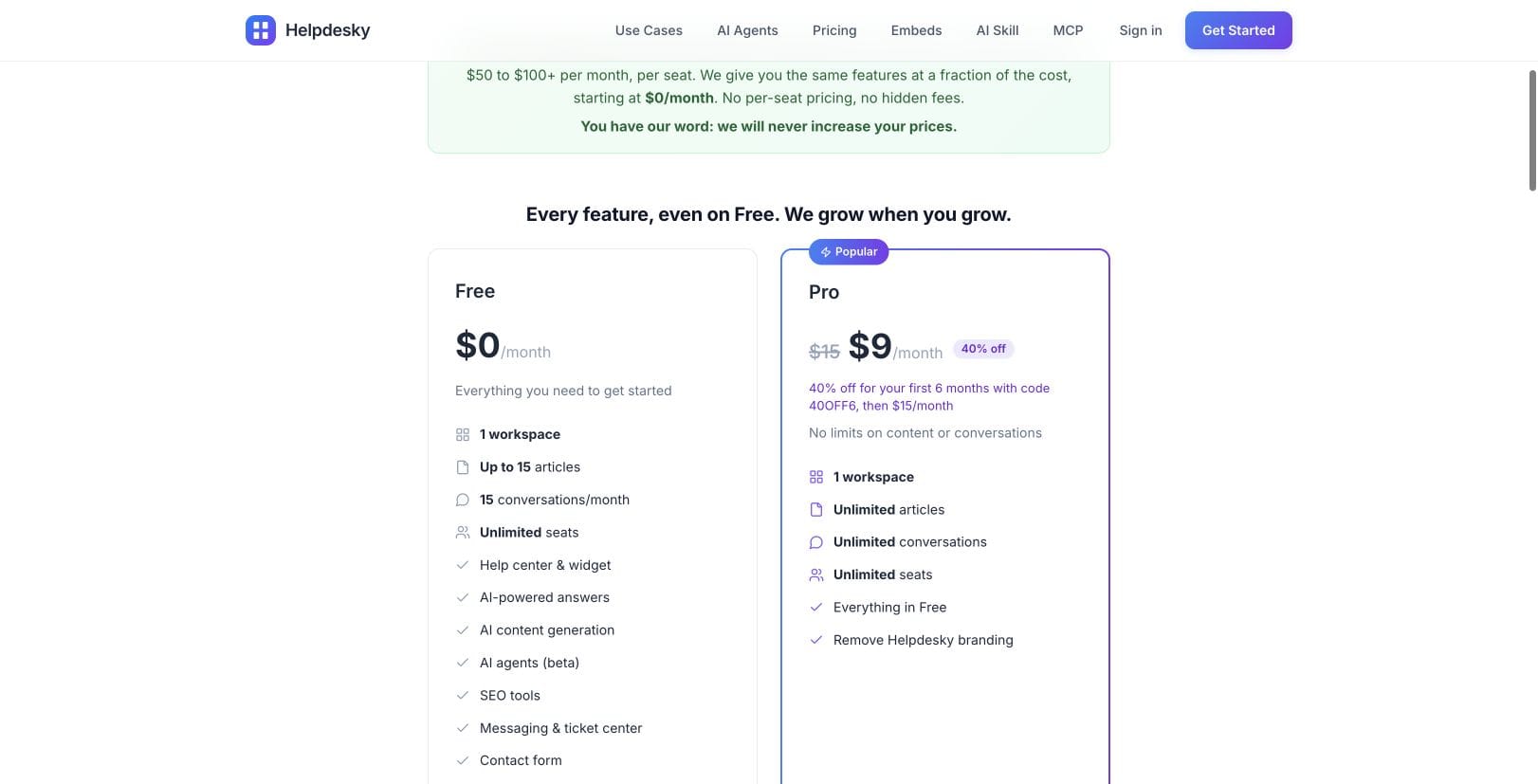
HelpDesky Pro costs $15 per month for one workspace, with unlimited seats, articles and conversations. The current code 40OFF6 reduces that to $9 per month for the first six months, then $15. A team of three or five pays the same platform fee.
Free includes 15 published articles and 15 monthly conversations, with unlimited seats. It can be useful for a small evaluation, but choose capacity that matches the support you actually receive.
AI runs on your own supported provider key, giving you provider choice and visibility into its separate usage bill. Check the chosen provider’s spending controls. The platform subscription does not make AI consumption free.
Do not count your entire Google Workspace bill as a saving if you will still use Gmail, Drive and other services. In that situation a support platform is an additional expense. Evaluate whether clearer handling and fewer coordination problems justify it, without inventing an hourly saving.
How can you test the decision before committing?
Run a small trial with sample requests that resemble your work. Record the result of each check, including anything that still requires a manual process.
- Coverage: let one teammate receive a request and another take responsibility. Check that both understand who replies next.
- Continuity: add an investigation note, then ask a third person to continue without a verbal briefing.
- Customer return: reply, close the case and send a follow up as the customer. Check history, notifications and reopening.
- Evidence: test the attachment types, sender addresses and reply paths your customers actually use.
- Review: identify unanswered and unresolved work. If you need response time reports or contractual service tracking, verify those exact requirements rather than assuming an inbox includes them.
Keep the existing mailbox available during evaluation. Forwarding new messages is not the same as importing historical email. Decide where older conversations remain searchable and who checks each destination during the change.
Once you have chosen the workflow, the email forwarding guide and ticket centre reference cover implementation. Start with the buying decision, then configure the routes that passed your trial.
The right time to move is when shared ownership and reliable follow through matter more than keeping everything in the familiar mailbox. If your current process still delivers that consistently, keep it. If it does not, test a connected support workspace against the problems you can already name.
Frequently asked questions
Is there a ticket volume where Gmail stops working?
No single number applies to every startup. A small number of complex cases with several responders can need more coordination than many simple questions handled by one person. Watch ownership, missed commitments and handover effort.
Does a shared Gmail inbox require a shared password?
No. Gmail supports delegation. Use controlled access rather than distributing a password, and review access when people leave the team.
Can Google Groups assign support conversations?
Yes. Collaborative Inbox supports taking and assigning conversations, completion status and related searches when configured with the required permissions. Evaluate whether those capabilities cover your needs before switching.
Do we have to stop using Gmail?
No. You can keep Gmail for ordinary business email while routing support into a dedicated workspace. Test forwarding and the complete reply journey before moving customer traffic.
Will forwarding import our old conversations?
Do not assume so. Forwarding incoming mail and migrating historical records are different jobs. Confirm import capabilities separately and retain access to the archive you still need.
Should we add AI at the same time?
Only when it solves a defined problem and your source material is ready. First make ownership and customer follow through dependable. Then evaluate AI answers against accurate documentation, with a clear route to a person.