
Notion or a dedicated help centre: when should you switch?
Notion can work for a simple public FAQ. Compare the cost and customer journey before moving to a dedicated help centre with support tools.
Notion vs HelpDesky: the monthly cost
The comparison below assumes every team member needs a full workspace account. Public readers are not paid members. Notion Plus is the lowest paid plan used here because connecting an existing custom domain requires a paid plan and a separate domain subscription.
| Team and feature | HelpDesky Pro | Notion Plus |
|---|---|---|
| 1 member, regular monthly price | $15 total | $12 total |
| 5 members, regular monthly price | $15 total | $60 total |
| 10 members, regular monthly price | $15 total | $120 total |
| One existing custom domain | Connection included | Optional $10 monthly extra |
| 5 members with that domain | $15 total | $70 total |
| Current HelpDesky offer | $9 monthly for six months with 40OFF6, then $15 | Regular prices shown |
| 5 member base subscription difference | 75% lower at $15; 85% lower during the $9 offer | Compared with $60 Plus, excluding domain connection |
| Customer support workflow | Help centre, contact form, ticket centre and shared inbox | Published pages, forms and configurable workspace workflows |
USD prices checked on 17 October 2026 using monthly billing. Sources: HelpDesky pricing, Notion pricing and Notion Sites pricing. Figures exclude taxes, domain registration, AI usage and other extras. HelpDesky publishes this comparison.
For five full members, the regular base subscription difference is $45 per month: ($60 minus $15) divided by $60 gives 75%. The offer makes that difference $51, or 85%, for six months. These are base subscription differences, not savings on the complete support or AI bill.
With one custom domain, the five member Notion total becomes $70 monthly. For one member, Plus with that domain costs $22; for ten, $130. Without the domain addition, a single Plus account costs less than HelpDesky Pro. The products also serve different jobs, so price alone should not decide the purchase.
When is Notion still enough?
A young SaaS may have ten useful answers, one person maintaining them and a support email address that works well. In that situation, publishing the answers from the workspace you already use can be a reasonable starting point.
Notion Free can publish unlimited Sites on one notion.site domain and enable search engine indexing. Paid plans add more site customisation and analytics options. A custom domain is optional, rather than a charge every public FAQ must incur.
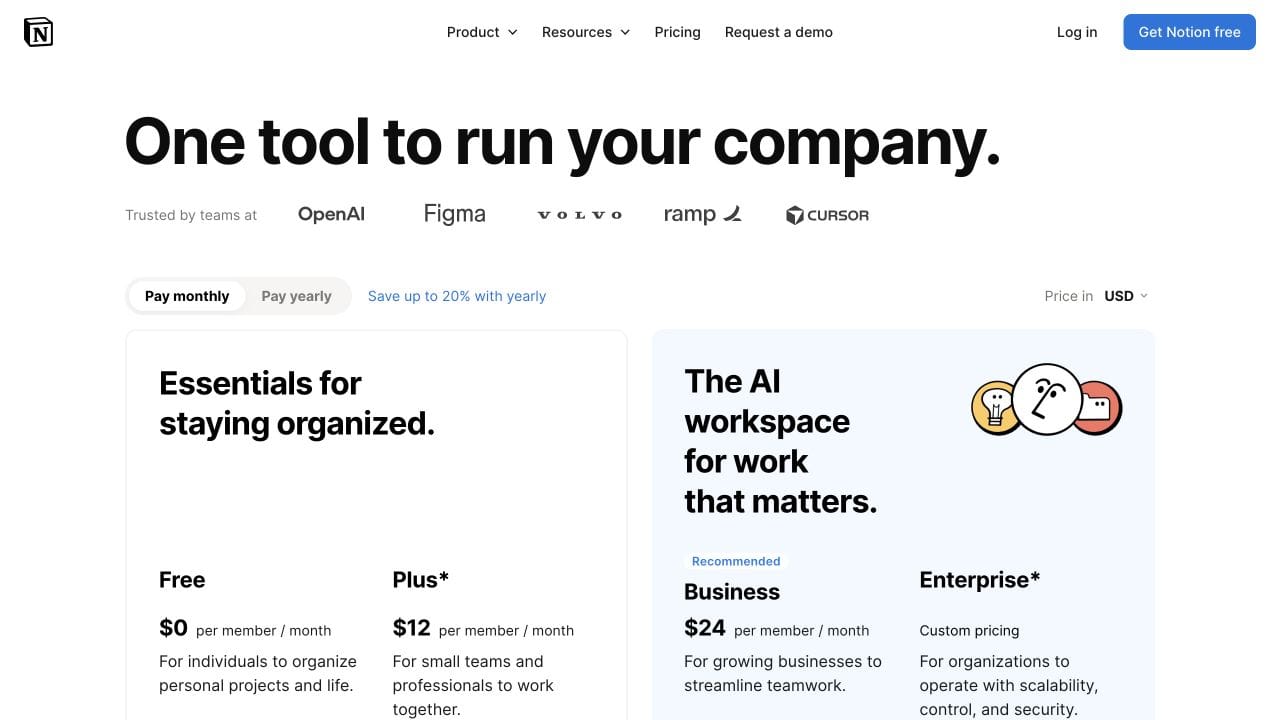
Notion’s annual Plus rate is $10 per member per month with an annual commitment; the domain addition is $8 monthly on annual billing. Do not compare those annual equivalents with a flexible monthly plan without showing the commitment. Free workspace collaboration limits and paid member counts also matter: guests and public visitors are not interchangeable with full members.
If your staff already use paid Notion for product planning, leaving it may not remove that bill. Compare the additional cost of your proposed support setup with the additional cost of HelpDesky. Moving customer documentation does not require abandoning your internal workspace.
What changes when documentation becomes customer support?
The useful question is what happens after a visitor reads an answer and still needs help. Someone investigating a failed payment needs a conversation with an owner, not simply another document to open.
HelpDesky brings public documentation, contact forms, a ticket centre and email forwarding into a support workspace. That makes it worth evaluating when the team wants these functions together instead of maintaining a public site alongside a separate collection and reply process.
Notion can host forms and support workflows built from its workspace tools. It is misleading to say it cannot collect requests. The buying decision is whether your configured process provides the customer experience and team ownership you need, or whether a dedicated support product is a better fit.
Use a real example during evaluation: a customer cannot find the explanation for an import error, asks for help, receives a reply and returns the following day. Check every transition. Our guide to contact forms, AI chatbots and ticket portals explains the different jobs those routes perform.
Will a dedicated help centre improve discovery?
Not automatically. Notion Sites can appear in search engines, and site search is available depending on the settings and customisation. A comparison that treats every Notion page as invisible or unsearchable starts from the wrong premise.
Evaluate the actual customer journey instead. Can a visitor find the right answer using the words they use in a support message? Does each important answer have a stable public address? Is there a clear next step when the article is insufficient?
HelpDesky offers a hosted help centre, custom domain, subfolder and headless delivery options. Choosing among them involves ownership as well as branding: a headless setup gives your website more responsibility for navigation and search. Review the help centre hosting options before choosing a route.
Clear, accurate public answers matter whichever platform you select. Our guide to documentation for AI search and citations covers the content and discovery checks. Neither a platform move nor a particular hosting arrangement guarantees rankings or citations.
How should you budget for AI answers?
HelpDesky’s regular Pro fee covers one workspace with unlimited seats, articles and conversations. Its current promotion is $9 monthly for the first six months with code 40OFF6, then $15. Connected AI provider usage is billed separately.
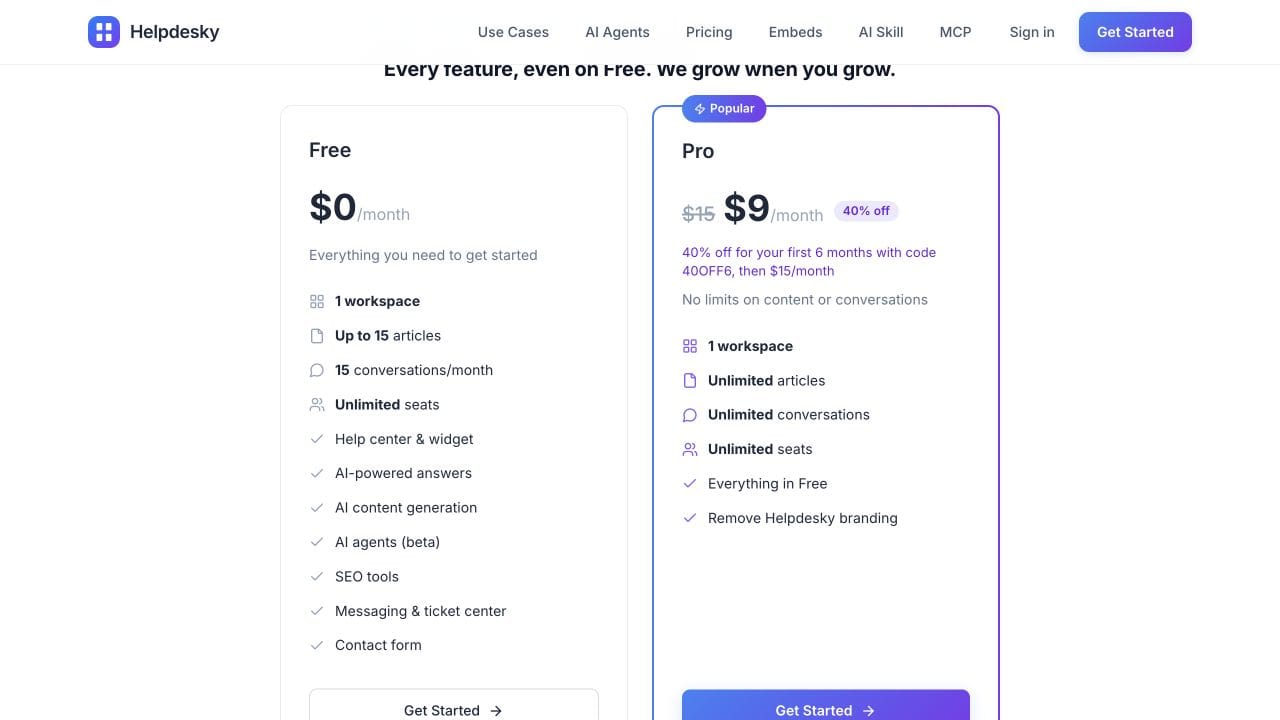
Bringing your own AI key lets you choose among supported providers and models, see the provider’s usage bill and manage spending controls there. Provider limits behave differently, so confirm whether your chosen control stops requests or only sends an alert before relying on it as a hard cap.
Notion workspace AI and customer facing answers are different evaluation requirements. Do not assume a paid writing assistant supplies the public support workflow you need. Check the intended audience, plan allowance and charging model for the specific AI feature in your shortlist.
What should you check before moving?
Use a small representative sample before committing the entire knowledge base. Include a plain answer, an illustrated article and a page with links to other answers. The aim is to test the proposed experience, not to assume every block or permission transfers automatically.
- Public scope: Identify customer material separately from internal notes. Review nested pages and permissions before publishing.
- Content fidelity: Check images, tables, code examples, embedded media and internal links in the destination.
- Addresses: List valuable old URLs and determine which redirects you can actually control. A Notion hosted address is not a redirect rule on your own domain.
- Support handoff: Test an unanswered question through to an owned conversation and a customer reply.
- Maintenance: Assign an owner and a review date. Decide where the authoritative version lives so two copies do not diverge.
- Exit conditions: Define what must work before switching public links, including mobile reading and access without a staff login.
Notion’s publishing documentation explains that subpages are published by default and describes the permission controls. Review the full page tree rather than assuming only the top page is visible.
See how Notion Sites presents public content
This official Notion launch video introduces Sites, including visual customisation, domains and analytics. It is useful context for the publishing side of this decision, but it was released in 2024 and is not evidence of current prices or a complete support workflow.
Frequently asked questions
Can I use Notion as a free public knowledge base?
Yes. Its Free plan supports public Sites and search engine indexing on a notion.site address. Check collaboration limits if several people need full workspace membership. Connecting your own domain requires a paid plan plus the domain subscription.
Does every customer viewing Notion need a paid seat?
No. Public readers are not paid workspace members. The cost examples above assume one, five or ten full staff accounts; they do not multiply the price by your customer count.
Does Notion have search?
Yes, Sites can offer search depending on their settings and customisation. Test the search experience on your actual site, including mobile, rather than treating a dedicated help centre as the only searchable option.
Will switching reduce our existing Notion bill?
Only if the switch lets you remove paid subscriptions you no longer need. A team retaining Notion for internal collaboration should compare the additional support costs, not claim the whole existing Notion bill disappears.
Is HelpDesky AI usage included in the $15 fee?
The platform includes AI features using your own supported provider key, but that provider bills usage separately. The unlimited Pro article and conversation allowances are not a promise of free AI tokens.
When is the switch worth evaluating?
When public answers and customer conversations need to work together, or maintaining separate tools is creating repeated handoff problems. Keep Notion if its publishing and your existing reply process already meet the need. Test a representative customer journey before deciding.
Choose around the customer’s next question
Notion can remain an effective writing workspace and a practical home for a simple FAQ. HelpDesky is worth considering when the job has expanded into public documentation and ongoing support, with a predictable platform fee for the team.
Start with the articles customers already use and the questions they still send afterwards. Evaluate those together, then choose the setup that makes maintaining answers and continuing conversations manageable.