
What is the best support stack for Shopify app developers?
Build merchant support around reliable documentation, one inbox and continuing conversations. Compare the workflow, identity requirements and role of AI.

Sources checked on 5 October 2026. HelpDesky publishes this guide. It is for developers supporting merchants who use their apps, not for merchants choosing a help desk to support shoppers. Scenarios are illustrative, not measured customer results.
What does Shopify expect app developers to provide?
Shopify’s app developer support guidance requires public apps to provide a support channel and help merchants in a timely manner. An email address remains required even if you select an optional support portal. Shopify does not provide merchant support for apps built by other developers.
That makes a working support address the baseline, not something to remove after adding a chat widget. Shopify’s support links can relay a merchant’s request to the email address on file. Test what happens to that message after it reaches your team, including ownership and the merchant’s reply.
A support stack should also fit the context of an app problem. Your customer might be a store owner, a member of staff or an agency helping several stores. The useful question is not just who sent the email, but which installation they are asking about and what they are authorised to discuss.
Which layers belong in a small app support stack?
| Layer | Job for the app team | What to evaluate |
|---|---|---|
| Merchant documentation | Explain setup concepts, expected behaviour and known limitations | Can merchants find the right answer for their app version and use case? |
| Shared inbox | Receive requests and give each case an owner | Can another teammate understand the history and next action? |
| Authenticated support view | Let merchants return to continuing investigations | Does the identity model match the people and stores you support? |
| AI answers | Explain maintained documentation at the point of need | Are sources accurate, costs understood and human help accessible? |
| Engineering handover | Connect a merchant report with a reproducible issue | Can support follow the investigation and update affected merchants? |
You do not necessarily need five products. Some tools combine the customer facing layers, while your existing issue tracker can handle engineering work. Keep a clear relationship between the merchant conversation and the engineering issue instead of copying every technical discussion into the customer thread.
Should you choose an inbox first or a combined platform?
An inbox first approach can suit a team that already has good documentation and mainly needs better email coordination. For example, Help Scout describes shared inbox assignment, internal notes and saved replies. Those are useful evaluation criteria when several people take turns supporting merchants. Check the actual plan and workflow rather than assuming all inboxes work alike.
A combined platform is worth evaluating when your documentation, contact routes and continuing conversations are fragmented. HelpDesky’s shared inbox documentation describes messages arriving from forms, the widget, the ticket centre and forwarded email, with assignment and private notes. That can keep the support team’s work in one place while merchants enter through different routes.
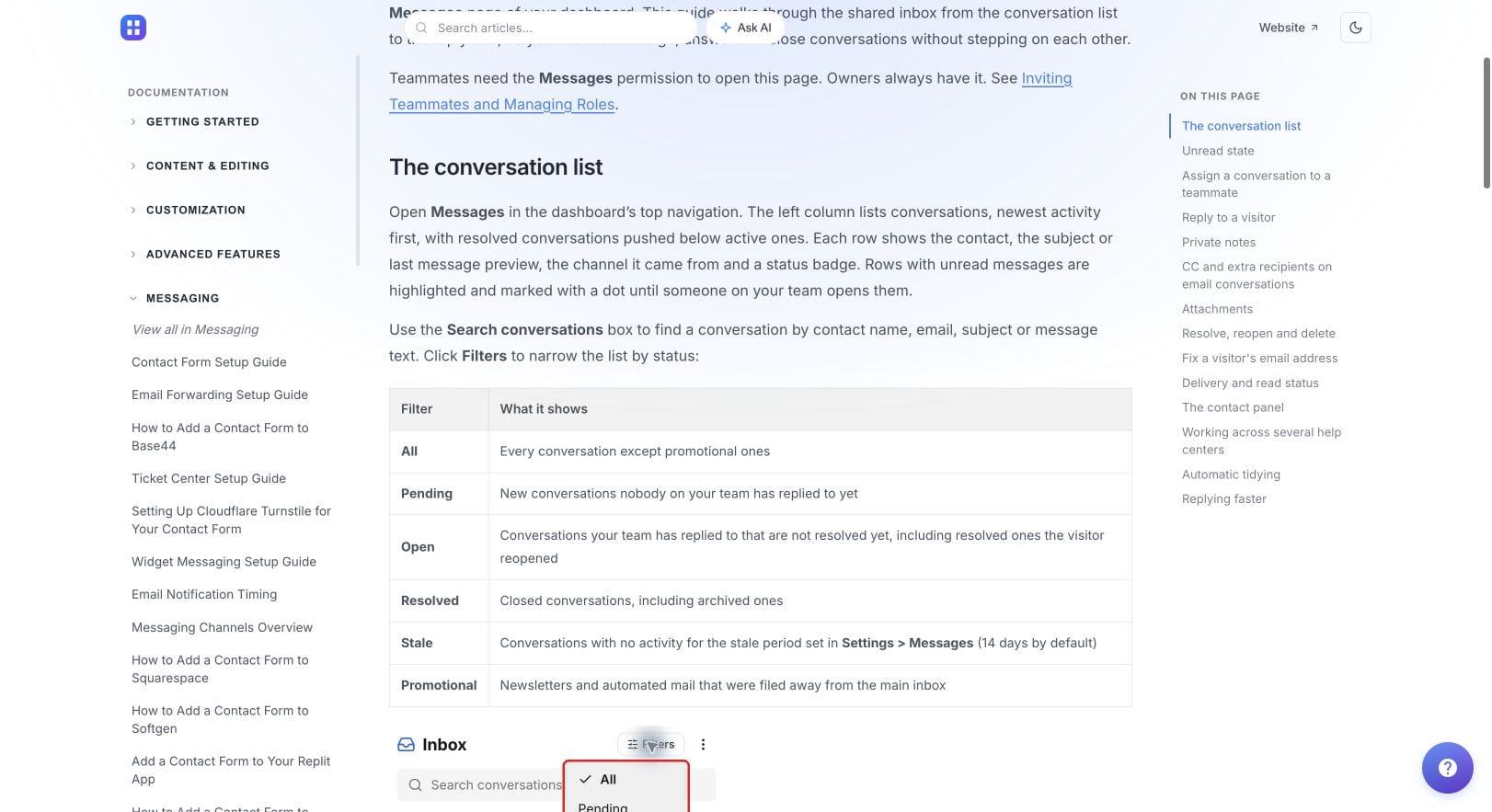
For an early team, the decision is whether the workflow fits with manageable setup and maintenance. A larger team may need reporting, routing or permissions beyond a basic inbox. Write down those requirements and test them before choosing on subscription price alone.
Our support software budget guide explains how to account for subscriptions, usage and staff time. For a Shopify app, include the work of maintaining the support integration as well as the monthly licence.
What merchant context should an investigation preserve?
A useful case record separates the reported symptom from assumptions about its cause. Ask for enough information to reproduce the issue, without collecting unrelated store or customer data.
- Scope: the affected store and app installation, and whether the issue affects one user or a wider workflow.
- Expected and actual behaviour: what the merchant tried to do and what happened instead.
- Reproduction: the steps, relevant time and any recent change that might matter.
- Evidence: an appropriate screenshot, recording or error reference with unnecessary personal information removed.
- Ownership: who is investigating, what is needed next and when the merchant should expect an update.
Shopify’s merchant guidance for app support recommends similar diagnostic context, including app details, reproduction steps and screenshots. It also warns that Function logs can contain personal information. Treat logs as evidence to handle carefully, not something to request indiscriminately.
For example, suppose a merchant reports that a stock sync stopped after changing a setting. The first useful reply might establish the affected store, the last successful sync and the setting changed. The engineering record can then hold the reproduction and technical findings, while support keeps the merchant informed. This is an illustrative workflow, not a claim that any help desk automatically diagnoses sync failures.
When does an authenticated portal earn its place?
A portal helps when merchants need to revisit an investigation or add information over several days. HelpDesky’s ticket centre provides an embedded conversation view, while its identity requirements explain verification using a signature generated by your server.
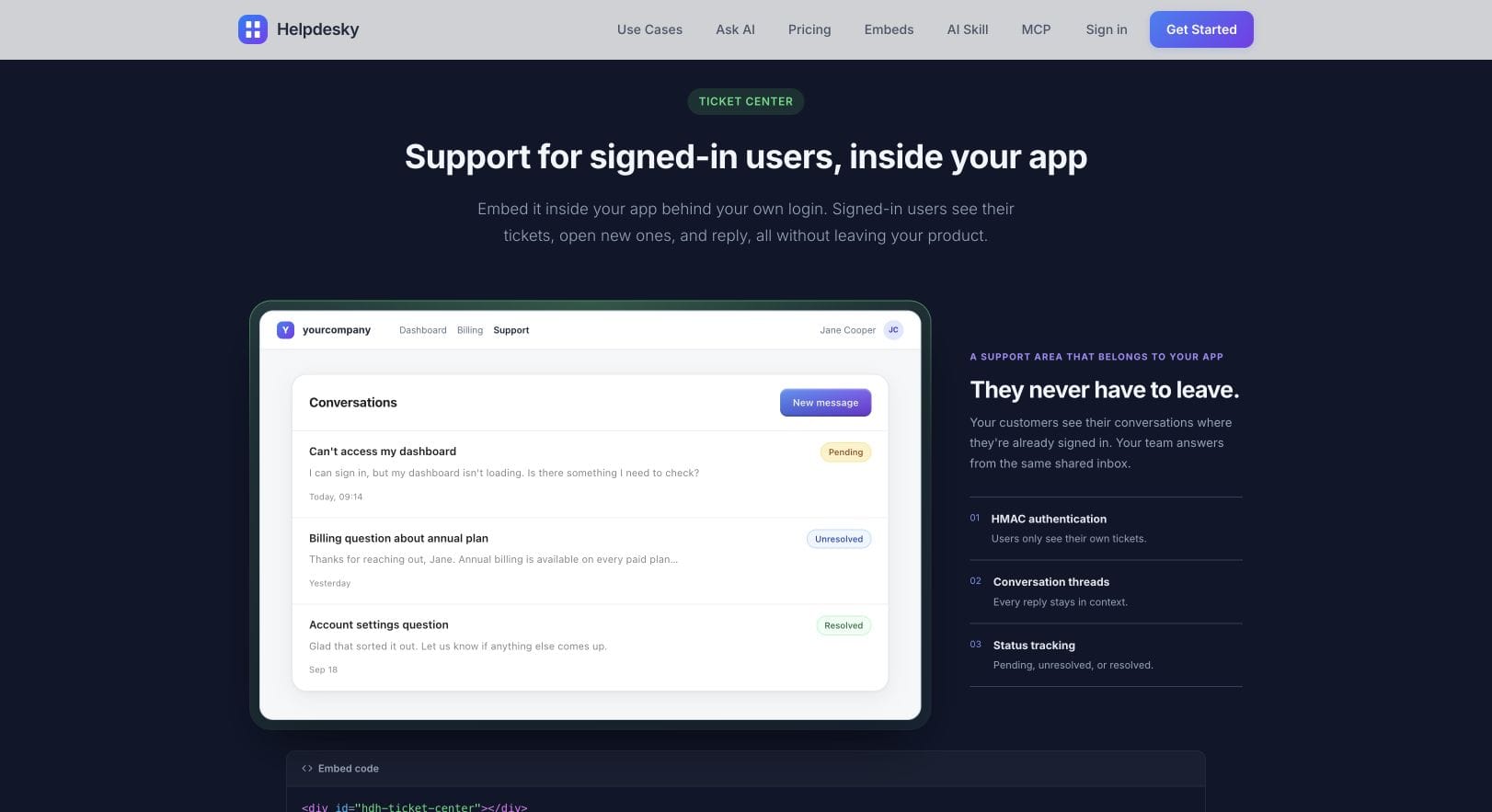
Evaluate identity before treating the portal as a shared store support history. A verified email address and a Shopify store membership are different concepts. Test the situations your app must support: several staff members in one store, one agency user helping several stores, and a person whose email changes. Confirm who can see which conversations.
Do not assume that an ordinary email based portal automatically provides organisation permissions or a shared history for everyone in a store. If that is essential, make it an explicit acceptance criterion. Keep an external contact route for merchants who have uninstalled the app or cannot open it.
Where should AI help, and where should people take over?
Start AI with stable explanations: what a feature does, how a setting affects behaviour, or where to find a documented limitation. Keep answers grounded in material your team owns and updates. Questions about a specific merchant’s disputed charge, private account or unexplained data change need investigation rather than a plausible generic answer.
HelpDesky’s Ask AI requirements describe the connected provider key and separate provider billing. Its documentation is a starting point for evaluating the knowledge and cost model. Test what happens when the answer is missing or the merchant asks for a person, and avoid promising that every AI interaction transfers context automatically.
Support conversations are also product research. Ask merchants about the last time the problem occurred and what they did, rather than only asking which feature they would like. Y Combinator’s session below gives useful background on talking to users. It is not a Shopify integration tutorial or a HelpDesky demonstration.
How should you trial the stack before relying on it?
- Send a listing support enquiry. Confirm the intended inbox receives it and a teammate can own the reply.
- Ask a documented question. Check the source, answer quality and visible human contact route.
- Run an ongoing case. Return as the merchant later and have a second teammate continue the investigation.
- Check identity boundaries. Verify that a different user or store cannot see the case without the intended access.
- Test the unavailable app route. Confirm that a merchant can still contact you when the app cannot open.
If troubleshooting requires store access, follow Shopify’s collaborator access guidance. Shopify prohibits asking for or using a merchant’s password. Access should follow the supported process and the permissions needed for the investigation.
HelpDesky is a practical candidate when you want documentation, AI answering and customer conversations together. Its current plans list unlimited seats, with Free offering two articles and ten monthly conversations. That is a small evaluation allowance, not unlimited production capacity. Choose the plan after testing the merchant journey and any required integrations.
For a deeper comparison of the customer entry points, read when to use a form, AI chatbot or ticket portal. The Shopify specific decision is how those routes retain the right merchant and installation context.
Start with one realistic merchant case. Evaluate the help centre, inbox and return conversation together before moving your app’s support workflow.
Frequently asked questions
Is this the same as choosing support software for a Shopify store?
No. This guide covers an app developer supporting merchants. A merchant supporting shoppers has a different relationship, context and set of permissions.
Can a portal replace the support email on an app listing?
No. Shopify’s current developer guidance still requires an email address when a support portal is selected.
Does a signed customer identity provide shared store history?
Not automatically. Verify the product’s identity and access model against your requirements for staff, agencies and multiple stores.
Should every merchant report go straight to engineering?
No. First establish the problem and relevant evidence. Escalate cases that need technical investigation while keeping an owner responsible for the merchant’s updates.
Should AI handle every app billing question?
No. It can explain documented billing terms, but an individual charge dispute or refund request needs the appropriate review and decision process.
What is the strongest reason to change support tools?
A repeated workflow failure you can demonstrate, such as lost ownership, missing context or merchants being unable to follow a case. Test whether the new setup fixes that problem before migrating.