
Helpdesky vs Zoho Desk for small SaaS teams
Compare the $5 Helpdesky Pro workspace with Zoho Desk’s per agent plans, including public help centre tiers, own key AI and service workflows.
For five people handling support, that is $5 a month for Helpdesky Pro versus $100 for Zoho Desk Standard on monthly billing, before taxes, AI usage and optional services. The useful question is whether your team needs the features behind Zoho’s higher subscription.
What does the same team cost each month?
These are regular USD base subscription prices checked on 11 November 2026. All people in the table need full support access. Zoho Standard is the starting comparison because its public knowledge base is included; Express and Free do not include that feature.
| Support users | Helpdesky Pro, monthly | Zoho Standard, monthly | Pro base subscription difference |
|---|---|---|---|
| 1 | $5 | $20 | 75% lower |
| 3 | $5 | $60 | 92% lower |
| 5 | $5 | $100 | 95% lower |
| 10 | $5 | $200 | 98% lower |
Zoho Standard costs $20 per agent per month on monthly billing. Its annual rate is $14 per agent per month, billed annually: five agents therefore cost $70 a month equivalent, or $840 a year. Against that annual equivalent, Helpdesky Pro’s $5 monthly base fee is 93% lower, rounded.
Percentages use the difference between subscriptions divided by the Zoho subscription. They are base subscription differences, not total cost savings. They exclude provider usage, taxes, add ons and migration work. No temporary Helpdesky promotion was displayed when checked; $5 is the current Pro price, not the old introductory offer.
Sources: Helpdesky pricing, Zoho Desk pricing and Zoho’s published currency rate data. Zoho localises its pricing; these calculations use its USD rates, not a currency conversion.
| Buying requirement | Helpdesky | Zoho Desk |
|---|---|---|
| Public help centre | Included on Free and Pro | Standard and above |
| Human seats | Unlimited on both plans | Per agent on paid plans |
| Multilingual knowledge base | Check your publishing workflow | Professional and above |
| Departmental workflows and Blueprints | Evaluate against your requirements | Professional and above |
| Help centres for multiple brands | Separate workspaces | Enterprise |
| Generative AI with your own key | Every plan; provider usage separate | Express and above; scope varies |
Edition placement comes from Zoho’s detailed plan comparison. A more expensive edition can be the right purchase when its workflow capabilities are requirements, rather than features you might use later.
Why does the public help centre change the comparison?
A small SaaS company often needs documentation before it needs a complex service operation. Customers should be able to find an answer without opening a ticket, and developers should be able to help with difficult questions without making every occasional contributor another subscription decision.
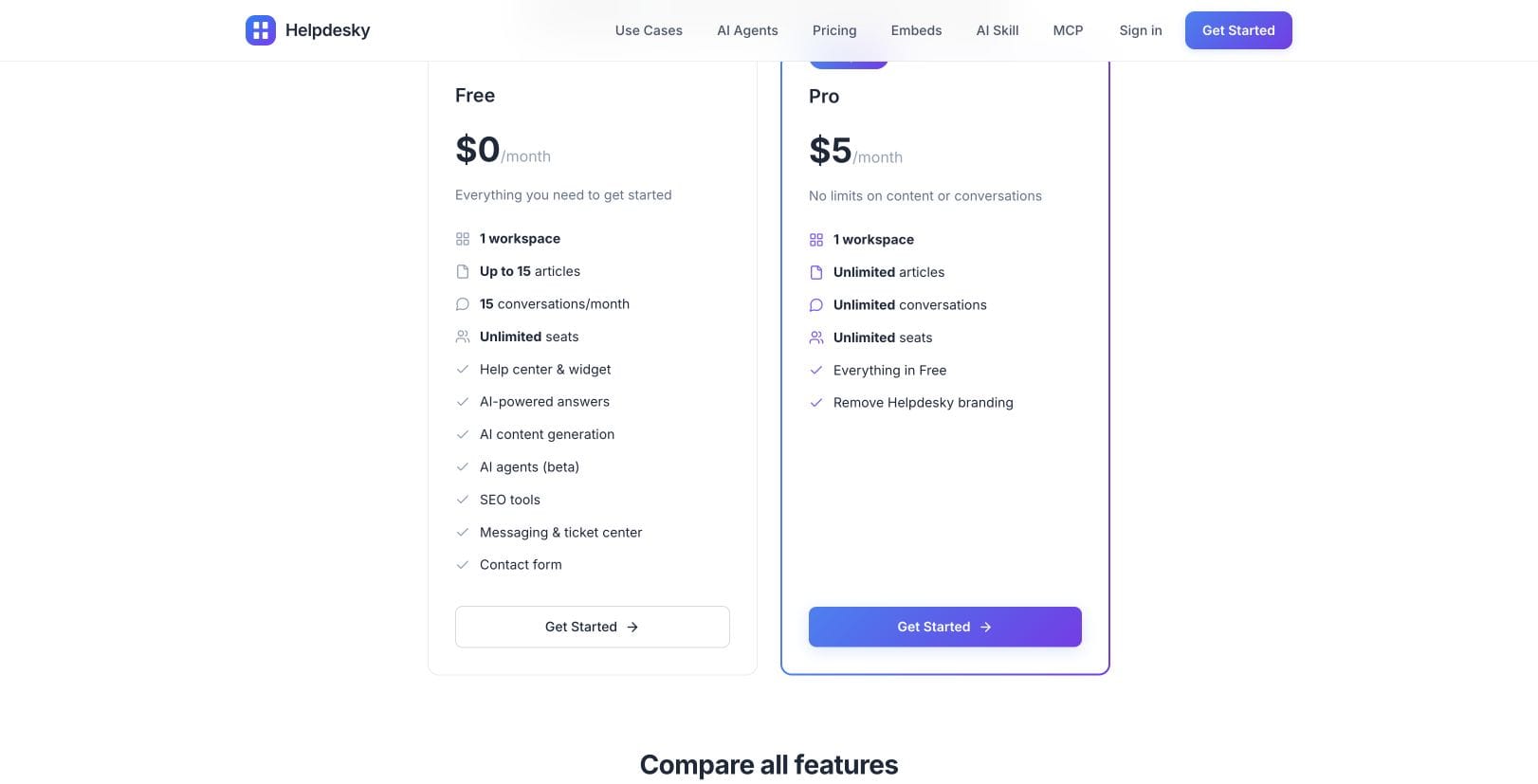
Helpdesky puts the help centre, support widget, contact form, ticket centre and email forwarding in the same platform. Its Free plan allows 15 published articles and 15 conversations a month for one workspace. Pro removes those article and conversation limits and the Helpdesky branding. Human seats are unlimited on both.
Zoho’s free edition supports three users, and Express supports up to five. Standard and above have no stated user count ceiling in the edition table, but each full agent still needs a paid licence. Unlimited capacity to add agents is different from including unlimited agents in one fee.
If founders, engineers and support specialists all answer customers, count everyone who needs that access. If some colleagues only review information internally, examine Zoho’s light agent permissions before counting them as full agents. Do not assume a cheaper collaborator role can do the same work.
Our guide to help desks with unlimited seats explains how to distinguish the number of people allowed from the number included in a subscription.
When is a higher Zoho edition worth considering?
Standard includes a public knowledge base, community features and Zoho CRM integration. Professional adds capabilities such as telephony integration, multiple departments, round robin assignment and Blueprints. Its multilingual knowledge base is another concrete reason to evaluate that edition.
For five full agents, Professional is $175 a month on monthly billing at $35 each. Its $23 annual rate gives a $115 monthly equivalent, billed as $1,380 a year. Enterprise is $250 a month for five agents at $50 each, or $200 monthly equivalent at the $40 annual rate, billed as $2,400 a year.
Enterprise includes a help centre for multiple brands, skills based assignment and a sandbox. If those are part of your support operation, comparing only Standard’s price would understate the package you need. Conversely, a team answering questions about one SaaS product may not need those controls.
Zoho Standard’s messaging allowances include one Business Messaging channel and one WhatsApp channel; its table notes separate WhatsApp usage charges. That does not make WhatsApp an unavoidable expense for every buyer. List the channels and integrations you actually intend to use, then price the applicable limits and any external services.
For another established service desk option, see our Helpdesky and Freshdesk comparison. Recheck the linked vendor’s current price when building a shortlist.
How should you compare the AI options?
Helpdesky’s Ask AI uses published documentation to answer questions with source links. AI agents in Copilot, Review and Autopilot modes are also available on every plan and are labelled beta. Your connected provider bills the tokens used; an unlimited conversation allowance does not mean unlimited free AI.
Supported provider connections include OpenAI, Anthropic, Google and xAI. Bringing your own key gives you a direct view of the usage bill and lets you manage provider spending controls while choosing from the provider and model options the product supports. It is not a promise that any model can be connected.
The Ask AI reference explains the documentation source and provider requirement. Review the AI API protection guidance as well. Check how your chosen provider enforces its budget settings: an alert and a hard spending stop are different controls.
Zoho’s table distinguishes generative assistance, Answer Bot, Zia Agent Studio and native Desk agents. It lists Answer Bot from Standard, while the prebuilt agents native to Zoho Desk are listed for Enterprise with US and India data centre availability. The separate Agent Studio allowance should not be read as proof that every native Desk agent is included in every edition.
Before choosing either product, test three cases: a question answered clearly in your documentation, a question the documentation does not cover, and an account specific request that needs a person. Check the answer, the cited source and the handover. These are proposed evaluation steps, not claims that we ran a comparative accuracy benchmark.
Can you keep control of your help centre address?
Helpdesky supports its own hosted address, a custom subdomain, a subfolder on your website or a headless presentation in your own templates. That flexibility matters if your documentation needs to share your main site’s navigation or publishing design. Read the help centre hosting options before choosing an architecture.
A subfolder is not an automatic ranking advantage. Google Search Central’s short video explains how to approach the subdomain or subfolder choice. Pick a structure your team can maintain, rather than treating a URL shape as an SEO shortcut.
If you already use Zoho Desk, map existing article URLs and check redirects before replacing your help centre. Google’s site move guidance recommends URL mapping, redirects and monitoring; temporary search fluctuations can still occur. Our help desk migration checklist covers the buying and planning questions.
Which should a small SaaS team shortlist?
Start with Helpdesky when you need one public help centre, shared support tools, occasional help from colleagues and a predictable platform fee. A team can evaluate the feature set on Free, then choose Pro when the content or conversation limits are too small.
Keep Zoho Desk on the shortlist when its CRM connection, departmental processes, multilingual knowledge base or enterprise controls match specific requirements. Price the edition that fulfils those requirements and include the time needed to configure and maintain the workflow.
For a five person team, $5 versus $100 is a substantial subscription difference. It becomes a useful decision only after both products have been checked against the work your customers actually need done.
Frequently asked questions
Does Zoho Desk Free include a public knowledge base?
No. Zoho’s edition comparison lists a private knowledge base for agents separately from the public knowledge base. The public version starts at Standard.
Is Zoho Desk Standard limited to five users?
The detailed edition comparison lists five users for Express and unlimited users for Standard and higher editions. Paid full agents are still billed individually. Confirm your account’s package if a regional FAQ gives a different impression.
What is the five person monthly price difference?
Using regular USD monthly billing, Helpdesky Pro is $5 per workspace and Zoho Desk Standard is $100 for five full agents. The Helpdesky base subscription is 95% lower, excluding AI, taxes and extras.
Does Helpdesky Pro include the AI provider bill?
No. Pro covers the platform for one workspace with unlimited seats, articles and conversations. The connected AI provider charges separately for usage.
Can Zoho Desk use an external AI key?
Yes. Its generative AI table lists BYOK on Express and higher editions. Provider choices, native AI features and data centre availability differ, so check the exact feature you plan to use.
Should we move just because the subscription is lower?
No. Check required channels, workflow controls, export options, article redirects and team adoption first. A lower recurring fee helps when the replacement also fits your support operation.