
GitBook or a help desk: when do you need both?
Keep specialist developer docs when you need them. Compare current team costs and decide when a shared support inbox should sit alongside GitBook or Mintlify.
A good docs site answers repeat questions. It cannot, by itself, investigate a particular customer’s failed payment or take responsibility for an unresolved account problem. The useful buying question is where that second kind of request goes.
This comparison looks at one documentation site and a team of three or five people who all need to collaborate. Prices were checked on 19 November 2026. The products cover different jobs, so a lower subscription is not evidence of identical capabilities.
What do three and five people actually pay?
| Product and monthly billing | Three people | Five people | Main role |
|---|---|---|---|
| HelpDesky Pro | $5 total | $5 total | Help centre and inbox |
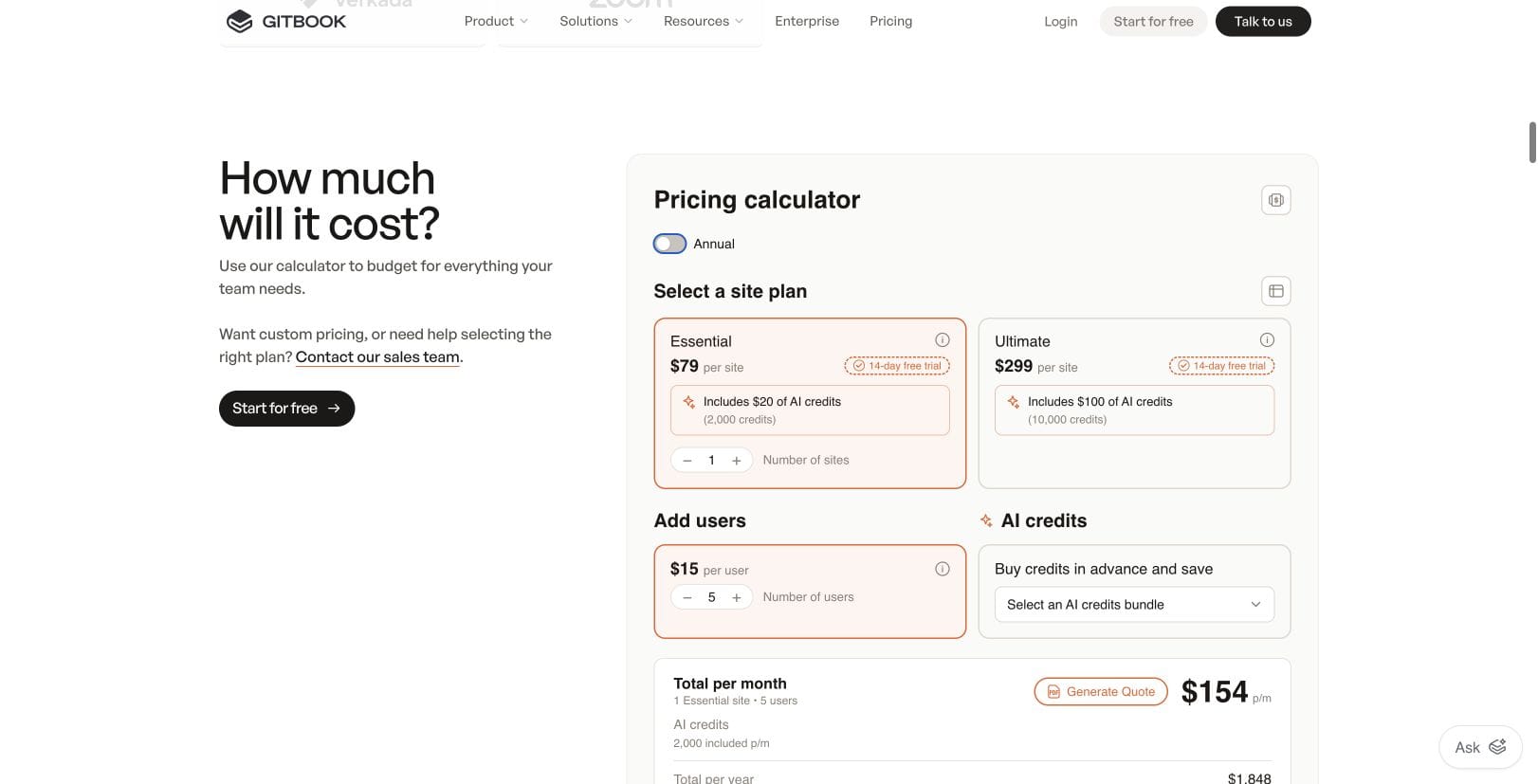
| GitBook Essential | $79 site + 3 × $15 = $124 | $79 site + 5 × $15 = $154 | Docs and AI Ask |
| GitBook Ultimate | $299 site + 3 × $15 = $344 | $299 site + 5 × $15 = $374 | Docs and AI Chat |
| Mintlify Free | $0 | $0 | Docs and API playground |
| Mintlify Pro | $540 total | $540 total | Docs and AI Assistant |
HelpDesky Pro includes one workspace with unlimited seats, articles and conversations; AI provider usage is separate. GitBook Essential includes 2,000 AI credits monthly. Ultimate adds Assistant Chat, an embeddable assistant, authenticated access and 10,000 monthly credits.
Mintlify Free covers five editors and includes a custom domain, Git sync and an API playground. Pro adds unlimited editors, Assistant, the writing agent and Autopilot, with 10,000 credits monthly.
USD base subscriptions, excluding taxes, extra AI usage and other services. GitBook users are staff collaborators, not public readers. Sources: HelpDesky pricing, GitBook pricing and calculator and Mintlify pricing.
Against GitBook Essential, HelpDesky’s $5 base subscription is approximately 96% lower for three people and 97% lower for five, using monthly billing. Against Ultimate it is approximately 99% lower for either team; against Mintlify Pro it is approximately 99% lower. These are base subscription differences, not total cost savings. Mintlify Free costs less than HelpDesky Pro.
Essential is the lowest listed GitBook tier for a collaborating team with a custom domain. Ultimate belongs in the comparison only if you need its additional capabilities. Mintlify Pro is optional for a team of five whose documentation needs fit Free; do not buy it merely to publish a branded docs site.
What changes with annual billing, trials and AI?
With annual billing, GitBook Essential is $65 per site plus $12 per user monthly equivalent: $101 for three people or $125 for five. Ultimate is $285 or $309 respectively. GitBook says annual plans are paid for twelve months upfront; the monthly figures are not a cancellable monthly subscription.
Mintlify Pro is $450 monthly equivalent when billed annually. Its current startup programme offers eligible applicants 50% off Pro for twelve months, while the current YC batch can apply for twelve months free. Eligibility conditions apply, including funding and company history for the startup route. These offers are separate from the regular totals above.
GitBook advertises a fourteen day trial. Mintlify’s Pro trial lasts fourteen days or until its 5,000 trial credits run out, whichever comes first. HelpDesky’s current paid price is $5 monthly; its pricing page shows no separate introductory promotion.
AI requires a second calculation. GitBook lists 20 credits per relevant question for Assistant Ask or Chat and $0.01 per additional credit. Its page also describes credit bundles and an optional auto pause. Confirm the active spending settings before relying on a limit.
Mintlify lists 25 credits per Assistant answer and 250 per Autopilot update, with no charge when it cannot answer or finds nothing to update. Pro’s 10,000 credits would cover 400 answers if used only for that purpose. Overage is $0.01 per credit, and the pricing FAQ says you can set a hard spending limit or disable overages. Other credit consuming work reduces that answer allowance.
When should you keep the documentation platform?
Keep it when the documentation workflow is doing valuable work that a general help centre would not replace. GitBook’s current plans include GitHub or GitLab synchronisation, change requests, automatically updated OpenAPI references and an interactive API playground.
Mintlify’s Free plan includes Git sync, a web editor, an API playground and custom components. Its documentation source stays in Git as Markdown or MDX. Pro adds features such as preview deployments and the AI assistant; Enterprise has further controls and integrations.
Those capabilities matter when an engineering team reviews documentation alongside code or customers need to try an API request. HelpDesky’s public product documentation describes help articles and support conversations, but does not establish equivalent Git synchronisation or OpenAPI generation. A content API and headless delivery are not the same as those workflows.
GitBook’s official video below illustrates the Git Sync workflow, including local files, GitHub configuration and content updates. It was published in September 2024, so use it to understand the approach rather than current interface details or pricing.
What does a help desk add?
It adds a place to own and continue individual customer conversations. HelpDesky routes widget messages, contact forms, ticket centre conversations and forwarded email into one shared inbox. Staff can assign a conversation, leave private notes, reply and resolve it. The shared inbox reference documents those behaviours.
For example, a developer can find the correct authentication header in your API docs. If their account still cannot access an endpoint, someone needs to investigate the account, ask for relevant details and follow up. That work needs an owner and a conversation history, not another public documentation paragraph.
Do not confuse an AI conversation with this complete human support process. GitBook offers Assistant Chat and Mintlify has an Assistant and support integrations. Those are useful capabilities, but the pricing pages do not establish an included customer ticket inbox equivalent to HelpDesky’s. Verify the destination, ownership and reply path of any integration you intend to use.
Our guide to contact forms, AI chatbots and ticket portals explains how to choose the customer entry point. If your existing reply process already works, there is no need to replace it solely because you publish docs elsewhere.
Should you use one product or keep two?
Keep two when the developer docs need their specialist publishing workflow and support needs a shared inbox. Link customers to one clear contact route from the docs. Keep technical reference material in its existing home and use the help centre for customer answers that your support team maintains.
Evaluate one product when most of your content is account guidance, billing explanations and common product questions, and the same people also answer customers. HelpDesky combines that help centre with support channels and unlimited seats for one workspace. This can remove a separate subscription only if you actually stop needing that service.
Decide which system owns each answer. Maintaining two conflicting copies of the same policy creates avoidable work. If website presentation is the main concern, our hosted versus headless help centre guide separates design control from content and support workflow requirements.
HelpDesky’s Ask AI can answer from published help articles with source links. Bringing your own key offers a choice of supported providers and models, a visible provider usage bill and access to that provider’s spending controls. OpenAI, Anthropic, Google and xAI are documented options; available models and budget enforcement depend on the provider and configuration.
See the Ask AI requirements before planning this part. The $5 subscription does not buy unlimited free AI tokens. Do not assume that keeping external GitBook or Mintlify docs automatically makes every page available to HelpDesky AI without checking the supported knowledge setup.
What should you test before deciding?
- A documentation change: Can the people who maintain the product review and publish an accurate update using their normal workflow?
- An unanswered question: Can a customer reach a person, and can that person assign, reply and close the conversation?
- A return visit: Can the customer find the reply and continue the same issue without starting again?
- The full bill: Include every retained docs subscription, staff collaborator, AI allowance and external service.
- Content ownership: Check export, public URLs and who keeps answers current before migrating a large library.
Use real questions from your own customers. A working API reference and a working support handover are both useful outcomes; your choice should preserve the ones you need.
Frequently asked questions
Can GitBook replace a help desk?
It can handle documentation and, on paid tiers, AI answers. If customers need human investigation, check the separate inbox, ownership and reply workflow. A docs assistant alone does not establish that those requirements are covered.
Is Mintlify free for a five person team?
Yes. Its current Free plan supports five editors, a custom domain, Git sync and an API playground. Pro becomes relevant for capabilities such as the AI assistant, analytics and unlimited editors.
Does GitBook charge for customers reading the docs?
No. Its collaborator charges apply to staff using the GitBook app. Published page views are unlimited. The table assumes three or five staff collaborators, not three or five customers.
Can I keep GitBook and add HelpDesky?
Yes, as separate services with a clear contact route. Five GitBook Essential collaborators plus HelpDesky Pro total $159 in monthly base subscriptions. Verify the customer journey and any knowledge integration you need.
Does HelpDesky replace an OpenAPI documentation tool?
Do not assume so. Its public product material does not document equivalent OpenAPI generation or Git Sync. Keep a specialist docs platform when those are essential requirements.
Is AI included in HelpDesky’s $5 price?
The platform includes AI features using your own supported provider key, while your provider bills usage separately. Pro’s unlimited article and conversation allowances do not remove those provider charges.