
Front or a cheaper help desk that includes a help centre?
Front includes a knowledge base, but the right tier depends on your domain and channels. Compare monthly costs for three and five people with HelpDesky.
Checked on 17 November 2026. HelpDesky publishes this comparison. Prices are in US dollars; the examples exclude AI usage, taxes and optional services.
What do three and five people actually pay?
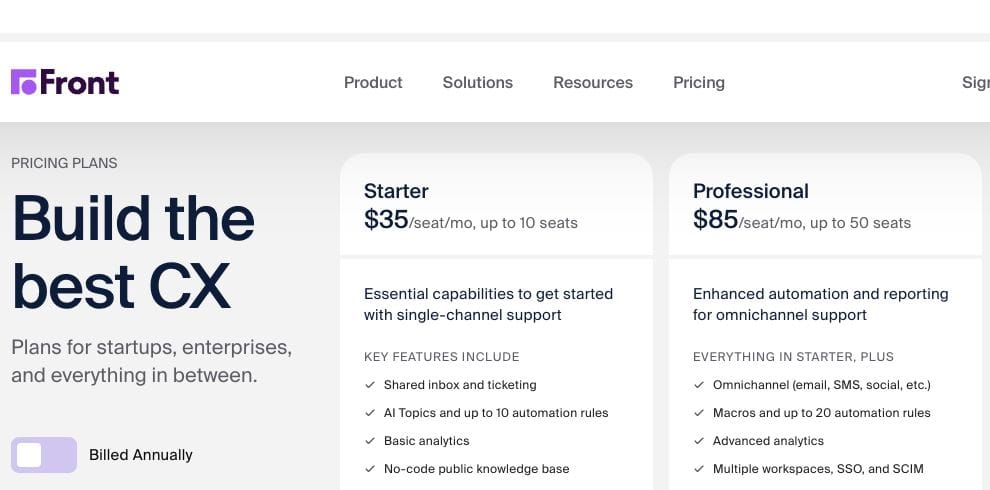
For monthly billing, HelpDesky Pro is $5 for one workspace. Front Starter is $35 per seat and Professional is $85 per seat. The table uses the lowest Front tier for each stated requirement, rather than treating all knowledge bases as equivalent.
| Monthly subscription | 3 people | 5 people | Relevant fit |
|---|---|---|---|
| HelpDesky Pro | $5 | $5 | Unlimited seats, articles and conversations; custom domain included |
| Front Starter, $35 per seat | $105 | $175 | Basic public knowledge base; one channel type; up to 10 seats |
| Front Professional, $85 per seat | $255 | $425 | Custom domain, omnichannel support and SSO; up to 50 seats |
Base subscription difference: HelpDesky Pro is approximately 95% lower for three people and 97% lower for five than Front Starter; against Professional, the differences are 98% and 99%. These are subscription comparisons, not full bill savings or claims of equivalent functionality.
Sources: HelpDesky’s current plans, Front’s monthly billing selector and Front’s custom domain requirements. Front documents a one seat minimum for Starter and Professional in its billing guide, so both team sizes fit.
Annual Front pricing is different: Starter is $25 per seat per month equivalent, or $75 for three and $125 for five; Professional is $65, or $195 and $325. Those totals require annual billing. HelpDesky’s $5 is its current monthly price, with no introductory offer displayed.
Does Front already include a help centre?
Yes. Front’s knowledge base documentation confirms availability on every current plan. Customers can browse published help content, while teams can also maintain internal knowledge. It would be misleading to describe Front as an inbox that always needs a separate documentation product.
The more useful question is which version of that help centre your team needs. Front’s default public address uses frontkb.com. Its own domain guide places a custom domain on Professional or above. If having help.yourcompany.com is a requirement, use the Professional row when budgeting.
Front also connects documentation to the responder’s workflow. Its knowledge base integration guide describes searching for an article and inserting its link into a reply, plus browsing published content in the inbox sidebar. That is useful when people need approved explanations while handling a conversation.
HelpDesky includes custom domains, a help centre widget and a customer ticket centre on both plans. Pro removes the branding and capacity limits of Free. If hosting flexibility matters, our hosted versus headless help centre guide explains the ownership tradeoff before you commit to a custom frontend.
When is Front worth the higher subscription?
Consider a team where a billing request needs an account manager, a support specialist and someone in operations before a reply can go out. The important purchase may be the coordination around that message, rather than the page where its public explanation lives.
Front’s product overview describes shared inbox workflows, internal discussions and rules for routing work. Evaluate those capabilities with a realistic handover: ask a colleague to continue a case using only the conversation record, then check whether the next action is clear.
Professional adds multiple channel types, more automation and SSO/SCIM. Starter remains a single channel type plan, so do not buy it assuming email and another type can run together. A requirement for several channels can move the purchase to Professional even when the team is well below ten people.
Front’s own product demo below gives a visual introduction to its conversation workspace. It is vendor material illustrating the workflow, not an independent performance test or a source for current prices.
When is HelpDesky the more proportionate choice?
A small SaaS may mainly need to publish answers, receive customer questions and involve an engineer when a case becomes technical. A flat workspace price lets occasional responders join without adding another recurring human licence charge.
HelpDesky’s shared inbox reference covers assignment, private notes, status filters and reopening after a visitor replies. Those are practical capabilities to test when deciding whether its simpler workflow is sufficient. Assignment signals ownership; it does not prevent another teammate from responding.
Start there if your support process is mostly documentation, website or app conversations and email. Do not assume the price makes it a replacement for every Front workflow. HelpDesky does not document equivalent enterprise identity management or the same breadth of channel integrations. Require a demonstration of any essential SSO, specialist routing or external system connection before choosing it.
Our guide to moving beyond a shared Gmail support inbox helps identify the coordination problem first. This comparison addresses the next decision: whether you need Front’s depth or a smaller connected support toolkit.
How should you compare AI costs?
Front lists Copilot at $20 per seat monthly as an addition to Starter and Professional, included with Enterprise. Autopilot starts at $0.39 per conversation, with sales involvement. These optional charges are separate from the table. Native WhatsApp can also bring Meta charges plus Front’s 20% administration fee; it is not a mandatory cost for an email team.
HelpDesky’s AI features run on your own supported provider key. Its AI agent reference lists providers including OpenAI, Anthropic, Google and xAI, with a model selector. This gives you a choice among supported providers and models, visibility into the separate usage bill and access to the spending controls offered by that provider.
Check how your chosen account enforces a limit before relying on it: an alert is not necessarily a hard stop. HelpDesky’s unlimited conversation allowance does not make provider tokens free. Its agents are in beta, so test suggestions, approval and handover with representative questions before increasing automation.
Compare one complete month of expected work: platform subscription, selected AI features, chargeable AI usage and any required extras. Keep migration time separate. A conversation, an AI response and a token are different units; multiplying them as though they were interchangeable produces an unreliable estimate.
A short trial that makes the decision clearer
Use the same small set of example cases in both products. This is a proposed evaluation, not a test we have performed.
- Public answer: find a relevant article as a customer and check the address and branding you require.
- Human handover: assign an unresolved question, add private context and ask a second responder to continue it.
- Return visit: close a case, then reply again as the customer and check that it returns to the working queue.
- AI uncertainty: ask something absent from the documentation and assess whether the response and escalation are acceptable.
- Actual plan: repeat essential checks on the tier you intend to buy. Front’s trial uses Professional, so a successful trial does not establish that Starter includes every feature you tried.
Choose Front if its coordination and channel capabilities solve work you can identify. Choose HelpDesky if the help centre, inbox and customer support entry points cover that work without the extra platform cost. The smaller bill is useful only when the team can still deliver a dependable answer.
Frequently asked questions
Is a knowledge base included in Front Starter?
Yes. Starter includes a basic public knowledge base. A custom domain requires Professional or above, so check the address and customisation you need before selecting the entry plan.
Can a five person team buy Front Starter?
Yes, five seats fit its ten seat ceiling. Whether it is suitable also depends on the required channels and help centre features. The cost table separates those requirements.
Can we mix Starter and Professional seats?
Front’s pricing FAQ says plans apply at organisation level, rather than allowing seats from different plans to be combined. Budget for the applicable tier across the team.
Does a Front trial prove Starter will do the job?
No. The standard trial provides Professional access with trial limits. Check each feature you rely on against the intended paid plan before committing.
Does HelpDesky’s flat price include free AI usage?
No. Human seats are unlimited, but your connected AI provider bills its usage separately. Monitor that bill and verify the provider’s available controls.
Can we evaluate HelpDesky without paying for Pro?
Yes. Free includes one workspace, unlimited seats, up to 15 published articles and 15 monthly conversations. Use it to check fit, then choose capacity appropriate to your workload.