
Jira Service Management or a simple SaaS help desk?
Jira’s free three agent plan and service workflows deserve a fair comparison. Check current team costs, knowledge base licensing and when HelpDesky fits.
Using Jira to build your SaaS does not automatically mean you should use it for every customer conversation. The useful question is whether your support process needs service management machinery, or a straightforward place to publish answers and handle requests.
What do three or five agents cost each month?
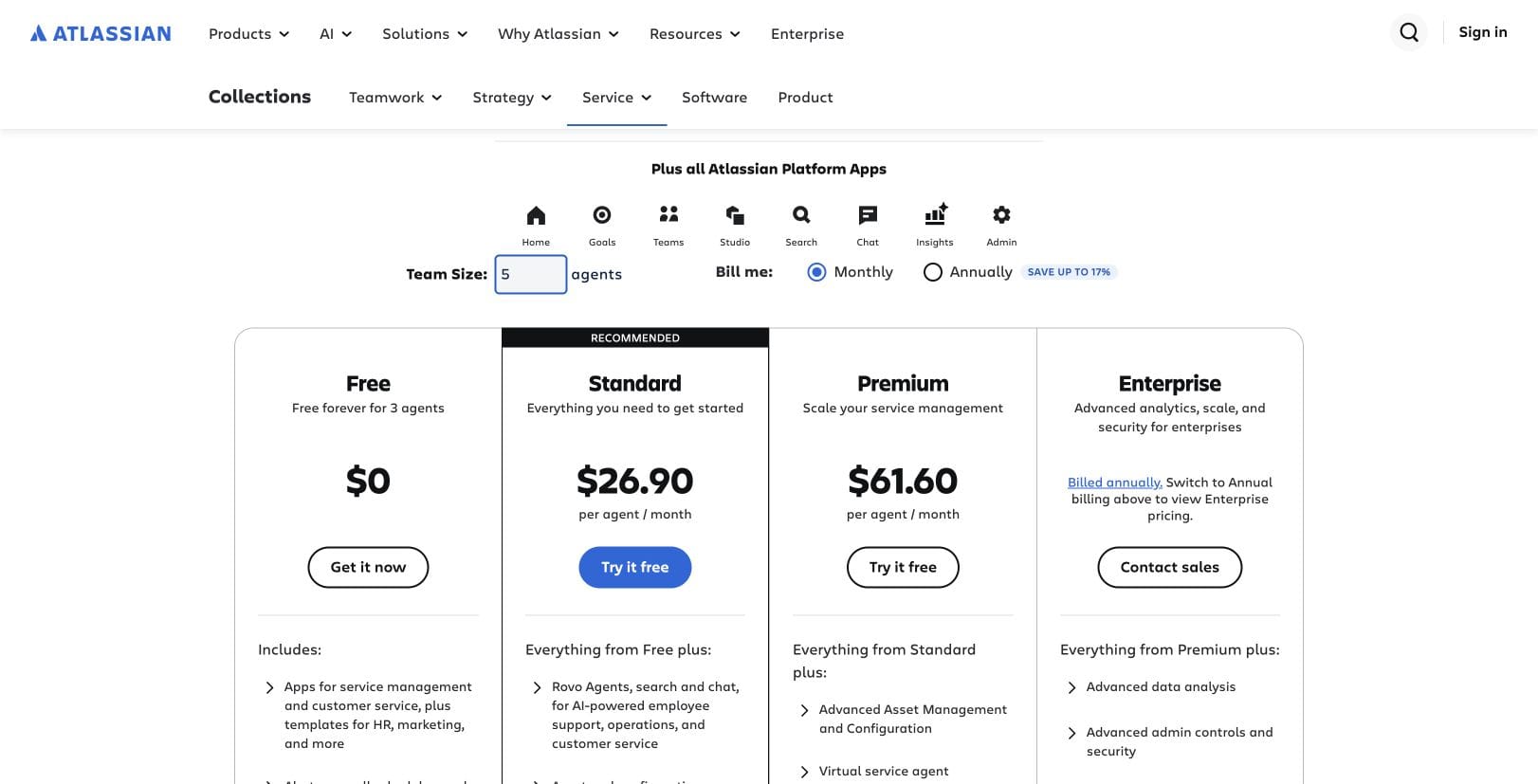
The table uses regular monthly US dollar billing, checked on 18 November 2026. All people counted here need to work on customer requests. Atlassian now presents Jira Service Management through its Service Collection pricing page, which also includes Customer Service Management.
| Plan | 3 agents | 5 agents | Relevant buying distinction |
|---|---|---|---|
| HelpDesky Pro | $5 total | $5 total | Unlimited seats, articles and conversations; one workspace |
| Service Collection Free | $0 total | Not eligible | Maximum 3 agents; embedded knowledge base and service portals |
| Service Collection Standard | 3 × $26.90 = $80.70 | 5 × $26.90 = $134.50 | Custom branded help centre; unlimited email notifications |
| Service Collection Premium | 3 × $61.60 = $184.80 | 5 × $61.60 = $308 | Advanced incident and change management; virtual service agent |
Sources: HelpDesky pricing and the Atlassian pricing calculator, set to three and five agents with Monthly selected. Its default larger team produces different per agent figures. Use your actual agent count when getting a quote.
HelpDesky’s base subscription is 94% lower than Standard for three agents and 96% lower for five. Against Premium, the differences are 97% and 98%, respectively. These rounded percentages equal the subscription difference divided by the relevant Atlassian total. They exclude AI usage, taxes and extras and do not imply equivalent capabilities or savings on the complete support bill.
There is no percentage saving against Jira’s $0 free tier: HelpDesky Pro costs $5 more. HelpDesky also has a free plan with unlimited seats, but only 15 published articles and 15 conversations a month. Pro removes those article and conversation limits and HelpDesky branding. Connected AI provider usage remains separate on both HelpDesky plans.
No temporary HelpDesky discount appeared on the live pricing page. Atlassian offers a 14 day Standard or Premium trial; that trial is separate from the regular prices above.
Which plan is the appropriate comparison?
For a three agent team that accepts its limits, start by evaluating Free. The current comparison lists 2 GB of file storage, 100 email notifications a day, 1,250 automation steps per subscription each month and community support. That can be enough for an early team with modest requirements.
For five agents, Standard is the lowest paid tier in this comparison. It is also relevant at three agents if you need the custom branded help centre, more storage or unlimited email notifications. Do not choose Premium merely because it appears beside Standard: justify it with a specific advanced capability.
Annual billing uses agent bands. The calculator quoted Standard at $800 a year for the one to three agent tier, equivalent to $66.67 a month, and $1,350 a year for four to five agents, equivalent to $112.50 a month. Premium was $1,850 and $3,100 a year for those respective bands, equivalent to $154.17 and $258.33 a month. These are annual commitments, not monthly cancellation prices.
Count roles before multiplying your company headcount. Atlassian’s agent and customer definitions distinguish agents who work on tickets and communicate with customers from customers who submit requests. Jira users without agent licences can still assist through some internal ticket actions. Five employees do not necessarily mean five paid agents.
Does Jira Service Management include a knowledge base?
Yes. Both products include knowledge publishing; HelpDesky is not uniquely offering a help centre here. Atlassian’s Service Collection licensing guide says its core knowledge base lets licensed agents create, read, update and delete articles without an additional knowledge base charge.
The same guide explains the Confluence dependency: an administrator must add a Confluence plan to the site, but no Confluence purchase is required for the core knowledge base. Users given separate Confluence product access for additional capabilities can incur charges under the chosen plan. Avoid assuming either that Confluence is always an extra paid purchase or that every Confluence feature is included.
HelpDesky combines published answers with a widget, contact form, ticket centre and email forwarding. Its shared inbox documentation explains how the team handles conversations. This is useful when the buying goal is a coherent customer support workspace with a predictable seat cost.
When does Jira’s service workflow justify the cost?
Imagine a customer reports an outage that affects several accounts. Your support team needs to connect the report to an engineering investigation, follow an escalation process and keep ownership clear across teams. That is a different requirement from answering a recurring question about an invoice.
Atlassian’s Jira Service Management overview describes a product built on the Jira platform for collaboration between IT, development, operations and business teams. Evaluate it when that shared process matters to your service delivery.
Bring an actual escalation to the trial. Ask a support agent to capture the request, an engineer to investigate it and another teammate to continue the customer conversation. Check whether the handover preserves the information each person needs. The right answer depends on that workflow, not simply on how many features appear on a pricing page.
HelpDesky’s published offering focuses on help content and customer messaging. Do not assume it replaces Jira integration, SLA timers, complex queues or incident response processes. If those are requirements, require a working demonstration before selecting it. Our HelpDesky and Opendesk comparison explores another distinction between customer help and service operations.
Atlassian’s official Brief Tour of Jira Service Management provides useful context for the service workflow. It is a product overview from 2024, so use the current pricing sources above for today’s packages and charges.
How should you compare AI and optional charges?
Keep each AI meter separate. The current Atlassian table places the Jira virtual service agent in Premium and Enterprise, with 1,000 assisted conversations a month or 12,000 a year and paid additional usage available. Customer Service Management’s AI agent uses a different measure: the licensing guide states $1 per successful AI agent resolution, charged from the first resolution.
Rovo has its own allowances. The pricing page lists 250 credits per user each month on Standard and 700 on Premium. Optional extra Assets capacity and Atlassian Guard subscriptions can also change a quote. None of these should be silently added as a mandatory fee for every small team.
HelpDesky takes your own supported AI provider key. Its Ask AI requirements name OpenAI, Anthropic, Google and xAI and explain separate provider billing. The AI agents overview documents provider and model selection and Copilot, Review and Autopilot modes, currently in beta.
The benefit is choice among supported providers and models, visibility into the usage bill and direct management of provider spending controls. Verify whether a particular budget setting stops requests or merely alerts you. Unlimited HelpDesky conversations do not mean unlimited free AI tokens.
What should a small SaaS test before choosing?
Use three ordinary cases: a question answered by a public article, an account issue needing a person, and a defect needing an engineer. For each case, check the customer’s route, the team’s ownership and the way the conversation finishes.
- Public answers: Can a customer find and read the right article without an unnecessary login?
- Human support: Can everyone who needs to reply do so under the proposed licences?
- Escalation: Can the engineer investigate without losing the customer context?
- Cost: Does the quote include your required branding, storage, automation and AI usage?
Running Jira for development and a separate customer help desk is a valid option if the handover works. Document who transfers useful details, who updates the customer and which system holds the definitive status. Do not assume an automatic integration exists.
If a public help centre and shared conversations cover your needs, evaluate HelpDesky with the colleagues who actually answer customers. Its flat Pro subscription makes adding another responder straightforward to budget.
Frequently asked questions
Is Jira Service Management free for a small team?
The current Service Collection Free plan supports up to three agents and unlimited customers. Its storage, email notification and automation allowances still apply. A five agent team needs a paid plan.
What does Jira Service Management cost for five agents?
On 18 November 2026, the live monthly calculator showed Standard at $134.50 total and Premium at $308 total for five agents. These are base subscriptions before taxes and optional or usage charges.
Do I need to buy Confluence for the knowledge base?
Atlassian says an administrator must add Confluence to the site, but core knowledge base use does not require a Confluence purchase. Separate Confluence product access and additional capabilities can change the licensing bill.
Is HelpDesky always cheaper than Jira?
No. Jira’s eligible free tier costs $0, while HelpDesky Pro costs $5 monthly. HelpDesky Pro has a lower base subscription than the paid three and five agent plans compared here, but capabilities and AI charges differ.
Can I keep Jira for development and use HelpDesky for support?
You can choose separate tools for those jobs. Test and document the handover between them rather than assuming a native Jira integration or automatic status synchronisation.
Does HelpDesky’s $5 subscription include AI usage?
It includes the AI features, with agents currently in beta, but your connected provider bills model usage separately. Select a supported provider and model and review its spending controls before enabling customer facing automation.