
HelpDesky vs Featurebase for small SaaS teams
A five person SaaS team comparison of regular subscriptions, qualifying startup offers, AI usage and the support workflows each product suits.
What does a five person team pay?
This comparison assumes five people who all reply to customers. Prices are in US dollars, checked on 13 November 2026. Regular monthly billing is the main comparison; taxes, AI usage and optional additions are excluded.
| Plan | Team total | Relevant features | HelpDesky base subscription difference |
|---|---|---|---|
| HelpDesky Pro | $5 per workspace | Unlimited seats, articles and conversations; help centre and support tools | Reference price |
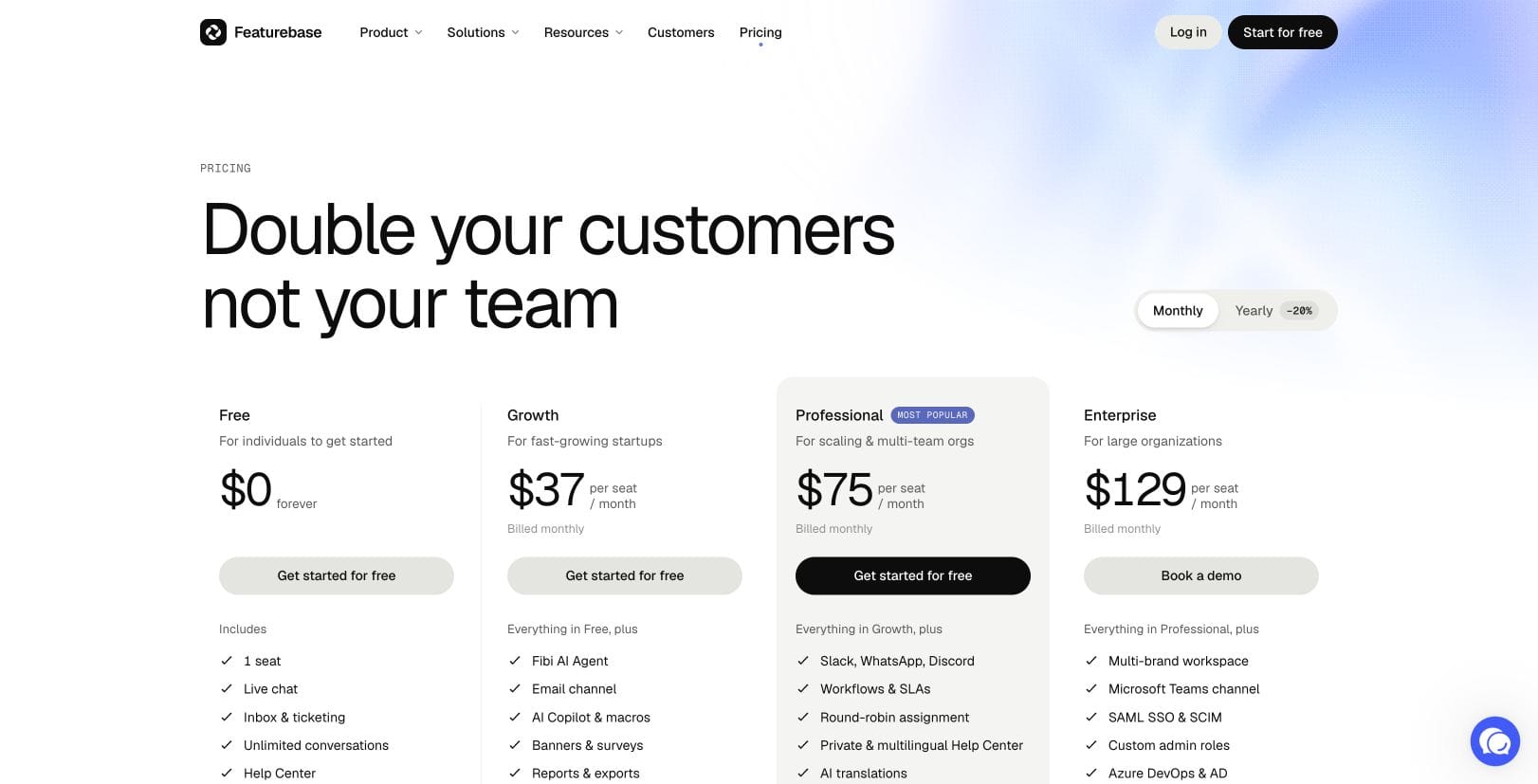
| Featurebase Growth | 5 × $37 = $185 | Chat, email, unlimited articles and conversations; Fibi available | $180 less; 97% lower |
| Featurebase Professional | 5 × $75 = $375 | Adds workflows, SLAs, Slack and private or multilingual help centres | $370 less; 99% lower |
Percentages are rounded to the nearest whole number: the subscription difference divided by the relevant Featurebase subscription. They are base subscription differences, not total cost savings. The products have different capabilities and AI billing.
Growth is the lowest regular paid Featurebase tier used here because it covers five full users, email support and a hosted help centre. Professional is the comparison when the added workflow requirements matter. Annual billing reduces Growth to a $145 monthly equivalent for five seats, with a $1,740 annual commitment; Professional becomes $295 equivalent, or $3,540 annually.
Separate current offers from the regular price
HelpDesky displayed Pro at $5 monthly without a temporary discount. Featurebase advertises a 10 day trial and a separate startup programme. The programme is a fixed package of six full seats and 20 Lite seats with Professional features, so it covers our five users without buying additional seats.
| Option | Monthly subscription | Important conditions |
|---|---|---|
| Featurebase startup programme | $63 in year one | Six full seats; 50 Fibi resolutions monthly in year one |
| HelpDesky Pro | $5 regular price | $58 less, or 92% lower base subscription; provider usage separate |
Applicants must be under two years old, have fewer than six employees, have raised less than $3 million and be new to paid Featurebase plans. The advertised discount falls to 40% in year two and 10% in year three, followed by regular pricing. Confirm acceptance and renewal terms; do not budget as though everyone qualifies or all first year AI usage is free.
What changes the AI and optional tools bill?
Featurebase charges $0.49 for a billable Fibi resolution. At 200 chargeable resolutions, the AI line is $98. Added to five Growth seats, that produces an illustrative $283 monthly bill before tax and optional additions.
A resolution can be confirmed by the customer or assumed when they leave without seeking further help. Featurebase charges once per conversation, with adjustments when a customer returns for further assistance. Read that definition before equating incoming conversations with billable resolutions.
HelpDesky’s corresponding budget is $5 plus your measured AI provider bill. We have not tested equivalent resolution rates, answer quality or token consumption, so the $283 example is not a full bill savings claim.
The Featurebase billing guide lists ten free Copilot conversations per seat each month. Unlimited Copilot costs an optional $19 per enabled seat monthly: $95 if all five need it. Branding removal is a separate $69 monthly addition. Neither charge belongs in every team’s bill automatically.
Other usage allowances matter if you use the relevant features: 5,000 outbound emails, 500 outbound messages shared by tours and surveys, and 250,000 AI translation characters monthly, with charges beyond those allowances. Support emails are free. Check both feature access and usage pricing for the selected tier.
See Featurebase’s usage cap explanation. A capped AI service also needs a staffed handover path; controlling cost does not remove the unanswered customer question.
When does HelpDesky fit the job?
HelpDesky suits a team whose immediate problem is organising answers and handling the questions those answers cannot resolve. A flat subscription makes it practical for founders and developers to participate without another paid seat whenever someone joins the support rota.
Pro includes one workspace, removes HelpDesky branding and has unlimited articles and conversations. The product combines a help centre, widget, contact form, ticket centre and email forwarding. Its straightforward Free and Pro choice lets you evaluate the workflow before expanding the content or conversation allowance.
HelpDesky AI agents are in beta. Copilot suggests replies, Review prepares drafts for approval and Autopilot can reply within configured guardrails. Start with the level of supervision your team can provide.
The provider and model requirements explain the own key approach. Supported providers include OpenAI, Anthropic, Google and xAI, among others. Choosing a supported provider and model gives you control over the AI route and visibility into its separate usage bill; it does not imply every model is supported or unlimited free AI.
If provider choice is your main buying criterion, our comparison of help desks using your own AI key covers other options and their plan limits.
When is Featurebase worth the larger subscription?
A SaaS team may need more than a place to answer questions. If the same customer conversations must feed product prioritisation, Featurebase’s feedback tools offer a reason to evaluate the broader suite: collecting requests, linking evidence to customer context and organising a roadmap.
Test that connection with a real example. A customer asks for an export feature, three others describe the same problem, and a product manager needs to understand who is affected. The value is whether the process keeps the evidence together and supports a useful decision, not how many feature names appear on a pricing page.
For more complex support, check Professional against your requirements. Its workflow and SLA tooling may justify the added subscription if it removes repeated manual routing. Featurebase’s Fibi product page also places custom actions on Professional and Enterprise. Do not assume the cheaper Growth tier covers every automated account action.
There is a current channel qualification: although headline plan cards mention them, the detailed pricing table marks WhatsApp, Discord and Microsoft Teams as coming soon. Verify availability before buying for one of those channels. This comparison does not claim HelpDesky has equivalent integrations or every Featurebase capability.
Choose the help centre address before migration
Both products can give a small team a hosted public knowledge base. Featurebase Growth includes a custom domain and Ask AI search. HelpDesky offers its hosted address, a custom subdomain, a subfolder through a proxy, or a headless approach using your own website templates.
Those choices affect who maintains the website and how customers move between help pages and your product. The HelpDesky hosting comparison explains the implementation responsibilities. Review existing article addresses and redirects before moving content; a low subscription is not a reason to break useful links.
Google Search Central’s explanation below gives context for the subdomain versus subfolder choice. It is background for that decision, not proof that either help desk will improve rankings.
Frequently asked questions
Can five people use Featurebase Free?
Featurebase Free includes one full seat and 50 help articles, so it is not the five full user plan in this comparison. Unlimited conversations do not remove the seat limit.
Can Lite seats replace paid support seats?
No. Featurebase’s seat rules say Lite users cannot reply to customers or be assigned conversations. They can contribute internal notes after being mentioned. Count the people who actually need to answer customers.
Is HelpDesky’s AI usage included in the $5?
The AI features are included, but provider consumption is billed separately to your connected account. No HelpDesky AI surcharge does not mean a zero provider invoice.
Does Featurebase charge for Fibi if we leave it unused?
Its billing guide says no. Optional AI use and optional Copilot subscriptions should be separate lines in your estimate, rather than assumed mandatory costs.
Can we test HelpDesky before paying?
Yes. Free includes unlimited seats for one workspace, up to 15 published articles and 15 conversations monthly. Provider usage remains separate and AI agents remain in beta.
Which should a small SaaS team try first?
Try HelpDesky first when the priority is affordable shared support and published answers. Evaluate Featurebase when feedback management, product planning or its advanced support workflows are purchase requirements. Test the same documented question, uncertain answer and human handover before deciding.
Begin with a few useful articles and invite the teammates who really handle support. Check the answers, the handover and the usage bill before increasing automation.
Published by HelpDesky. This is a sourced buying comparison, not a benchmark of either product’s AI accuracy. Prices and availability can change.