Help desks that run on your own AI key: prices compared
Five hosted help desks compared by team subscription, supported AI routes and the limits that matter for a small SaaS support team.
Bringing your own AI key can give you a choice of supported providers and models, visibility into the usage bill and direct access to your provider’s spending controls. It does not make every help desk equivalent, or make AI usage free.
What does each help desk cost for five people?
These are regular monthly subscriptions in US dollars, checked on 12 November 2026, for five people who need to handle support. Each selected hosted plan includes a help centre or knowledge base. The comparison excludes taxes, external AI usage and optional extras.
| Product and plan | Five person monthly total | Relevant allowance | HelpDesky base subscription difference |
|---|---|---|---|
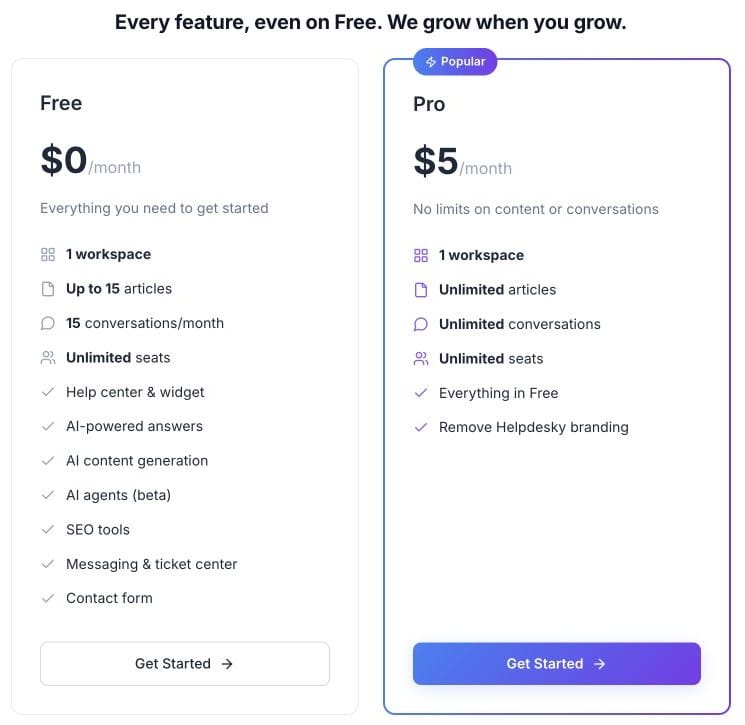
| HelpDesky Pro | $5 per workspace | Unlimited seats, articles and conversations | Reference price |
| Campfire Growth | $20 flat | 10 seats under fair use; 2,500 conversations monthly | $15 less; 75% lower |
| Opendesk Pro | 5 × $18 = $90 | Five paid users; $50 pooled AI allowance monthly | $85 less; 94% lower |
| HelpWell Growth | $99 flat | 10 teammates and 10,000 marketing contacts | $94 less; 95% lower |
| Kerux Basic | 5 × $29 = $145 | Two shared inboxes and two sending domains | $140 less; 97% lower |
Percentages use the selected competitor subscription as the denominator and are rounded to the nearest whole number. They describe base subscription differences, not total bill savings. Included AI allowances and separate provider charges can change the overall comparison.
No temporary HelpDesky discount was displayed on the checked pricing page. Campfire advertises a 14 day trial, Kerux a 30 day trial and HelpWell a seven day trial. These are separate from the regular prices above. Kerux also displays a $24 per agent monthly equivalent with annual billing; the table uses its $29 monthly option.
HelpDesky: a small platform bill with room for the team
HelpDesky is a practical starting point when your priority is published support content, customer questions and a shared support workflow without paying for each teammate. Pro covers one workspace. The Free plan also has unlimited seats, but caps published articles and monthly conversations at 15 each.
Its AI agents are currently in beta. Copilot suggests replies for a person to send, Review prepares drafts for approval, and Autopilot can reply within configured guardrails. These are different levels of responsibility, so begin with the one your team can supervise.
HelpDesky lists OpenAI, Anthropic, Google and xAI among its supported providers. Its Ask AI documentation explains how customer answers draw on published articles and link back to their sources. The provider bills the usage separately; the platform subscription is not a bundle of unlimited AI tokens.
Campfire: a flat plan with channel and usage limits
Campfire Growth is the lowest listed package here that accommodates five people. It includes up to ten widgets and ten seats under fair use, with 2,500 conversations and 500,000 AI tokens a month. Starter has three seats, so its free price is not the five person team price.
Campfire offers its own AI or your keys at the same platform price. Its provider documentation lists OpenAI, OpenRouter, Groq, Together, Ollama and compatible endpoints. Claude and Gemini can connect through OpenRouter; that is different from assuming a direct native integration for every provider.
The product is worth evaluating when a shared queue across web chat, email and social messaging matters. Its current product page describes Flamey drafting from the help centre, with human review or configurable automatic replies. Confirm how your chosen AI route interacts with the published plan allowances before committing to a high volume workload.
Opendesk: own keys alongside a hosted AI balance
Opendesk Pro bills owners, admins and agents at $18 each monthly; read only viewers are free. Five people answering customers therefore cost $90, with $50 in pooled monthly AI allowance. The free hosted plan allows one team member, so it is not an equivalent five person option.
Its AI guide covers drafts, summaries, translation and other support assistance. Cloud accepts an OpenRouter, Anthropic or compatible OpenAI endpoint key. The pricing page warns that triage and automation decisions can still use its AI balance. The detailed guide adds an exception: OpenRouter handles those decisions on your key too; other provider routes use the balance unless a separate TypeSafe key handles decisions.
That makes Opendesk useful to evaluate if you want both a hosted allowance and your own provider route. Check which tasks consume each balance, rather than treating the provider invoice as the only remaining AI cost. Our HelpDesky and Opendesk comparison looks more closely at the product and hosting decision.
HelpWell: use the package that covers all five teammates
HelpWell Starter is $49 monthly but includes only three teammates. Growth, at $99 with ten teammates, is the appropriate listed package for this comparison. Its pricing page describes the AI agent as running on your OpenRouter key, with a hosted help centre and a shared inbox for chat and email.
Growth also includes marketing features. Extra teammates beyond ten cost $10 each monthly; extra blocks of 10,000 marketing contacts cost $49, and extra blocks of 10,000 session replays cost $19. Those additions are not mandatory costs for the five person example.
Choose it for the broader product mix if you need that mix. If your aim is simply to organise support content and conversations, compare the additional functions with the subscription you would actually use.
Kerux: broad provider choice with a seat based subscription
Kerux Basic combines AI answers from the help centre, human handoff, writing assistance and thread summaries with its two inbox allowance. Its five person subscription is $145 monthly. Growth is $49 per agent monthly if you need additions such as round robin assignment, custom ticket fields or API access.
The Kerux provider guide lists Groq, Anthropic, OpenAI, Google, Mistral, DeepSeek, OpenRouter and xAI, plus compatible endpoints. The key controls the provider route; it does not remove the per agent platform subscription.
Kerux is worth testing when its integrations and routing suit your operation. Basic is the lower priced starting point in this table, but a team that requires API access should budget for Growth instead: five agents would cost $245 monthly before provider usage.
How should a small SaaS team choose?
Start with a short set of real customer questions: a documented setup question, an ambiguous request and a case that needs a person. Evaluate whether the answer cites the right article, whether a teammate can correct it, and whether handoff preserves the conversation. These are suggested trial checks, not results from a benchmark we have run.
Then compare three separate budgets: the help desk subscription, AI provider usage, and any channel or optional service charges. Use the provider’s available spending controls and monitor its dashboard. Confirm whether a particular control stops requests or only sends an alert; a budget label alone is not proof of a hard cap.
A dedicated key for support can make usage easier to attribute and revoke. Select from models the help desk actually supports, then measure quality and cost on the same sample of questions. Do not assume the cheapest token price produces the lowest cost per useful answer.
For a small team that wants to keep the fixed platform bill low, HelpDesky’s $5 plan is the lowest paid hosted subscription in this shortlist. If approval matters more than automatic replies, our guide to choosing approval or autopilot for AI support gives you a separate decision framework.
Keep the help centre useful outside the chatbot
Customers should still be able to open and share the source article. When evaluating vendors, check your public documentation address and migration options as well as the AI connector. HelpDesky documents custom domain, subfolder and headless hosting choices.
This Google Search Central video discusses subdomains and subfolders. It is useful background for choosing the public address of your help centre, not evidence that a particular help desk will improve rankings.
Frequently asked questions
Which option has the lowest paid subscription for five people?
Among the five hosted options compared here, HelpDesky Pro is lowest at $5 monthly for one workspace. This excludes AI usage, taxes and extras and is not a claim about every help desk on the market.
Does bringing an AI key mean every AI function uses it?
No. Verify the feature scope and provider route. Opendesk’s detailed guide says decision tasks use your OpenRouter key, or a separate TypeSafe key; otherwise they can still use its hosted balance. A key option alone does not describe every background task.
Can five people test HelpDesky on Free?
Yes. Free includes unlimited seats for one workspace, with up to 15 published articles and 15 monthly conversations. Connected AI usage remains separate, and AI agents are in beta.
Is Campfire’s free plan suitable for five seats?
Its published Starter allowance is three seats under fair use. The $20 Growth plan is the package used here because it accommodates five people within its ten seat allowance.
Does HelpWell’s $49 plan cover this team?
No. Starter covers three teammates. The five person calculation uses Growth at $99, which includes ten teammates.
Is self hosting the same as a zero cost help desk?
No. Opendesk lists a free self hosted edition with unlimited team members, but running it still requires infrastructure and operational work, plus the chosen AI route. Compare that workload separately from the hosted subscriptions above.
Start with a small set of published answers and a workflow your team can supervise. HelpDesky lets you test its features on Free, then move to Pro when you need more content or conversations.