
Helpdesky vs chat.sh: which AI help centre fits you?
Compare the same team size, included AI credits and migration needs before choosing Helpdesky or chat.sh. Prices verified on 31 October 2026.
Both products combine a help centre, a customer messenger and an inbox. The useful distinction is what happens as your team, documentation and AI activity grow. A low platform fee, an included answer allowance and a lifetime payment solve different budgeting problems.
This is Helpdesky’s comparison of the published product documentation and live prices checked on 31 October 2026. It is not an independent performance test. All prices below are in US dollars for one workspace, before tax and extras.
What does the same team pay each month?
| Team or allowance | Helpdesky Pro | chat.sh |
|---|---|---|
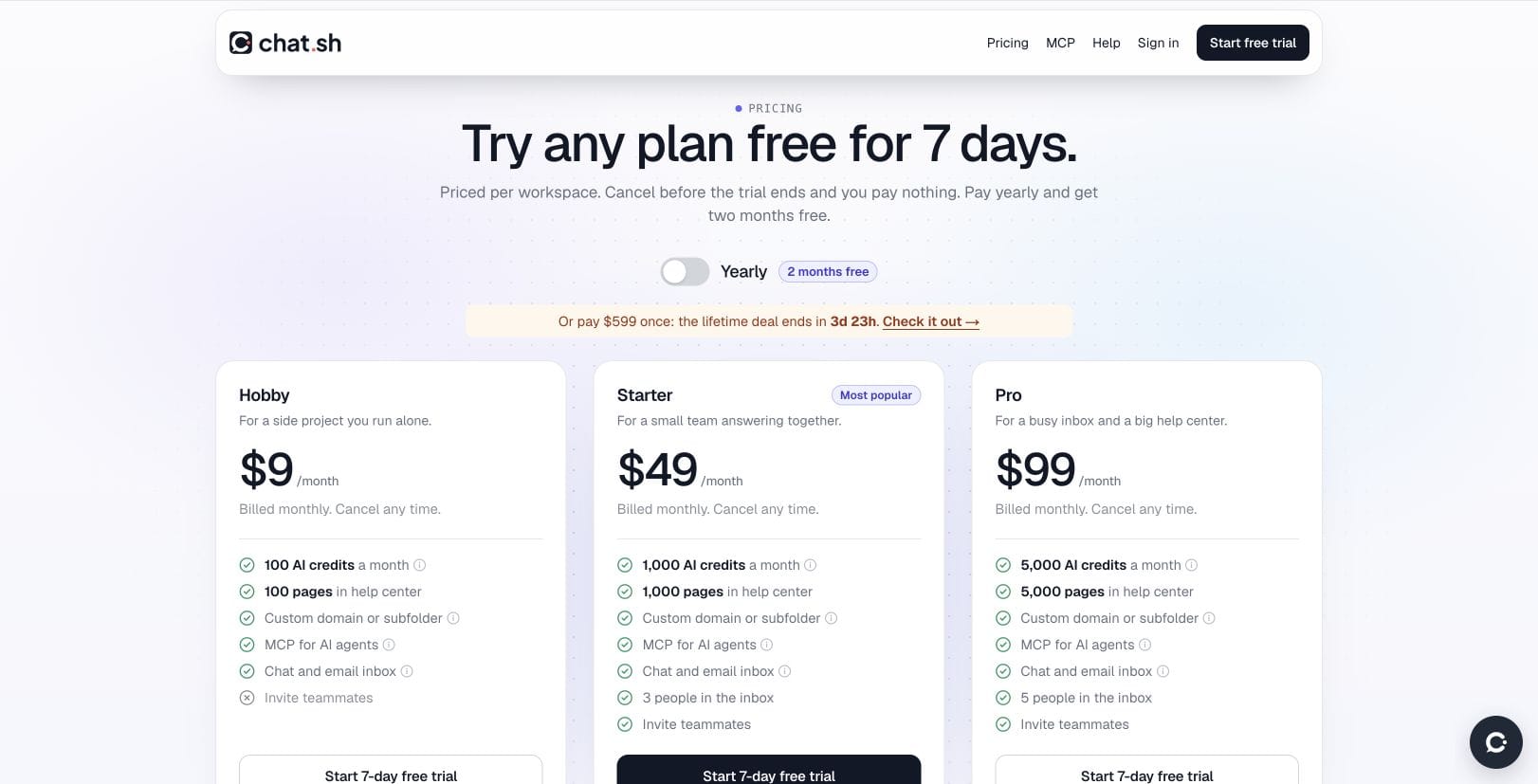
| Three people | $5 per month | Starter: $49 per month |
| Five people | $5 per month | Pro: $99 per month |
| Base subscription difference | About 90% lower for three; 95% lower for five | Compared with the matching monthly plan above |
| Team capacity | Unlimited seats | Starter: 3; Pro: 5 inbox users |
| Published content | Unlimited articles | Starter: 1,000 pages; Pro: 5,000 pages |
| AI usage | Your provider bills separately | Starter: 1,000; Pro: 5,000 credits per month |
| Core support tools | Help centre, widget and shared inbox | Help centre, messenger and shared inbox |
The figures compare Helpdesky Pro’s current monthly price with the lowest chat.sh monthly package that accommodates each stated team. The percentage calculation is the subscription difference divided by chat.sh’s subscription: $44 ÷ $49 for three people and $94 ÷ $99 for five.
These are base subscription differences, not total bill savings. chat.sh includes an AI allowance; Helpdesky’s connected provider charges separately. Helpdesky Pro’s unlimited conversations do not mean unlimited free AI.
For a solo operator, chat.sh Hobby is $9 monthly with 100 AI credits and 100 pages, but it does not allow inviting teammates. Its annual options are separate commitments: Starter is $490 a year and Pro is $990 a year, equivalent to about $40.83 and $82.50 a month respectively. The table uses monthly billing instead.
How should you evaluate the $599 lifetime offer?
At the time of checking, chat.sh also advertised a temporary $599 payment per workspace for lifetime access with 1,000 AI credits each month, 1,000 pages and three people in the inbox. Check the current offer before buying: this is an observed promotion, not the regular monthly price or a five person package.
At Helpdesky’s current $5 monthly platform price, two years would cost $120 and five years $300, before provider usage. The $599 payment remains $599 over those illustrative periods, excluding any additional credits or extras. These calculations assume unchanged prices and requirements; they do not predict future product availability.
That makes the lifetime option a decision about the included package and your expected use, rather than an automatic subscription saving. A stable three person team that values bundled answers and imports may prefer it. A team adding occasional support contributors may place more value on Helpdesky’s unlimited seats and smaller initial payment.
Included AI credits or your own provider account?
chat.sh’s credit and page definitions explain the allowance. An AI answer uses one credit, while search is free. Monthly credits reset on the first day of the month. The documentation lists an optional additional 1,000 credits for $20, purchased by contacting support.
Its messenger documentation also describes exceptions: an answer that is not covered fully or partly by the sources does not consume a credit. When the allowance is exhausted, AI pauses while customers can still contact the team. Count chargeable answers using those rules, rather than treating every visitor message as a credit.
Helpdesky instead connects your own AI account. Its Ask AI requirements document OpenAI, Anthropic, Google and xAI keys. Without a configured provider key, Ask AI does not run. Pro’s $5 is the platform subscription; the provider’s usage bill is additional.
The benefit is direct visibility into provider spending and a choice of supported providers and models. For AI agents, Helpdesky’s provider and model guidance describes choosing from the models available for your key. This does not mean every model is supported by every feature.
Before committing, try representative questions with both systems: a well documented answer, an ambiguous request, an outdated article and a question neither should answer. Record source support, remaining human work and actual usage charges. Neither a low token price nor an included credit proves that an answer is correct.
What counts as a page, and can you use PDFs?
chat.sh’s page allowance is a content measure. An article or web page counts in units of 2,500 characters, with even a short item using at least one page; each PDF page counts separately. A 1,000 page allowance therefore does not necessarily mean 1,000 articles.
Its product overview describes answers using articles, web pages and PDFs. That is a useful reason to shortlist it when substantial knowledge already lives in PDF files.
Helpdesky Pro removes the article count limit, and Ask AI can use published help articles and external web pages added as sources. The reviewed Helpdesky documentation does not establish equivalent PDF ingestion. If PDFs are central to your support process, test that requirement explicitly rather than assuming the products accept the same source material.
Can you keep your domain and work through an AI assistant?
Both products support a help centre on your own domain or within a folder on your site. Helpdesky’s hosting options include its hosted address, your subdomain, a subfolder and a headless setup using your own templates. The latter options require access to your website infrastructure or code.
Both also document MCP connections for AI assistants. Compare Helpdesky’s MCP server with chat.sh’s supported assistant connections by the actual actions and permissions you need. MCP availability alone is not a reason to choose one over the other.
For a purchase decision, ask whether an assistant can read the right sources, prepare drafts and request approval before publishing or sending replies. Keep those requirements separate from whether the customer messenger can answer questions.
Which is easier to move into?
chat.sh documents dedicated imports from Intercom, Help Scout and Notion, as well as text and Markdown files. Its homepage says importing comes with every plan, while the import page still refers to the lifetime offer. Confirm entitlement with the vendor if importing is essential to your monthly plan purchase.
The page describes old article link redirects for Intercom and Help Scout. It does not make the same redirect promise for every Notion URL. Review the source specific behaviour and test your important existing links.
The reviewed Helpdesky documentation does not identify an equivalent dedicated importer for those services. An API or MCP workflow may suit a team with technical help, but it should be assessed as migration work. Our help desk migration checklist covers the inventory, URL mapping and verification work to budget before moving.
Choose using the work your team actually does
- Choose Helpdesky for growing participation. Its $5 Pro subscription includes unlimited seats, articles and conversations for one workspace, with a help centre and support tools in the same product.
- Shortlist chat.sh for bundled AI and PDF knowledge. Its included credits and documented sources may suit a team that prefers not to manage a separate provider account.
- Give imports their own evaluation. A supported migration route can matter more than a small subscription difference. Confirm its plan entitlement and redirect behaviour.
- Test the whole support path. A good answer matters, but so do the unanswered question, the human reply and the ownership of the conversation.
For broader buying context, the video below discusses how different help desk packages fit different team needs. It is produced by Desk365 and promotes that vendor; it does not review Helpdesky or chat.sh. Use it as context for your shortlist, not as the source for this comparison’s prices or a neutral product ranking.
Frequently asked questions
Does chat.sh only sell a lifetime plan?
No. On 31 October 2026 its live pricing also showed Hobby at $9 monthly, Starter at $49 and Pro at $99. The temporary $599 lifetime offer was a separate option with its own allowances.
Can five people share the $599 lifetime package?
The advertised package covered three people in the inbox. Do not budget it as a five person package. The monthly Pro plan shown in this comparison covers five users for $99.
Are Helpdesky’s AI answers included in the $5 price?
The platform provides the feature, but connected AI provider usage is billed separately through your own key. Unlimited platform conversations do not remove that provider bill.
Does 1,000 chat.sh pages mean 1,000 help articles?
Not necessarily. Articles and web pages are measured in 2,500 character units, with a minimum of one page per item. PDFs count by their number of pages.
Can both products use my own help centre address?
Yes, both document custom domain and subfolder options. Check the hosting access each approach needs and verify redirects when replacing an existing help centre.
Which should a small SaaS team try first?
Start with Helpdesky if unlimited team participation, a low platform price and direct AI provider choice are your priorities. Test chat.sh if included credits, PDF sources or its documented imports are central to the decision. Evaluate real questions and migration requirements before committing.
Helpdesky’s Free plan lets you evaluate the workflow with unlimited seats, up to 15 articles and 15 conversations a month. AI still requires your provider key. Move to Pro when its unlimited platform allowances fit your needs.